ก่อน NOVA: ระบุพารามิเตอร์Before NOVA: identify
FOAM-X
แปลงผลวัดในท่ออิมพีแดนซ์เป็นพารามิเตอร์ JCA / JCAL / Biot ที่ NOVA ใช้ได้Turns impedance-tube data into JCA / JCAL / Biot parameters NOVA can use
Mecanum · ซอฟต์แวร์จำลองวัสดุหลายชั้นMecanum · Multilayer simulation
NOVA ของ Mecanum ใช้ออกแบบ จำลอง และปรับปรุงชุดวัสดุอะคูสติกหลายชั้น (multilayer acoustic treatment) ก่อนสร้างหรือวัดจริง ทำนายการดูดซับ การสะท้อน การส่งผ่านเสียง และค่าตัวเลขเดียว เช่น STC และ Rw หน้านี้อธิบายว่า NOVA คืออะไร ทำไมต้องจำลองวัสดุ ข้อมูลวัสดุมาจากไหน และผลจำลองเชื่อมกับผลวัดอย่างไรMecanum NOVA is used to design, simulate and optimise multilayer acoustic treatments before anything is built or measured. It predicts absorption, reflection, transmission loss and single-number ratings such as STC and Rw. This page explains what NOVA is, why acoustic materials are modelled, where the material data comes from and how simulation connects with measurement.
หน้าผลิตภัณฑ์ของ Mecanum ไม่ได้ระบุเลขรุ่นMecanum's product page does not state a version number.
Mecanum ระบุชื่อ Get Best Solutions Company Ltd. เป็นตัวแทนจำหน่าย (distributor) สำหรับประเทศไทย ในรายชื่อตัวแทนบนหน้า About us ของ Mecanum NOVA เป็นผลิตภัณฑ์ของ Mecanum Inc. (แคนาดา)Mecanum's distributor list on its About us page names Get Best Solutions Company Ltd. as its distributor for Thailand. NOVA is a product of Mecanum Inc. (Canada).
ภาพรวมOverview
NOVA คือซอฟต์แวร์ของ Mecanum สำหรับ ออกแบบ จำลอง และปรับปรุงชุดวัสดุอะคูสติกหลายชั้น ก่อนสร้างหรือวัดจริง ผู้ใช้ประกอบชั้นวัสดุแบบลากวาง (drag-and-drop) เลือกชนิดแรงกระตุ้น แล้วให้โปรแกรมคำนวณการดูดซับ การสะท้อน การสูญเสียการส่งผ่านเสียง (TL) และค่าตัวเลขเดียว ได้แก่ STC, Rw, SAA, αw, IIC และ Ln,wNOVA is Mecanum's software to design, simulate and optimise multilayer acoustic treatments before anything is built or measured. You assemble the layers with a drag-and-drop builder, choose the excitation, and the program calculates absorption, reflection, transmission loss (TL) and the single-number ratings STC, Rw, SAA, αw, IIC and Ln,w.
Mecanum ระบุว่า NOVA ใช้ข้อมูลวัสดุได้จากแบบจำลอง micro-macro ในตัว (JCAL และ Biot) และคลังวัสดุ หรือจากข้อมูลที่วัดได้ นำเข้า transfer matrix ที่ได้จากการวัดหรือการจำลองได้ มีฟังก์ชัน auralization ให้ฟังผลก่อนและหลังใช้วัสดุ เปรียบเทียบผลจำลองกับผลวัด และส่งออกไปยัง VA One, COMSOL และ SimcenterMecanum states that NOVA takes material data from built-in micro-macro models (JCAL and Biot) and a material library, or from measured data; it can import transfer matrices from measurement or simulation. It offers auralization to hear the result before and after a treatment, compares simulation with measurement, and exports to VA One, COMSOL and Simcenter.
ระบบนิเวศการทดสอบวัสดุของ Mecanum: NOVA อยู่ที่ขั้น MODEL ถึง OPTIMIZEThe Mecanum material-testing ecosystem: NOVA covers MODEL to OPTIMIZE
แผนผังแนวคิดตามการเชื่อมโยงที่ Mecanum อธิบายไว้ในหน้าผลิตภัณฑ์ ดูภาพรวมทั้งระบบได้ที่ Mecanum ระบบทดสอบวัสดุอะคูสติกConceptual chain following the links Mecanum describes on its product pages. See the whole system on Mecanum acoustic material testing
อธิบายจากพื้นฐานถึงระดับวิศวกรFrom beginner to engineer
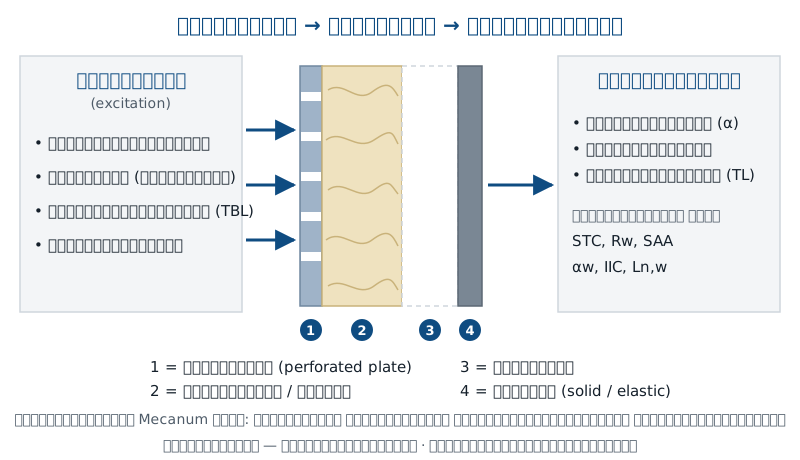
ชุดวัสดุกันเสียงหรือดูดซับเสียงจริงมักมีหลายชั้น เช่น แผ่นเจาะรู ใยดูดซับ ช่องอากาศ และแผ่นผนัง การเปลี่ยนความหนาหรือสลับชั้นเพียงเล็กน้อยทำให้ผลเปลี่ยนมาก ถ้าต้องสร้างตัวอย่างและวัดทุกทางเลือกจะใช้เวลาและงบประมาณสูง การจำลองช่วยคัดทางเลือกที่ไม่เข้าเป้าออกก่อน แล้วค่อยสร้างและวัดเฉพาะแบบที่มีแนวโน้มดีที่สุดReal sound-insulating or absorbing packages usually have several layers, such as a perforated plate, an absorbing fibre layer, an air gap and a wall panel. Small changes in thickness or layer order can change the result a lot, and building and measuring every option costs time and money. Simulation screens out the options that miss the target, so only the most promising designs are built and measured.
สำหรับเสียงที่ตกกระทบตั้งฉาก ความสัมพันธ์พื้นฐานระหว่างอิมพีแดนซ์ผิวของชุดวัสดุกับค่าการดูดซับเขียนได้ดังนี้ (ความรู้อะคูสติกทั่วไป ไม่ใช่สูตรเฉพาะของ NOVA)For sound at normal incidence, the basic link between the surface impedance of a treatment and its absorption is shown below (general acoustics, not a NOVA-specific formula).
R = (Zs − Z0) / (Zs + Z0) , α = 1 − |R|²
สิ่งที่ NOVA จำลองได้What NOVA models
| หัวข้อItem | ตามที่ Mecanum ระบุAs stated by Mecanum |
|---|---|
| ชนิดชั้นวัสดุLayer types | ตามที่ Mecanum ระบุAs stated by Mecanumของแข็ง/ยืดหยุ่น, วัสดุรูพรุน/เส้นใย, แผ่นเจาะรู, แผ่นลามิเนต, เมตาแมทีเรียล และแบบฝังในชั้น ได้แก่ เรโซเนเตอร์เฮล์มโฮลทซ์ วัสดุรูพรุนสองระดับ (double porosity) และแผ่นวัสดุรูพรุนเป็นหย่อม (porous patches) จัดเป็นชุดเดี่ยวหรือแบบขนานได้Solid/elastic, porous/fibrous, perforated plates, laminated panels, metamaterials, plus embedded Helmholtz resonators, double-porosity media and porous patches; single or parallel configurations |
| แรงกระตุ้นExcitations | ตามที่ Mecanum ระบุAs stated by Mecanumสนามเสียงแบบกระจาย (diffuse field), แรงกระทำแบบจุด (เช่น ฝนตกบนหลังคา), turbulent boundary layer และเครื่องเคาะพื้น (tapping machine)Diffuse field, point load (e.g. rain on the roof), turbulent boundary layer and tapping machine |
| ผลลัพธ์Results | ตามที่ Mecanum ระบุAs stated by Mecanumการดูดซับ การสะท้อน การสูญเสียการส่งผ่านเสียง (TL)Absorption, reflection, transmission loss (TL) |
| ค่าตัวเลขเดียวSingle-number ratings | ตามที่ Mecanum ระบุAs stated by MecanumSTC, Rw, SAA, αw, IIC, Ln,wSTC, Rw, SAA, αw, IIC, Ln,w |
| เครื่องมืออื่นOther tools | ตามที่ Mecanum ระบุAs stated by Mecanumประกอบชั้นแบบลากวาง, auralization, เปรียบเทียบผลจำลองกับผลวัด, ส่งออกไปยัง VA One, COMSOL, SimcenterDrag-and-drop stack builder, auralization, simulation vs measurement comparison, export to VA One, COMSOL, Simcenter |
| ระบบปฏิบัติการ ราคา ลิขสิทธิ์ โมดูลOS, price, licence, modules | ตามที่ Mecanum ระบุAs stated by MecanumMecanum ไม่ได้เผยแพร่Not published by Mecanum |
แบบจำลองวัสดุMaterial models
ผลจำลองดีได้เท่ากับข้อมูลวัสดุที่ใส่เข้าไป Mecanum ระบุแหล่งข้อมูลวัสดุของ NOVA ไว้สามทาง:A simulation is only as good as its material data. Mecanum names three sources of material data for NOVA:
หน้าทางการของ Mecanum ระบุแบบจำลอง JCAL และ Biot สำหรับ NOVA และไม่ได้กล่าวถึงแบบจำลองเชิงประสบการณ์อื่น หากงานของคุณต้องใช้แบบจำลองเฉพาะ ควรสอบถามก่อนMecanum's official pages name the JCAL and Biot models for NOVA and do not mention other empirical models. If your work needs a specific model, ask first.
ขั้นตอนการทำงานWorkflow
ขั้นตอนเรียบเรียงจากความสามารถที่ Mecanum ระบุ (ข้อมูลวัสดุ, การจำลอง, การเปรียบเทียบกับผลวัด) ลำดับการทำงานจริงขึ้นกับโครงการSteps arranged from the capabilities Mecanum lists (material data, simulation, comparison with measurement); the actual order depends on the project.
คู่มือเริ่มต้นใช้งานBeginner Guide
Mecanum ยังไม่เผยแพร่คู่มือผู้ใช้ NOVA ต่อสาธารณะ ชื่อหน้าต่างและปุ่มในคู่มือนี้อ่านจากวิดีโอสาธิตทางการของ Mecanum (NOVA 2024) และอาจเปลี่ยนตามเวอร์ชันMecanum has not published a public NOVA user manual. Window and button names here are read from Mecanum's official demo videos (NOVA 2024) and may change between versions.
ต้องมีอะไรบ้างก่อนเริ่มWhat you need before you start
แถบด้านซ้ายเรียงห้าโมดูลตามลำดับการทำงาน: Database (วัสดุ ชั้น และแหล่งกระตุ้น) Noise control treatment builder (ประกอบชุดวัสดุ) Solution set maker (กำหนดปัญหาและคำนวณ) Toolbox (เครื่องมือเล็ก ๆ เช่น wave number) และ Auralization (ฟังผล) NOVA ใช้ transfer matrix method ซึ่งคำนวณเร็วThe left bar lists the five modules in working order: Database (materials, layers and excitations), Noise control treatment builder (build the treatment), Solution set maker (define the problem and compute), Toolbox (small tools such as wave numbers) and Auralization (listen). NOVA uses the transfer matrix method, which is fast.
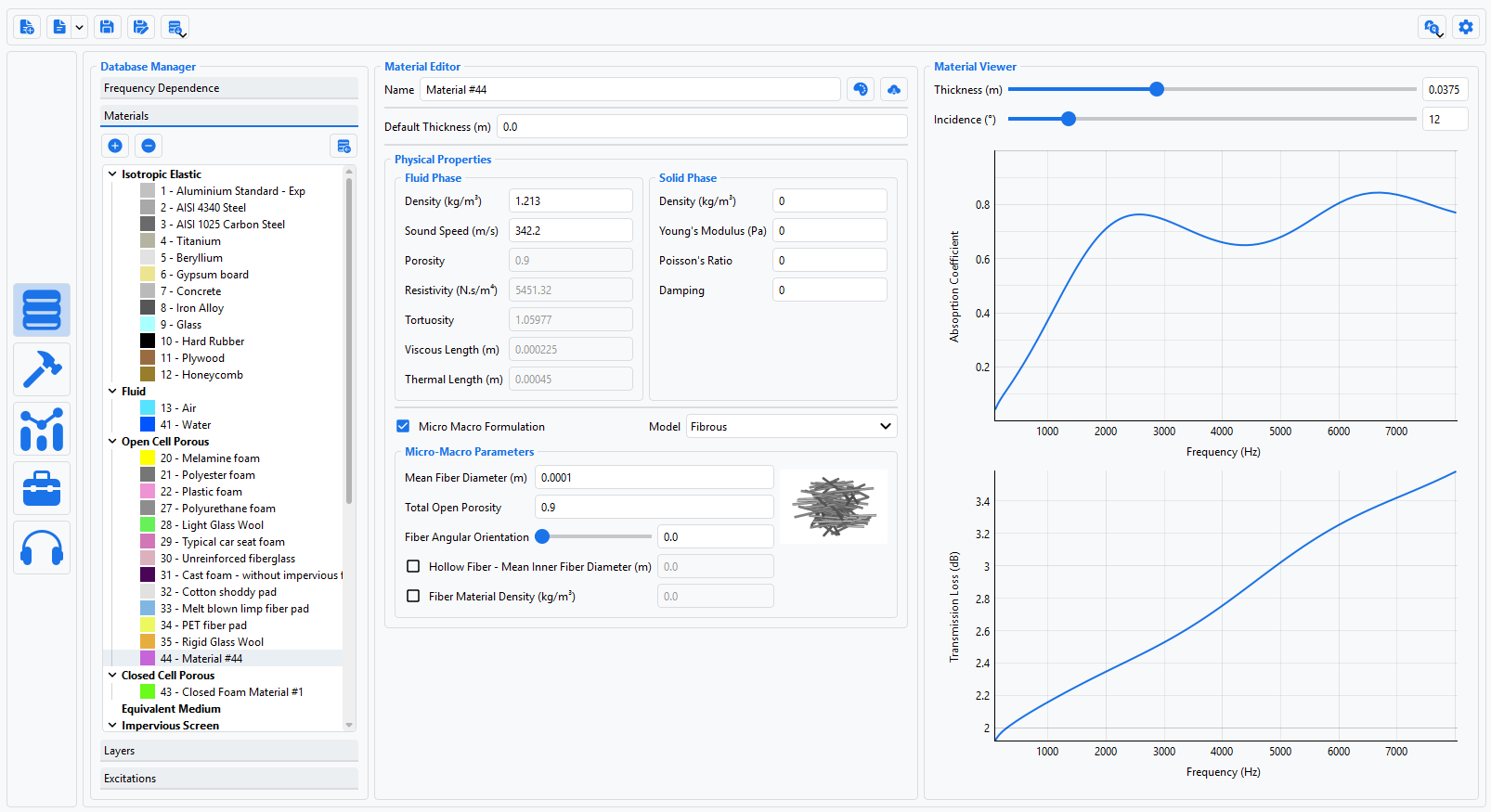
เลือกวัสดุจากคลัง เช่น Melamine foam หรือ Gypsum board หรือกด + เพื่อสร้างวัสดุใหม่ ตั้งชื่อและชนิด (เช่น Open Cell Porous Elastic) แล้วใส่ค่า Fluid Phase (porosity, resistivity, tortuosity, viscous และ thermal length) และ Solid Phase (density, Young's modulus, Poisson's ratio, damping) ใช้แถบเลื่อนความหนาและมุมตกกระทบดูผลเบื้องต้นได้ทันทีPick a material from the library, such as Melamine foam or Gypsum board, or press + to create one: give it a name and type (for example Open Cell Porous Elastic), then enter the Fluid Phase values (porosity, resistivity, tortuosity, viscous and thermal lengths) and the Solid Phase values (density, Young's modulus, Poisson's ratio, damping). The thickness and incidence sliders give an immediate first look.
ในโปรแกรมIn the programDatabase Manager → Materials → + → Create New Material (Name, Type) → Material EditorDatabase Manager → Materials → + → Create New Material (Name, Type) → Material Editor
ข้อควรระวังWatch outค่าที่ไม่ถูกต้องจะขึ้นเครื่องหมายสีส้ม และ NOVA จะไม่คำนวณจนกว่าจะแก้ ตรวจหน่วยด้วย: NOVA รับ viscous / thermal length เป็นเมตรInvalid values are flagged in orange and NOVA will not compute until they are fixed. Check the units too: NOVA takes the viscous and thermal lengths in metres.
ใน NCT Manager เพิ่ม Single Treatment แล้วลากวัสดุหรือชั้นจาก SNCT ToolBox มาวางเรียงกัน ตั้งความหนาแต่ละชั้น (ถ้าไม่ตั้งจะใช้ความหนาเริ่มต้นของวัสดุ) ทำหลายชุดเพื่อเปรียบเทียบแนวคิด เช่น โฟมอย่างเดียวกับโฟมที่มีแผ่นต้านทานการไหลIn NCT Manager add a Single Treatment, then drag materials or layers from the SNCT ToolBox into the stack and set each layer's thickness (otherwise the material's default thickness is used). Build several treatments to compare concepts, such as foam alone versus foam with a resistive screen.
ในโปรแกรมIn the programNCT Manager → Single Treatments · SNCT ToolBox (Materials / Layers) · SNCT ViewerNCT Manager → Single Treatments · SNCT ToolBox (Materials / Layers) · SNCT Viewer
สร้าง solution set เลือก solver (TMM สำหรับแผ่นขนาดไม่จำกัด หรือ FTMM เมื่อต้องคิดขนาดแผ่น Lx, Ly) ช่วงความถี่ ด้านที่เสียงมา แหล่งกระตุ้น ชุดวัสดุ และด้านรับเสียง ถ้าจะเทียบกับท่ออิมพีแดนซ์ ให้ใช้ Plane Wave กับ Hard Wall ถ้าต้องการการดูดซับในสนามเสียงแพร่กระจาย ให้ใช้ Diffuse FieldCreate a solution set and choose the solver (TMM for an infinite panel, FTMM to include the panel size Lx, Ly), the frequency domain, the emission side, the excitation, the treatment and the receiving side. To compare with an impedance tube, use Plane Wave with a Hard Wall; for diffuse-field absorption, use Diffuse Field.
ในโปรแกรมIn the programSimulation Manager → Create New Solution Set → Solution Set Editor (Solver, Freq. Domain, Excitation, SNCT, RBC)Simulation Manager → Create New Solution Set → Solution Set Editor (Solver, Freq. Domain, Excitation, SNCT, RBC)
ข้อควรระวังWatch outตั้งปัญหาให้ตรงกับการทดสอบที่จะเทียบ การดูดซับแบบตั้งฉากในท่อไม่ใช่ค่าเดียวกับการดูดซับในสนามเสียงแพร่กระจายSet the problem up to match the test you compare against: normal-incidence absorption in a tube is not the same as diffuse-field absorption.
คำนวณ แล้วดูผลในแท็บ Graphics หรือ Tables เช่น สัมประสิทธิ์การดูดซับ ค่าการสูญเสียจากการส่งผ่าน (TL) insertion loss อิมพีแดนซ์ และตัวประกอบการสะท้อน ส่วน Ratings ให้ค่าตัวเลขเดียว เช่น STC, Rw, SAA, αw, IIC และ Ln,wCompute, then view the results in the Graphics or Tables tab: absorption coefficient, transmission loss (TL), insertion loss, impedance and reflection coefficient. Ratings gives single numbers such as STC, Rw, SAA, αw, IIC and Ln,w.
ในโปรแกรมIn the programSimulation Results → Graphics / Tables · Curve Manager · RatingsSimulation Results → Graphics / Tables · Curve Manager · Ratings
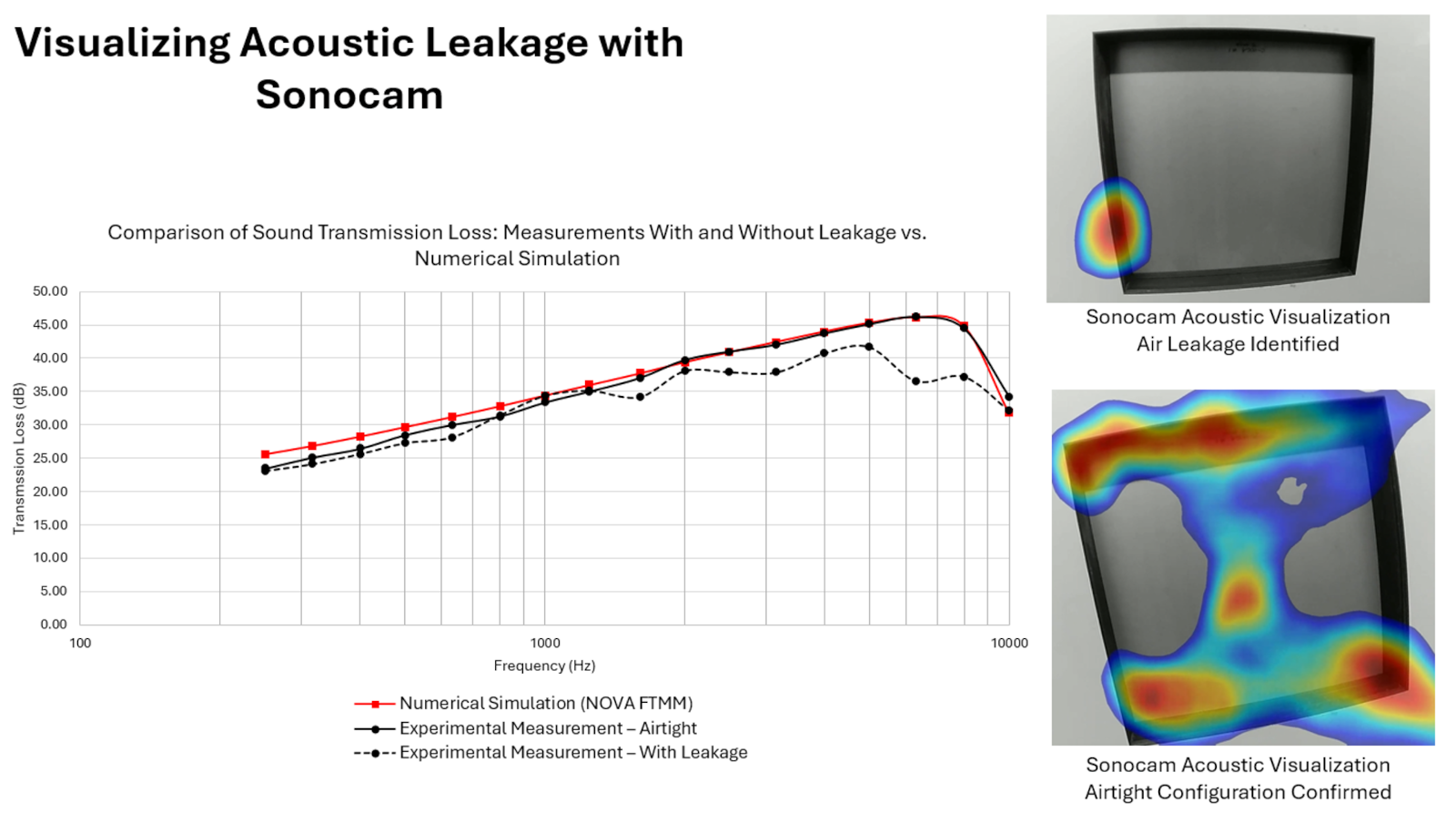
ซ้อนเส้นผลวัดจริงเพื่อตรวจว่าแบบจำลองสมเหตุสมผล แล้วใช้โมดูล Auralization ฟังผลของ TL ที่คาดการณ์กับเสียงอุตสาหกรรมที่มีให้หรือเสียงของคุณเอง ก่อนเลือกแนวทางOverlay the measured curve to check that the model is reasonable, then use the Auralization module to hear the predicted TL applied to the supplied industrial sounds or your own, before choosing a design.
Mecanum ระบุว่าส่งออกผลไปยัง VA One, COMSOL และ Simcenter ได้ ส่วนรูปแบบไฟล์ยังไม่มีเอกสารทางการเผยแพร่Mecanum states that results can be exported to VA One, COMSOL and Simcenter; the file formats are not yet officially documented.
วิธีนำเข้าผลจาก FOAM-X หรือ AcoustaLink การนำเข้าผลวัดเพื่อเทียบ รูปแบบไฟล์ส่งออก เวอร์ชัน และเงื่อนไขใบอนุญาต ยังไม่มีเอกสารทางการเผยแพร่ ขั้นตอนนี้อ้างอิงหน้าผลิตภัณฑ์และวิดีโอสาธิตของ Mecanum เท่านั้นHow FOAM-X or AcoustaLink results are imported, how measured curves are loaded for comparison, export formats, the version and licence terms have no published official documentation; these steps rely only on Mecanum's product page and demo videos.
ฟังผลลัพธ์Listen to the result
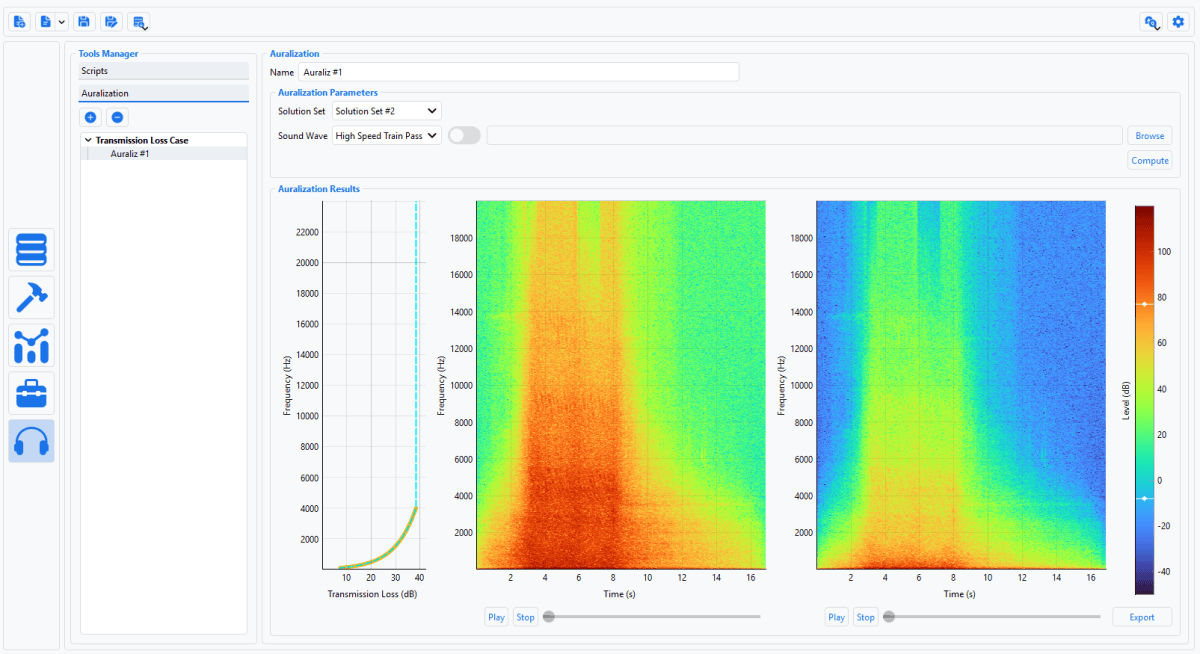
Mecanum ระบุว่า NOVA มีฟังก์ชัน auralization ภาพหน้าจอแสดงกรณี Transmission Loss: เลือกเสียงต้นทาง (ในภาพคือ High Speed Train Pass) นำค่า TL ที่จำลองได้ไปกรองเสียงนั้น แล้วแสดง spectrogram ของเสียงก่อนและหลังผ่านชุดวัสดุ พร้อมปุ่มเล่นเสียง ช่วยให้ผู้ที่ไม่ใช่วิศวกรเข้าใจว่าตัวเลข TL หมายถึงเสียงที่ได้ยินต่างกันอย่างไรMecanum states that NOVA includes auralization. The screenshot shows a Transmission Loss case: a source sound is chosen (High Speed Train Pass in the screenshot), the simulated TL is applied to it, and spectrograms of the sound before and after the treatment are shown with play buttons. It helps non-engineers understand what a TL number means for what people actually hear.
เหมาะกับใคร และควรรู้อะไรก่อนเลือกWho it is for, and what to check first
GET BEST SOUND ช่วยอะไรได้: ให้คำปรึกษาว่าเครื่องมือวัดและซอฟต์แวร์ชุดใดเหมาะกับวัสดุและเป้าหมายของคุณ ประสานข้อมูลผลิตภัณฑ์กับ MecanumHow GET BEST SOUND helps: advice on which instruments and software fit your material and target, coordination of product information with Mecanum.
คำถามที่พบบ่อยFAQ
FOAM-X หาพารามิเตอร์ของวัสดุหนึ่งชนิดจากผลวัด ส่วน NOVA ใช้พารามิเตอร์ของวัสดุหลายชนิดมาประกอบเป็นชุดหลายชั้น แล้วทำนายผลของทั้งชุดFOAM-X identifies the parameters of one material from measurements; NOVA combines the parameters of several materials into a multilayer stack and predicts how the whole stack performs.
Mecanum ระบุการดูดซับ การสะท้อน TL และค่าตัวเลขเดียว STC, Rw, SAA, αw, IIC และ Ln,wMecanum lists absorption, reflection, TL and the single-number ratings STC, Rw, SAA, αw, IIC and Ln,w.
ไม่ควรใช้แทน การจำลองช่วยคัดแบบและเข้าใจพฤติกรรมของชุดวัสดุ แต่ผลที่ใช้รับรองหรือยื่นตามสเปกควรมาจากการทดสอบตามมาตรฐาน Mecanum เองเน้นการเทียบผลจำลองกับผลวัดIt should not. Simulation helps screen designs and understand how a package behaves, but results used for certification or specification compliance should come from standard tests. Mecanum itself emphasises comparing simulation with measurement.
หน้าทางการของ Mecanum ไม่ได้กล่าวถึง ระบุเฉพาะแบบจำลอง JCAL และ Biot คลังวัสดุ ข้อมูลที่วัดได้ และ transfer matrix ที่นำเข้าMecanum's official pages do not mention them; they name the JCAL and Biot models, the material library, measured data and imported transfer matrices.
Mecanum ระบุการส่งออกไปยัง VA One, COMSOL และ SimcenterMecanum lists export to VA One, COMSOL and Simcenter.
Mecanum ไม่ได้เผยแพร่ราคาและรูปแบบลิขสิทธิ์Mecanum does not publish prices or licence types.
ข้อมูลตรวจสอบกับเว็บไซต์ทางการของ Mecanum เมื่อ 26 กันยายน 2026 เนื้อหาเขียนใหม่โดย GET BEST SOUND ไม่ได้คัดลอกจาก Mecanum ภาพหน้าจอเป็นตัวอย่างของ Mecanum ไม่ใช่ผลวัดของ GET BEST SOUNDChecked against Mecanum's official website on 26 September 2026; text written by GET BEST SOUND, not copied from Mecanum. Screenshots are Mecanum examples, not GET BEST SOUND measurements.
กำลังออกแบบชุดวัสดุหลายชั้นและอยากทำนายผลก่อนสร้างตัวอย่าง เล่าเป้าหมายและวัสดุที่มีให้ทีมวิศวกร GET BEST SOUND ฟังได้Designing a multilayer package and want to predict it before building samples? Tell the GET BEST SOUND engineers about your target and materials.