โจทย์ของงานThe measurement problem
ผู้จัดงานต้องตอบสามฝ่ายพร้อมกัน: ผู้ชมที่ต้องการเสียงที่ดีและสนุก หน่วยงานหรือเจ้าของสถานที่ที่กำหนดเกณฑ์ระดับเสียง และเพื่อนบ้านที่ไม่ต้องการถูกรบกวน ผู้ควบคุมเสียงจึงต้องรู้ระดับเสียงเทียบกับเกณฑ์ระหว่างงาน ไม่ใช่หลังงานจบแล้วThe organiser answers to three parties at once: an audience that wants good, exciting sound; an authority or venue that sets a level limit; and neighbours who do not want to be disturbed. The sound engineer therefore needs the level against the limit during the show, not after it.
ทำไมจึงยากWhy it is difficult
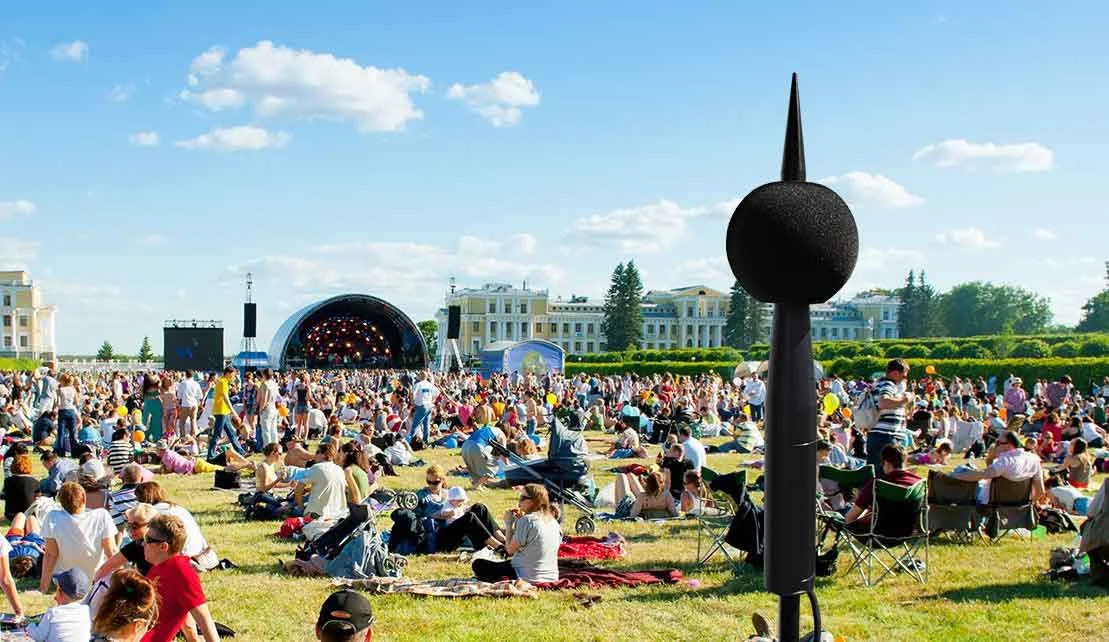
- จุดที่ดังที่สุดไม่ใช่จุดที่วางเครื่องวัดได้ บริเวณหน้าเวทีดังที่สุด แต่เครื่องวัดต้องอยู่ที่ตำแหน่งควบคุมเสียงซึ่งปลอดภัยและมองเห็นได้The loudest point is not where the meter can stand. The area in front of the stage is loudest, but the meter must sit at the mixing position, where it is safe and visible.
- ผู้ควบคุมเสียงต้องดูจอหลายจอ ข้อมูลระดับเสียงต้องอ่านได้ในเสี้ยววินาทีThe engineer watches many screens. The level information has to be readable at a glance.
- เสียงที่เกินเกณฑ์ไม่ได้มาจากระบบเสียงเสมอไป เช่น เสียงปรบมือและเสียงเชียร์ของผู้ชมNot every exceedance comes from the PA, for example applause and cheering.
- งานกลางแจ้งมีลมและฝน ไมโครโฟนต้องมีการป้องกันOutdoor shows have wind and rain; the microphone needs protection.
สิ่งที่ต้องวัดและเกณฑ์ที่ใช้What to measure, and against which limit
เกณฑ์ระดับเสียงของงานแสดงสดต่างกันตามประเทศ เมือง และสถานที่ จึงต้องเริ่มจากการถามว่าเกณฑ์ของงานนี้คืออะไร ใครเป็นผู้กำหนด และวัดที่ตำแหน่งใด เครื่องวัดจะถูกตั้งค่าเป็นโปรไฟล์การวัดตามเกณฑ์นั้นไว้ล่วงหน้าLevel limits for live events differ by country, city and venue, so the first step is to ask what this event's limit is, who sets it and where it applies. The meter is then pre-configured with a measurement profile for that limit.
สำหรับประเทศไทย จากประกาศทางการที่เราตรวจสอบไว้ ยังไม่พบเกณฑ์ระดับเสียงระดับชาติสำหรับผู้ชมในงานแสดง เกณฑ์ที่ใช้จึงมาจากข้อกำหนดของท้องถิ่น เงื่อนไขของสถานที่ หรือข้อตกลงของผู้จัด ส่วนเสียงที่ไปถึงเพื่อนบ้านอยู่ใต้กฎหมายเสียงรบกวนและเหตุรำคาญ และพนักงานในงานอยู่ใต้เกณฑ์เสียงในที่ทำงาน ดูพื้นฐานของค่าที่ใช้ในบทความการเฝ้าระดับเสียงในงานแสดงสดFor Thailand, in the official notifications we have reviewed, no national level limit for audiences at shows was found; the limit in use comes from a local rule, the venue's conditions or the organiser's agreement. Noise reaching neighbours falls under the disturbance and nuisance laws, and event staff under the workplace limits. For the quantities used see live event sound level monitoring.
หลักการ: วัดที่ FOH แต่ควบคุมที่จุดดังที่สุดThe principle: measure at FOH, control at the loudest point
ก่อนงาน ให้เครื่องวัดหาค่าแก้ (Correction) ระหว่างจุดที่ดังที่สุดของงานกับตำแหน่งที่วัดจริง เช่น ตำแหน่งควบคุมเสียง ค่าแก้นี้จะถูกรวมเข้ากับข้อมูลการวัด ทำให้ควบคุมระดับเสียงที่จุดดังที่สุดในพื้นที่ผู้ชมได้ แม้เครื่องวัดจะอยู่ที่อื่นBefore the show, the meter determines the correction between the loudest point of the event and the actual measurement position, such as the mixing position. The correction is included with the measurement data, so the level at the loudest point in the public area can be controlled even though the meter stands elsewhere.
ขั้นตอนการทำงานTypical workflow
- ก่อนงาน: ยืนยันเกณฑ์ของงาน ตั้งโปรไฟล์การวัด ติดตั้งไมโครโฟนที่ FOH (ใช้ไมโครโฟนกลางแจ้งสำหรับงานกลางแจ้ง) และตรวจระดับด้วยเครื่องสอบเทียบเสียงBefore the show: confirm the limit, set the measurement profile, install the microphone at FOH (an outdoor microphone for open-air shows) and check the level with a sound calibrator.
- หาค่าแก้: วัดระหว่างจุดดังที่สุดกับ FOH แล้วบันทึกค่าแก้ลงในเครื่องFind the correction: measure between the loudest point and FOH and store the correction in the meter.
- เริ่มงาน: เปิดเครื่อง เลือกโปรไฟล์ กดเริ่ม เครื่องวัดและบันทึกทุกค่าเองโดยไม่ต้องทำอะไรเพิ่มShow time: power up, select the profile, press start; the meter measures and logs everything without further input.
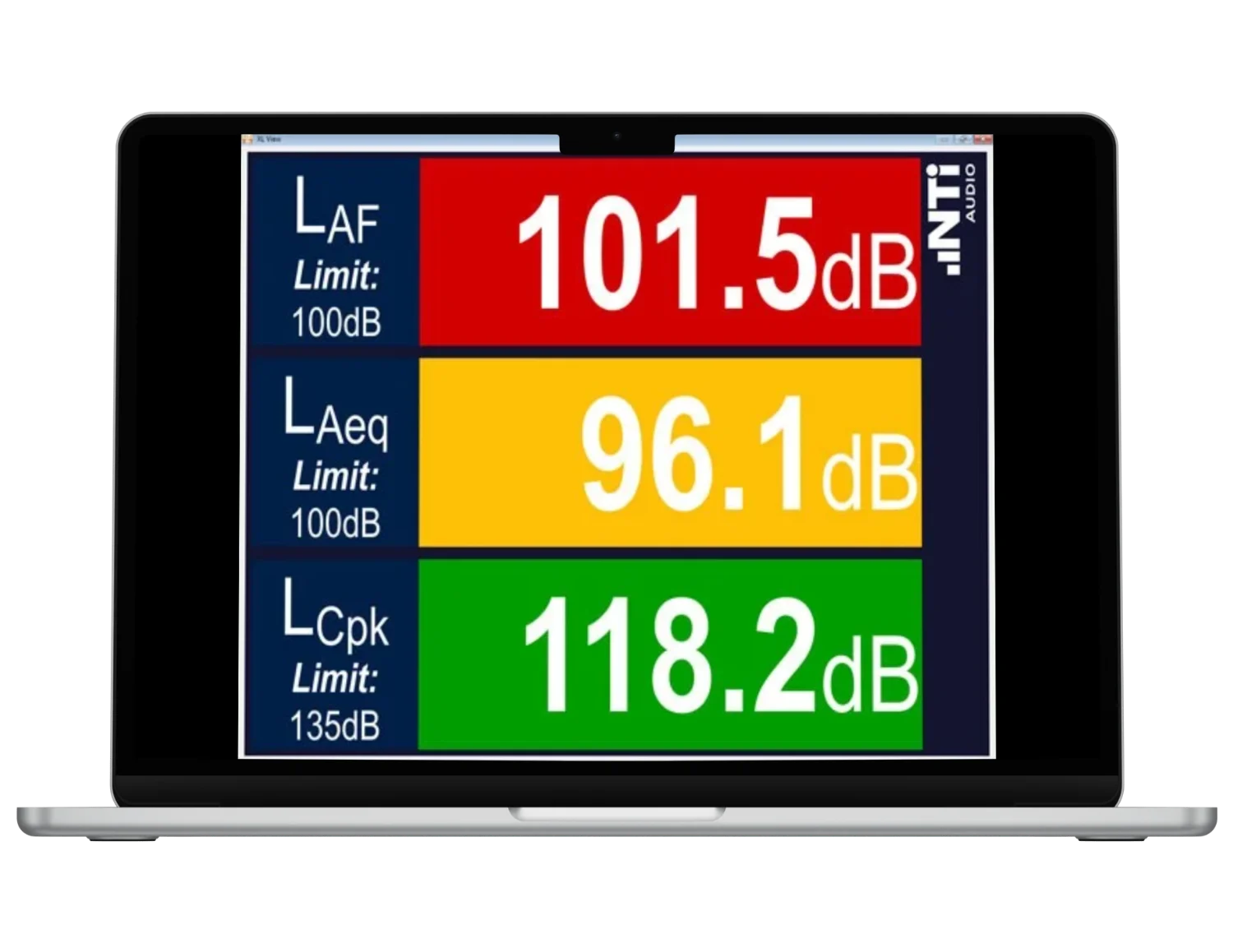
- ระหว่างงาน: ผู้ควบคุมเสียงดูสัญญาณเขียว เหลือง แดง สีเหลืองคือเตือนล่วงหน้า สีแดงคือเกินเกณฑ์ ให้ลดระดับที่มิกเซอร์During the show: the engineer watches green, amber and red: amber is the pre-warning, red means over the limit, reduce the level at the desk.
- หลังงาน: นำข้อมูลที่บันทึกเข้าแม่แบบรายงาน และฟังไฟล์เสียงเพื่อตรวจช่วงที่เกินเกณฑ์ซึ่งอยู่นอกการควบคุมของผู้ควบคุมเสียง เช่น เสียงปรบมือดังAfter the show: load the logged data into a report template, and play the audio to review over-limit periods outside the operator's control, such as loud applause.
การแสดงผลให้ผู้ควบคุมเสียงShowing the level to the engineer
- ไฟบนเครื่องวัด: เขียว เหลือง แดง เครื่องแสดงไฟแดงเมื่อระดับเกินเกณฑ์ และต่อ Limit Light ภายนอกเพิ่มได้Light on the meter: green, amber, red; the meter shows red when the level is above the limit, and an external Limit Light can be added.
- XL View ของ XL3: XL3 ทุกเครื่องส่งค่าที่เลือกได้สามค่าพร้อมเกณฑ์ไปยัง iPad โทรศัพท์ เว็บเบราว์เซอร์ หรือสมาร์ตทีวี ให้ผู้ควบคุมเสียง ผู้จัด ผู้ชม หน่วยงาน และเพื่อนบ้านดูได้XL View on the XL3: every XL3 streams three selectable levels with their limits to an iPad, phone, browser or smart TV, for the engineer, organiser, audience, authorities and neighbours.
- XL View ใน Projector PRO (XL2): แสดงหนึ่งถึงสามค่าเป็นตัวเลขขนาดใหญ่บนคอมพิวเตอร์ สีเหลืองคือเตือนล่วงหน้า สีแดงคือสัญญาณเตือนXL View in Projector PRO (XL2): one to three levels in large figures on a computer; amber is the pre-warning, red the alarm.
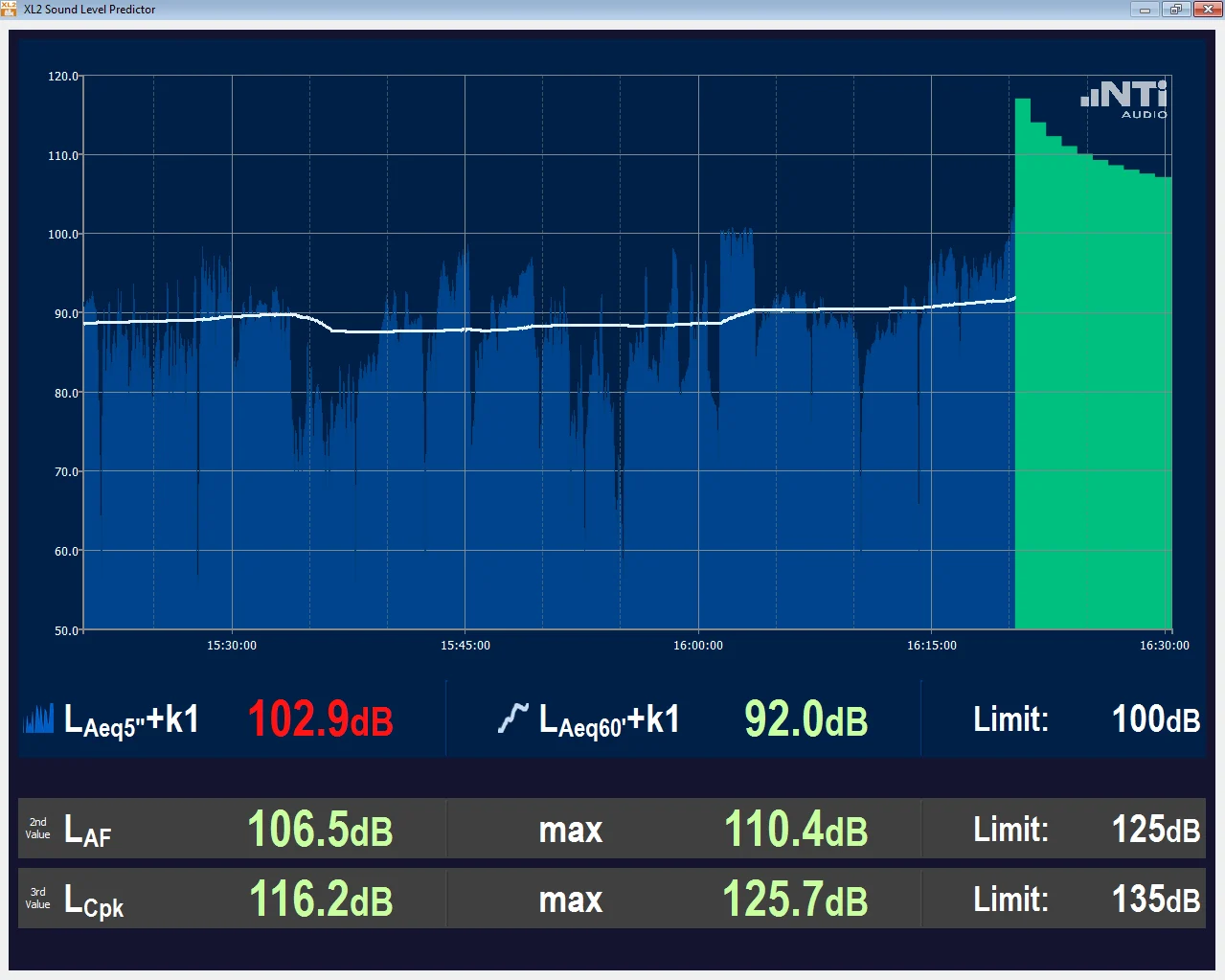
- Sound Level Predictor (Projector PRO, XL2): แท่งสีเขียวแปลว่ายังต่ำกว่าเกณฑ์มาก แท่งสีแดงบอกให้ลดระดับที่มิกเซอร์Sound Level Predictor (Projector PRO, XL2): green bars mean well below the limit; red bars tell the engineer to reduce the level at the desk.
เฝ้าระวังจากระยะไกลและงานหลายวันRemote monitoring and multi-day events
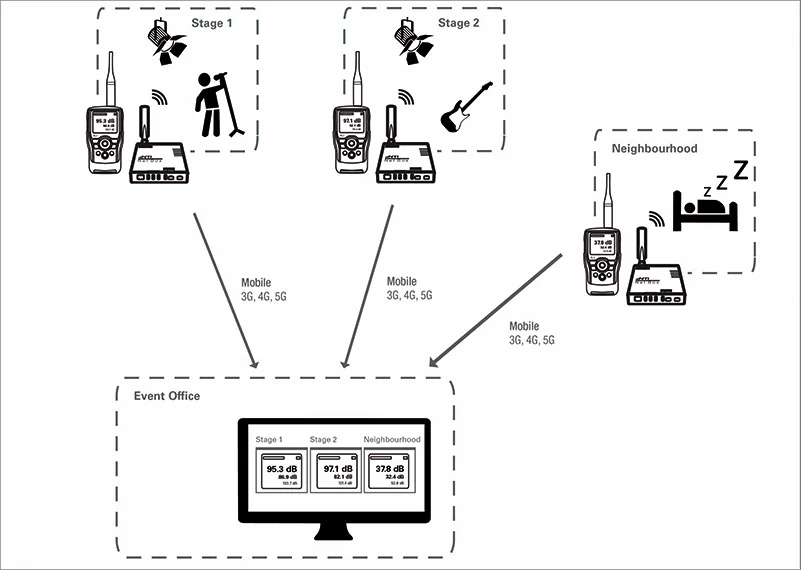
- XL2 และ XL3 ต่อกับเว็บได้ เริ่มและหยุดการวัดจากเบราว์เซอร์บนโทรศัพท์ แท็บเล็ต หรือคอมพิวเตอร์ได้The XL2 and XL3 can connect to the web; measurements are started and stopped from a browser on a phone, tablet or computer.
- แบ่งปันลิงก์แบบดูอย่างเดียวให้เพื่อนบ้านหรือเจ้าหน้าที่ได้ ซึ่งช่วยสร้างความไว้วางใจA view-only link can be shared with neighbours or officials, which builds trust.
- สำหรับงานหลายวัน Projector PRO เริ่มเฝ้าระวังอัตโนมัติเมื่อเปิดคอมพิวเตอร์และหยุดเมื่อปิดเครื่อง การตั้งค่าบันทึกเป็นโปรไฟล์ได้For multi-day events, Projector PRO can start monitoring automatically at computer start-up and end at shutdown; settings are saved in a profile.
ชุดเครื่องมือEquipment
| รายการItem | ชุด XL3XL3 set | ชุด XL2XL2 set |
|---|---|---|
| เครื่องวัดMeter | ชุด XL3XL3 setXL3XL3 | ชุด XL2XL2 setXL2XL2 |
| การแสดงผลขนาดใหญ่Large display | ชุด XL3XL3 setXL View ในตัว ใช้ได้ฟรีBuilt-in XL View, free of charge | ชุด XL2XL2 setProjector PRO กับ XL2 Projector PRO OptionProjector PRO with the XL2 Projector PRO Option |
| ไมโครโฟนMicrophone | ชุด XL3XL3 setไมโครโฟนวัดเสียง และไมโครโฟนกลางแจ้งสำหรับงานกลางแจ้งMeasurement microphone; outdoor microphone for open-air shows | ชุด XL2XL2 setไมโครโฟนวัดเสียง และไมโครโฟนกลางแจ้งสำหรับงานกลางแจ้งMeasurement microphone; outdoor microphone for open-air shows |
| อุปกรณ์เสริมOptions | ชุด XL3XL3 setLimit Light, Sound CalibratorLimit Light, sound calibrator | ชุด XL2XL2 setLimit Light, Sound CalibratorLimit Light, sound calibrator |
ข้อผิดพลาดที่พบบ่อยCommon mistakes
- วัดที่ FOH โดยไม่ใช้ค่าแก้ ทำให้ระดับที่หน้าเวทีสูงกว่าที่รายงานMeasuring at FOH without the correction, so the level in front of the stage is higher than reported.
- ไม่บันทึกเสียงประกอบ จึงอธิบายไม่ได้ว่าช่วงที่เกินเกณฑ์มาจากระบบเสียงหรือจากผู้ชมNo audio recording, so an exceedance cannot be attributed to the PA or to the audience.
- ตั้งเกณฑ์ผิดจากที่หน่วยงานกำหนด เช่น ผิดช่วงเวลาเฉลี่ยSetting a limit that differs from the authority's, for example the wrong averaging period.
- ไม่ตรวจระดับด้วยเครื่องสอบเทียบก่อนงานNo calibrator check before the show.
คำถามที่พบบ่อยFAQ
ต้องวัดตรงไหนของงาน?Where in the venue should the meter be?
โดยทั่วไปที่ตำแหน่งควบคุมเสียง (FOH) พร้อมค่าแก้ไปยังจุดที่ดังที่สุดในพื้นที่ผู้ชม เว้นแต่เกณฑ์ของงานจะกำหนดตำแหน่งอื่นUsually at the mixing position (FOH), with the correction to the loudest point in the audience area, unless the event's limit specifies another position.
เพื่อนบ้านหรือเจ้าหน้าที่ดูระดับเสียงสดได้ไหม?Can neighbours or officials watch the level live?
ได้ แบ่งปันลิงก์แบบดูอย่างเดียวได้ และ XL View ของ XL3 เปิดบนเบราว์เซอร์หรือสมาร์ตทีวีได้Yes. A view-only link can be shared, and the XL3's XL View opens in a browser or on a smart TV.
เสียงปรบมือทำให้เกินเกณฑ์ จะอธิบายอย่างไร?Applause pushed us over the limit. How do we explain it?
บันทึกไฟล์เสียงพร้อมกับการวัด หลังงานเปิดฟังช่วงที่เกินเกณฑ์เพื่อแสดงว่าเสียงมาจากผู้ชม ไม่ใช่ระบบเสียงRecord audio with the measurement; afterwards, play back the over-limit period to show the sound came from the audience, not the PA.