NTi Audio · Cloud & Software

Room Acoustics Reporter
ซอฟต์แวร์วิเคราะห์และรายงานอะคูสติกห้องRoom acoustics analysis and reporting software

ซอฟต์แวร์บน PC สร้างรายงานการวัดเวลาเสียงก้องอัตโนมัติและวิเคราะห์สเปกตรัมผลตอบสนองความถี่ จากข้อมูลที่บันทึกด้วยเครื่องวัดระดับเสียงPC software that automatically generates reverberation time reports and analyses the frequency response spectrum from sound level meter data.

ซอฟต์แวร์วิเคราะห์และรายงานอะคูสติกห้อง
  • ตัวแทนจำหน่าย NTi Audio อย่างเป็นทางการในประเทศไทยOfficial NTi Audio distributor in Thailand
  • วิศวกรช่วยเลือกชุดตามงาน (Application Engineering)Application engineering
  • สาธิตและอบรมการใช้งานDemo & training
  • สอบเทียบและซัพพอร์ตทางเทคนิคCalibration & technical support

What the software does

Room Acoustics Reporter ทำอะไรWhat the Room Acoustics Reporter does

ช่วยนักอะคูสติกและผู้เชี่ยวชาญแสดงผลและประเมินข้อมูลการวัดโดยละเอียด และทำรายงานตามมาตรฐาน เป็นซอฟต์แวร์ ไม่ใช่เครื่องมือวัดSupports acousticians and experts in visualising and evaluating measurement data in detail, and in standard-compliant reporting. It is software, not a measuring instrument.

เวลาเสียงก้องReverberation time

ตาม ISO 3382, DIN 18041 และอื่น ๆAccording to ISO 3382, DIN 18041, etc.

จำลองอะคูสติกห้องRoom acoustic prediction

Sabine และ EyringSabine, Eyring

นำเข้าข้อมูลวัสดุดูดซับและ ToleranceImport absorber data and tolerances

กำหนดเองได้User-defined

สเปกตรัมและ Noise CurvesSpectra and noise curves

1/1 และ 1/3 ออกเตฟ1/1 and 1/3 octave

รายงานตามมาตรฐานStandard-compliant reporting

ใส่โลโก้และลายเซ็นได้With your logo and signature

เหมาะกับใครWho it is for

ใครใช้ และแก้ปัญหาอะไรWho uses it and what it solves

ผลวัดเวลาเสียงก้องจากหลายตำแหน่งต้องเฉลี่ย เทียบกับเกณฑ์ และมักต้องตอบว่าถ้าเพิ่มวัสดุดูดซับแล้วจะดีขึ้นเท่าใด ซอฟต์แวร์รวมผลวัด เทียบ Tolerance และประเมินผลของวัสดุก่อนติดตั้งจริงReverberation results from several positions have to be averaged and compared with a target, and the question is often how much added absorption would help. The software combines the measurements, checks them against tolerances and estimates the effect of materials before installation.

นักอะคูสติกและที่ปรึกษาAcousticians and consultants

รายงานเวลาเสียงก้องและ Noise Curves สำหรับห้องเรียน สำนักงาน และห้องประชุมReverberation and noise-curve reports for classrooms, offices and meeting rooms

ผู้ออกแบบและผู้ติดตั้งงานอะคูสติกAcoustic designers and installers

เปรียบเทียบก่อน/หลังปรับปรุง และประเมินวัสดุดูดซับBefore/after comparison and absorber estimates

บริการอะคูสติกห้องRoom acoustics service

ให้ GET BEST SOUND วัดและทำรายงานให้Have GET BEST SOUND measure and report for you

ดูบริการ →See the service →

หลักการHow it works

เวลาเสียงก้องวัดอย่างไร และซอฟต์แวร์ช่วยตรงไหนHow reverberation time is measured — and where the software helps

เวลาเสียงก้องคืออะไรWhat reverberation time is

เวลาที่ระดับเสียงในห้องลดลง 60 dB หลังแหล่งเสียงหยุด ห้องผิวแข็งก้องนาน ฟังเสียงพูดไม่ชัด ห้องที่มีวัสดุดูดซับก้องสั้นลง ค่าที่เหมาะสมขึ้นกับขนาดและการใช้งานห้องThe time the sound level in a room takes to fall by 60 dB after the source stops. Hard rooms reverberate for a long time and speech becomes unclear; absorbing materials shorten it. The right value depends on the room's size and use.

เครื่องวัดทำอะไรWhat the meter does

เปิดเสียงทดสอบดังจนระดับในห้องคงที่ แล้วหยุดเสียง เครื่องวัดบันทึกการลดลงของระดับในแต่ละย่านความถี่ และคำนวณ T20 หรือ T30 จากช่วงการลดลง 20 หรือ 30 dB แล้วขยายเป็น 60 dB ทำซ้ำหลายตำแหน่งไมโครโฟนและแหล่งกำเนิดเสียงA loud test sound fills the room until the level is steady, then stops. The meter records the decay in each frequency band and calculates T20 or T30 from a 20 or 30 dB part of the decay, extended to 60 dB. This is repeated at several microphone and source positions.

ซอฟต์แวร์ทำอะไรWhat the software does

รวมผลทุกตำแหน่งเป็นค่าเฉลี่ยของห้อง คำนวณ Tmid ตาม ISO 3382-1 เทียบกับช่วง Tolerance ของมาตรฐานที่เลือก และจำลองว่าถ้าเพิ่มวัสดุดูดซับหรือจำนวนคน เวลาเสียงก้องจะเปลี่ยนเท่าใดIt combines all positions into a room average, calculates Tmid per ISO 3382-1, compares the result with the tolerance range of the chosen standard, and predicts how reverberation would change with added absorbers or persons.

การจำลองคิดอย่างไรHow the prediction works

สูตร Sabine ประมาณเวลาเสียงก้องจากปริมาตรห้อง V และพื้นที่ดูดซับเสียงรวม A (T ≈ 0.161 · V / A) เมื่อเพิ่มวัสดุ A จะเพิ่มขึ้นและ T ลดลง สำหรับห้องที่ดูดซับเสียงมาก สูตร Eyring ให้ผลที่เหมาะกว่า ทั้งสองเป็นค่าเฉลี่ยของห้อง ไม่คิดตำแหน่งของวัสดุSabine's formula estimates the reverberation time from the room volume V and the total absorption area A (T ≈ 0.161 · V / A): adding material raises A and lowers T. For highly absorptive rooms Eyring's formula fits better. Both are room averages and ignore where the material is placed.

วิเคราะห์อะไรได้บ้างWhat it analyses

งานวิเคราะห์ที่รองรับSupported analyses

เวลาเสียงก้องReverberation time

เปรียบเทียบก่อน/หลังปรับปรุงห้อง, จำลองการเพิ่มวัสดุดูดซับเสียง, เทียบกับ Tolerance ตามมาตรฐานBefore/after comparison of room treatment, simulation of added sound absorbers, comparison with standard tolerances

สเปกตรัมผลตอบสนองความถี่ (RTA)Frequency response spectrum (RTA)

เฉลี่ยสเปกตรัมจากหลายตำแหน่ง, คำนวณผลต่างระดับ D ระหว่างสองห้อง, แก้ค่าเสียงพื้นหลังAveraging spectra from several positions, level difference D between two rooms, background noise correction

Noise Curves, 1/12 ออกเตฟ และ XL2 Cinema MeterNoise curves, 1/12 octave and XL2 Cinema Meter

ตรวจผ่าน/ไม่ผ่านด้วย Tolerance, แปลงข้อมูล 1/12 เป็น 1/3 ออกเตฟอัตโนมัติ, รายงานตามมาตรฐานPass/fail against tolerances, automatic 1/12 to 1/3 octave conversion, standard-compliant reports

สัมประสิทธิ์การดูดซับเสียงSound absorption coefficient

ตาม ISO 354, ISO 11654 และ ASTM C423 พร้อม Class A–E และค่า NRC, SAAPer ISO 354, ISO 11654 and ASTM C423, with absorber class A–E, NRC and SAA

ขั้นตอนการทำงานWorkflow

จากการวัดเวลาเสียงก้องสู่รายงานFrom reverberation measurement to report

  1. วัด RT / สเปกตรัมด้วยเครื่องวัดระดับเสียงMeasure RT / spectra with the sound level meter
  2. Measurements View: ลากข้อมูลเข้า จัดเป็นก่อน/หลังMeasurements view: drag & drop, sorted before/after
  3. Calculations View: สเปกตรัม RT ของแต่ละการวัดCalculations view: RT spectrum per measurement
  4. Results View: RT เฉลี่ย กราฟ 50 Hz – 10 kHz และ TmidResults view: average RT, 50 Hz – 10 kHz chart, Tmid
  5. จำลองวัสดุดูดซับ (Sabine / Eyring)Absorber prediction (Sabine / Eyring)
  6. รายงานพร้อมโลโก้และลายเซ็นReport with logo and signature
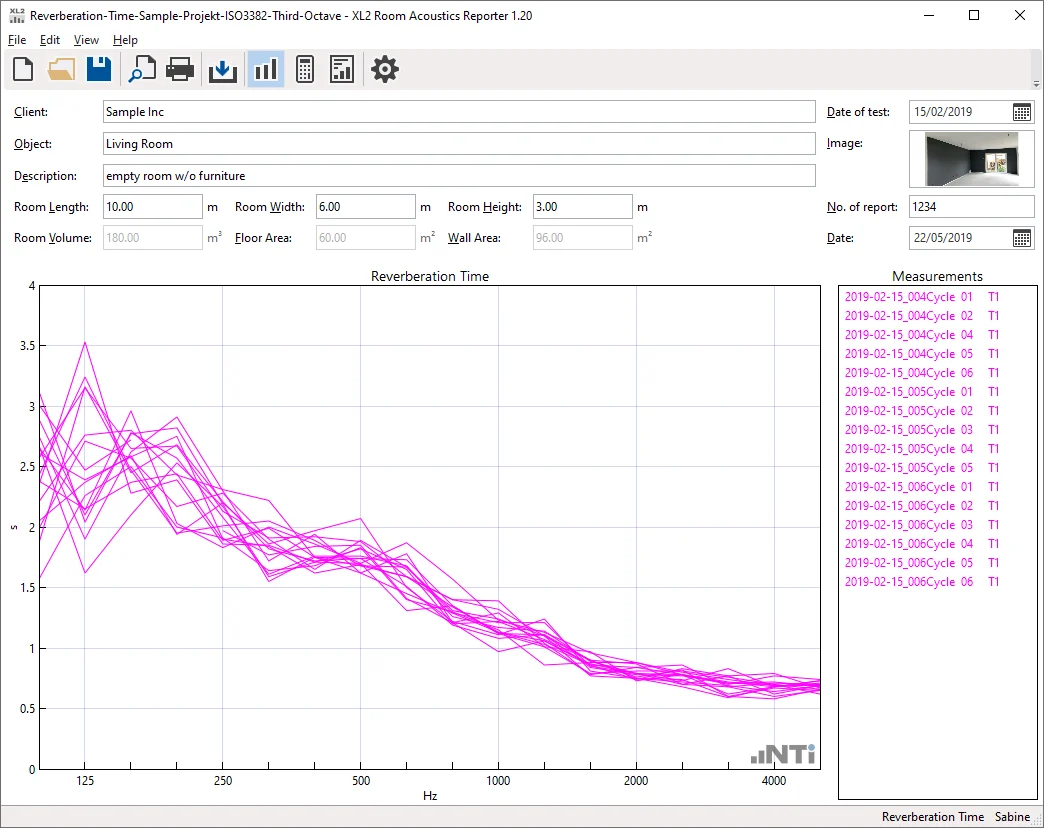
หน้าข้อมูลการวัดใน Room Acoustics ReporterRoom Acoustics Reporter measurements view
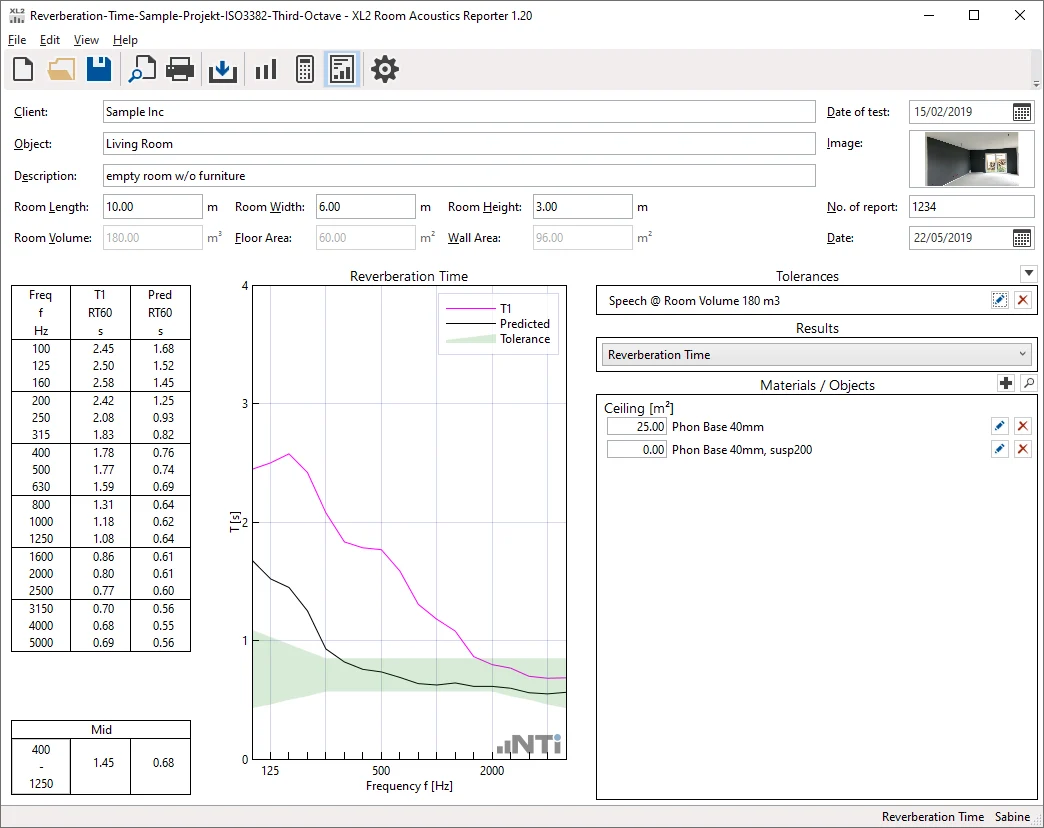
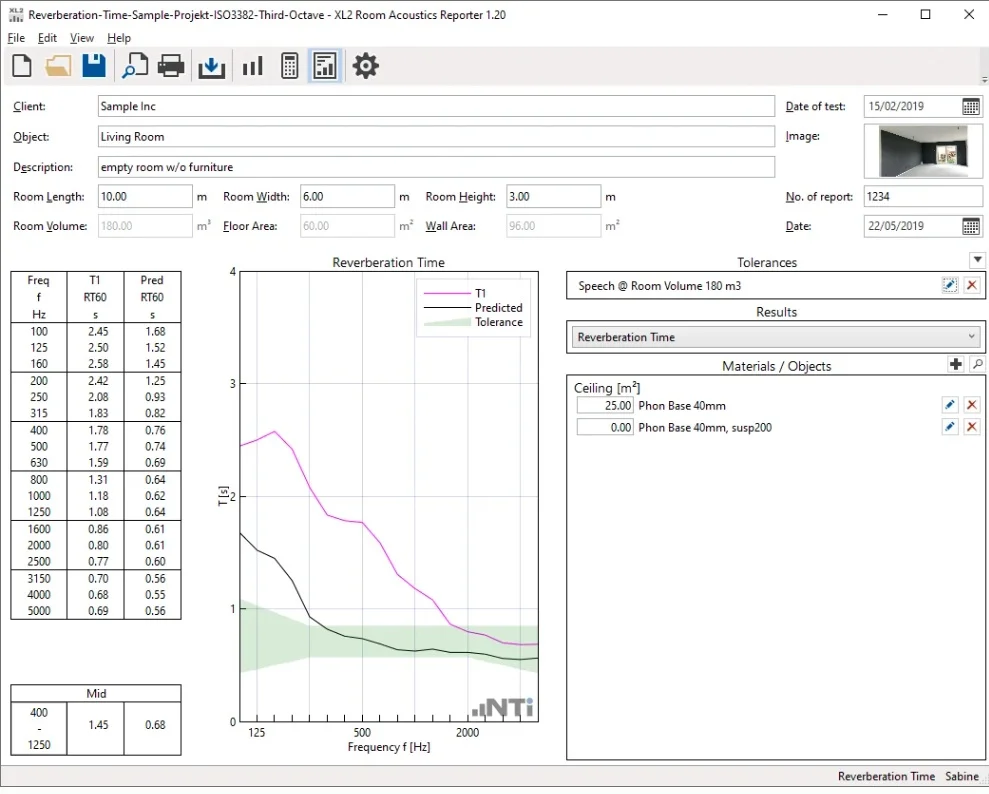
ผลเวลาเสียงก้องพร้อมเกณฑ์ใน Room Acoustics ReporterRoom Acoustics Reporter results with tolerance

Room Acoustics Reporter: หน้าข้อมูลการวัด และผลพร้อมเกณฑ์และวัสดุ (ภาพหน้าจอ: NTi Audio)Room Acoustics Reporter: measurements view and results with tolerance and materials (screenshots: NTi Audio)

คู่มือเริ่มต้นใช้งานBeginner Guide

คู่มือเริ่มต้นใช้งาน Room Acoustics Reporter: รายงานเวลาเสียงก้องฉบับแรกRoom Acoustics Reporter Beginner Guide: your first reverberation-time report

ขั้นตอนและชื่อเมนูตามคู่มือ Room Acoustics Reporter V1.20 ของ NTi Audio ซึ่งเขียนสำหรับ XL2 ส่วนการนำเข้าข้อมูลจาก XL3 ยังไม่มีขั้นตอนทางการที่เราตรวจได้ ดูหมายเหตุท้ายหัวข้อSteps and menu names follow NTi Audio's Room Acoustics Reporter V1.20 manual, written for the XL2. We could not find an official step-by-step for importing XL3 data; see the note at the end of this section.

ต้องมีอะไรบ้างก่อนเริ่มWhat you need before you start

  • XL2: XL2 Extended Acoustic Pack (สำหรับเวลาเสียงก้องแบบ 1/3 ออกเตฟ) และ Room Acoustics Reporter 365 หรือ Room Acoustics Option (ถาวร) เพื่อเปิดการนำเข้าข้อมูล คู่มือแนะนำเฟิร์มแวร์ V4.70 ขึ้นไป (ขั้นต่ำสำหรับการนำเข้า V4.20)XL2: the XL2 Extended Acoustic Pack (for 1/3-octave reverberation time) and Room Acoustics Reporter 365 or the permanent Room Acoustics Option to enable import; the manual recommends firmware V4.70 or later (V4.20 minimum for import).
  • XL3: NTi ระบุว่าการใช้งานเต็มรูปแบบต้องมี Extended Room Acoustics ซึ่งเพิ่มการวัด 1/3 ออกเตฟ 50 Hz–10 kHz และ T20 / T30 / T15 / EDT พร้อมกันXL3: NTi states that full functionality needs Extended Room Acoustics, which adds 1/3-octave measurement from 50 Hz to 10 kHz and simultaneous T20 / T30 / T15 / EDT.
  • แหล่งเสียงที่ดังพอ (ลำโพงรอบทิศกับเสียง pink noise แบบเปิดปิด หรือเสียงอิมพัลส์) และคอมพิวเตอร์ WindowsA loud enough source (an omnidirectional loudspeaker with interrupted pink noise, or an impulse) and a Windows computer.
  • พื้นฐาน: เวลาเสียงก้อง RT60 และ ISO 3382Background: reverberation time RT60 and ISO 3382.
  1. STEP1

    เตรียมโฟลเดอร์และชื่อไฟล์บน XL2Prepare folders and file names on the XL2

    ส่งออกไฟล์ savenames.txt จากโปรแกรมไปไว้ที่รากของการ์ด XL2 ตั้ง Autosave เป็น Off และสร้างหนึ่งโฟลเดอร์ต่อหนึ่งห้องในโฟลเดอร์ Projects แต่ละห้องจะเป็นหนึ่งโปรเจกต์ในโปรแกรมExport the savenames.txt file from the program to the root of the XL2's card, set Autosave to Off, and make one folder per room under Projects; each room becomes one project in the program.

    ในโปรแกรมIn the programในโปรแกรม: View → Settings → แท็บ Mapping → Export... · บน XL2: Autosave: OffIn the program: View → Settings → Mapping tab → Export... · on the XL2: Autosave: Off

  2. STEP2

    วัดเวลาเสียงก้องMeasure the reverberation time

    วัดด้วยฟังก์ชัน RT60 แบบออกเตฟหรือ 1/3 ออกเตฟ บันทึกเป็นชุด T1 ถ้าจะวัดสเปกตรัมเสียงรบกวนให้ใช้ SLMeter RTA 1/3 ออกเตฟ ถ่วงน้ำหนัก Z ราว 15 วินาที ระดับสัญญาณต้องสูงกว่าเสียงพื้นหลังพอให้เห็นการลดลงเต็มช่วง และบันทึกว่ามีคนหรือเฟอร์นิเจอร์อยู่ในห้องแค่ไหนMeasure with the RT60 function in octaves or 1/3 octaves and save it as dataset T1. For a noise spectrum, use SLMeter RTA in 1/3 octaves, Z-weighted, about 15 seconds. The signal must be far enough above the background to show the full decay; note how many people and how much furniture are in the room.

    ในโปรแกรมIn the programXL2: RT60 → Save Test → Room-Acoustic → เลือกชื่อ (เช่น T1)XL2: RT60 → Save Test → Room-Acoustic → choose the name (e.g. T1)

  3. STEP3

    สร้างโปรเจกต์ใหม่Create a new project

    เลือกชนิดโปรเจกต์ เช่น Reverberation Time, Spectrum / RTA หรือมาตรฐานที่ต้องการ แล้วกด OKChoose the project type, such as Reverberation Time, Spectrum / RTA or a specific standard, then press OK.

    ในโปรแกรมIn the programFile → New... → เลือกชนิด → OKFile → New... → choose the type → OK

  4. STEP4

    นำเข้าข้อมูลImport the data

    ลากโฟลเดอร์ของห้องมาวางในช่องนำเข้า โฟลเดอร์ต้องมีทั้งไฟล์ .txt และไฟล์ระบบ .xl2 ข้อมูลเข้าไปที่ T1 โดยค่าเริ่มต้น ถ้าเป็นชุดหลังปรับปรุงห้องให้คลิกขวาแล้ว Assign To เป็น T2 และลบค่าที่ผิดออกDrag the room folder into the drop field; it must contain the .txt files and the .xl2 system files. Data goes to T1 by default; for an after-treatment dataset, right-click → Assign To → T2, and delete false readings.

    ในโปรแกรมIn the programช่อง “Drop measurement files or folder here” · File → Import → Folder... / File... · คลิกขวา → Assign To“Drop measurement files or folder here” field · File → Import → Folder... / File... · right-click → Assign To

  5. STEP5

    ตรวจค่าเฉลี่ยCheck the averages

    มุมมอง Calculations แสดงช่วงของข้อมูลเป็นพื้นที่สีเทา ปิดค่าที่ผิดปกติออกจากการเฉลี่ยThe Calculations view shows the spread of the data as a grey area; switch off outliers from the average.

    ในโปรแกรมIn the programView → Calculations → Measurements SelectionView → Calculations → Measurements Selection

  6. STEP6

    อ่านผลและค่าเฉลี่ยย่านกลางRead the results and the mid-frequency average

    มุมมอง Results แสดงกราฟและตาราง 50 Hz–10 kHz และค่าเวลาเสียงก้องเฉลี่ยของย่านที่เลือก (Tmid ตาม ISO 3382-1) ตั้งย่านนี้ได้เอง ถ้ามีเกณฑ์ออกแบบ ให้เลือก Tolerance เพื่อแสดงผ่าน/ไม่ผ่านThe Results view shows the chart and table from 50 Hz to 10 kHz and the average reverberation time over the chosen range (Tmid per ISO 3382-1), which you can set. If there is a design target, choose a Tolerance to show pass / fail.

    ในโปรแกรมIn the programView → Results · Edit → Mid Frequency Range... · Tolerances / Edit ToleranceView → Results · Edit → Mid Frequency Range... · Tolerances / Edit Tolerance

  7. STEP7

    ลองจำลองการปรับปรุงห้องTry a room treatment simulation

    เพิ่มวัสดุดูดซับ วัตถุ หรือคน ในแผง Materials / Objects โปรแกรมคาดการณ์เวลาเสียงก้องใหม่ด้วยสูตร Sabine (ค่าเริ่มต้นตาม DIN EN 12354-6) หรือ Eyring ซึ่งแนะนำเมื่อค่าการดูดซับเฉลี่ยเกิน 0.30 และแสดงการเปลี่ยนระดับเสียงAdd absorbers, objects or people in the Materials / Objects panel. The program predicts the new reverberation time with the Sabine formula (the default, per DIN EN 12354-6) or Eyring, recommended when the mean absorption exceeds 0.30, and shows the level change.

    ข้อควรระวังWatch outสูตรนี้สมมติว่าเสียงแพร่กระจายทั่วห้อง วัสดุกระจายสม่ำเสมอ และห้องไม่ยาวเกิน 1:5 ถ้าไม่เป็นเช่นนั้น เวลาเสียงก้องจริงมักยาวกว่าที่จำลองThe formula assumes a diffuse field, evenly spread absorption and a room no longer than 1:5; when that is not true, the real reverberation time is often longer than simulated.
  8. STEP8

    กรอกหัวรายงาน พิมพ์ และบันทึกFill in the header, print and save

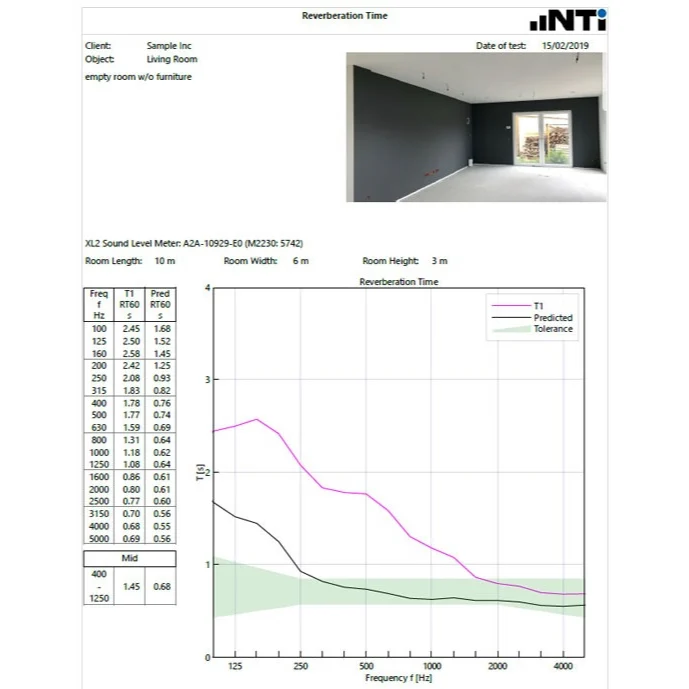
    ใส่ผู้ว่าจ้าง ชื่องาน รายละเอียด และขนาด / ปริมาตรห้อง แล้วพิมพ์รายงาน (ไฟล์ PDF ทำผ่าน PDF printer) บันทึกโปรเจกต์เป็นไฟล์ .xlraEnter the client, object, description and room dimensions / volume, then print the report (for a PDF, use a PDF printer). Save the project as an .xlra file.

    ในโปรแกรมIn the programFile → Print Preview / Print · File → SaveFile → Print Preview / Print · File → Save

ชื่อเมนูตามคู่มือ Room Acoustics Reporter V1.20 (พฤศจิกายน 2021) สำหรับ XL2 หน้าผลิตภัณฑ์ของ NTi ระบุมาตรฐานรุ่นใหม่กว่าและรองรับ XL3 แต่ไม่ได้ระบุเวอร์ชันโปรแกรมปัจจุบัน สำหรับ XL3 เรายังไม่พบขั้นตอนนำเข้าข้อมูลที่ NTi เผยแพร่ (ชนิดไฟล์และโครงสร้างโฟลเดอร์) ถ้าจะใช้กับ XL3 กรุณาติดต่อเราก่อนMenu names follow the Room Acoustics Reporter V1.20 manual (November 2021) for the XL2. NTi's product page lists newer standard editions and XL3 support but not the current program version. For the XL3 we have not found a published NTi import procedure (file types and folder structure); please contact us before using it with an XL3.

ค่าที่ต้องอ่านให้เป็นValues to understand

ค่าหลักในรายงาน Room Acoustics ReporterThe main values in a Room Acoustics Reporter report

ความหมายตามที่ NTi อธิบาย รายละเอียดทางอะคูสติกอยู่ในบทความที่ลิงก์ไว้Meanings as NTi describes them; the acoustics is in the linked articles.

T20 และ T30T20 and T30 T20 · T30 · s

คืออะไรWhat it is
เวลาเสียงก้องที่ประเมินจากการลดลง 20 dB หรือ 30 dB แล้วขยายเป็น 60 dBThe reverberation time evaluated over a 20 dB or 30 dB decay range, extrapolated to 60 dB.
ทำไมต้องสนใจWhy it matters
NTi ระบุว่า T30 ให้ความไม่แน่นอนต่ำกว่า T20 แต่ต้องมีช่วงสัญญาณเหนือเสียงพื้นหลังมากกว่าNTi notes T30 has lower uncertainty than T20 but needs more signal above the background.
อ่านพื้นฐานเพิ่มเติม →Read the basics →

ค่าเฉลี่ยย่านกลางMid-frequency average Tmid · s

คืออะไรWhat it is
เวลาเสียงก้องเฉลี่ยในย่านความถี่ที่เลือก ตาม ISO 3382-1The average reverberation time over a chosen frequency range, per ISO 3382-1.
ทำไมต้องสนใจWhy it matters
เป็นตัวเลขเดียวที่มักใช้เทียบกับเกณฑ์ออกแบบThe single number usually compared with design targets.
เข้าใจผิดบ่อยCommon misunderstanding
ย่านที่ใช้เฉลี่ยต่างกันตามมาตรฐานหรือเกณฑ์ ต้องระบุย่านในรายงานThe averaging range differs between standards and criteria; state it in the report.

ชุดข้อมูล T1 / T2Datasets T1 / T2 T1 · T2

คืออะไรWhat it is
สองชุดผลวัดในโปรเจกต์เดียว เช่น ก่อน / หลังปรับปรุงห้อง หรือห้องเปล่า / มีตัวอย่างวัสดุTwo measured datasets in one project, such as before / after treatment, or empty room / with a material specimen.
ทำไมต้องสนใจWhy it matters
ใช้แสดงผลของการปรับปรุงหรือหาค่าการดูดซับของวัสดุUsed to show the effect of treatment or to derive a material's absorption.

พื้นที่ดูดซับเทียบเท่าและค่าการดูดซับเฉลี่ยEquivalent absorption area and mean absorption A · ᾱ · m² · –

คืออะไรWhat it is
คำนวณจากเวลาเสียงก้องที่วัดได้กับปริมาตรและพื้นที่ผิวของห้องDerived from the measured reverberation time with the room volume and surface area.
ทำไมต้องสนใจWhy it matters
เป็นฐานของการจำลองเมื่อเพิ่มวัสดุดูดซับThe basis for simulating added absorption.
อ่านพื้นฐานเพิ่มเติม →Read the basics →

ค่าการดูดซับเสียงของวัสดุSound absorption of materials αs · αp · αw · NRC · SAA · –

คืออะไรWhat it is
ผลจากการวัดในห้องก้องตาม ISO 354 (พร้อม αp, αw และชั้น A–E ตาม ISO 11654) หรือ ASTM C423 (NRC และ SAA)Results of reverberation-room measurement per ISO 354 (with αp, αw and class A–E per ISO 11654) or ASTM C423 (NRC and SAA).
ทำไมต้องสนใจWhy it matters
ใช้เปรียบเทียบและจัดชั้นวัสดุดูดซับเสียงUsed to compare and classify absorbers.
เข้าใจผิดบ่อยCommon misunderstanding
αs จากห้องก้องอาจเกิน 1 ได้เพราะผลของขอบตัวอย่างA reverberation-room αs can exceed 1 because of edge effects.
อ่านพื้นฐานเพิ่มเติม →Read the basics →

เส้นเกณฑ์เสียงรบกวนNoise rating curves NC · RNC · NR · GK · –

คืออะไรWhat it is
ค่าตัวเลขเดียวจากสเปกตรัมเสียงรบกวน ตามเส้นเกณฑ์แต่ละตระกูลSingle numbers from a noise spectrum, per each curve family.
ทำไมต้องสนใจWhy it matters
ใช้ประเมินเสียงระบบปรับอากาศและเสียงพื้นหลังของห้องUsed to assess HVAC and background noise in rooms.
เข้าใจผิดบ่อยCommon misunderstanding
แต่ละตระกูลแปลงเป็นกันไม่ได้โดยตรง และไม่ใช่ค่า dBAThe families do not convert directly into one another, and none of them is a dBA value.
อ่านพื้นฐานเพิ่มเติม →Read the basics →

ตัวอย่างสถานการณ์Example scenario

ขั้นตอนหน้างาน: ห้องเรียนที่นักเรียนฟังครูไม่ชัดOn site: a classroom where pupils struggle to hear the teacher

  1. บันทึกขนาดห้อง วัสดุผิว และจำนวนที่นั่งRecord room dimensions, surface finishes and seating
  2. วัดเสียงพื้นหลังขณะระบบปรับอากาศทำงานMeasure background noise with the air conditioning running
  3. สอบเทียบเครื่องวัดCheck the meter with the calibrator
  4. วัดเวลาเสียงก้องหลายตำแหน่ง จากแหล่งเสียงอย่างน้อยสองตำแหน่งMeasure reverberation at several positions from at least two source positions
  5. นำข้อมูลเข้า Room Acoustics Reporter หาค่าเฉลี่ยและ TmidImport into the Room Acoustics Reporter; room average and Tmid
  6. เทียบกับ Tolerance ของเกณฑ์ที่เลือก เช่น DIN 18041Compare with the tolerance of the chosen criterion, e.g. DIN 18041
  7. จำลองแผ่นดูดซับบนฝ้าเพดานPredict the effect of ceiling absorbers
  8. ออกรายงานก่อนปรับปรุง แล้ววัดซ้ำหลังติดตั้งเพื่อเปรียบเทียบReport the before state, then re-measure after installation for comparison

ตัวอย่างสถานการณ์ทั่วไป ไม่ใช่โครงการจริงของ GET BEST SOUND จำนวนตำแหน่งและระดับความแม่นยำ (Survey / Engineering / Precision) ให้ใช้ตาม ISO 3382-2 หรือมาตรฐานที่โครงการกำหนดA generic example, not a real GET BEST SOUND project. Use the number of positions and accuracy level (survey / engineering / precision) from ISO 3382-2 or the standard your project specifies.

ฟังก์ชันหลักKey functions

จำลอง วิเคราะห์ และรายงานPrediction, analysis and reporting

จำลองผลวัสดุดูดซับเสียงAbsorber simulation

  • นำเข้าค่าสัมประสิทธิ์การดูดซับของวัสดุผิวหรือวัตถุ แล้วคำนวณเวลาเสียงก้องใหม่และการเปลี่ยนแปลงระดับเสียงในห้องImport absorption coefficients of surfaces or objects and calculate the expected new reverberation time and level change
  • จำลองการเพิ่มจำนวนคนในห้องได้Can simulate additional persons in the room
  • แสดงอัตราส่วน A/V และค่าสัมประสิทธิ์การดูดซับเฉลี่ยShows the A/V ratio and the average sound absorption coefficient
  • จำลองตามสูตร Sabine และ DIN EN 12354-6 หรือ Eyring สำหรับห้องที่ดูดซับเสียงสูงSimulation using Sabine's formula and DIN EN 12354-6, or Eyring for highly absorptive rooms

เวลาเสียงก้องReverberation time

  • ความละเอียด 1/1 หรือ 1/3 ออกเตฟ เฉลี่ยหลายการวัด และโหลดผลแต่ละรอบได้1/1 or 1/3 octave resolution, averaging of several readings, individual cycle results can be loaded
  • คำนวณ Tmid ตาม ISO 3382-1Tmid calculated per ISO 3382-1
  • ตัดสินผ่าน/ไม่ผ่านด้วย Tolerance บนและล่างPass/fail with upper and lower tolerances

สเปกตรัมผลตอบสนองความถี่Frequency response spectrum

  • เฉลี่ยสเปกตรัมออกเตฟหรือ 1/3 ออกเตฟที่นำเข้า และเทียบกับช่วง ToleranceAverages imported octave or 1/3 octave spectra and compares them with the tolerance range
  • ถ่วงน้ำหนัก A, C และ Z; ผลรวม ผลต่าง D การแก้ค่าเสียงพื้นหลัง และระดับรวมA, C and Z weighting; sum, difference D, background noise correction and broadband level
  • รองรับข้อมูลจาก Spectrum (RTA) และฟังก์ชัน XL2 Noise Curves, 1/12 Octave และ Cinema MeterSupports Spectrum (RTA) data and the XL2 functions Noise Curves, 1/12 Octave and Cinema Meter

Noise Curves

  • คำนวณสเปกตรัมเสียงพื้นหลังเฉลี่ยในห้องและเทียบกับช่วงเป้าหมายตามการใช้งานห้องAverage background noise spectrum compared with the target range for the room's use
  • Noise Criteria NC และ Room Noise Criterion RNC (ANSI/ASA S12.2-2019)Noise Criteria NC and Room Noise Criterion RNC (ANSI/ASA S12.2-2019)
  • Noise Rating NR (ISO/R 1996-1971), Grenzkurven GK (DIN 15996:2020)

รายงานReporting

  • รายงานการวัดตามมาตรฐานพร้อมพิมพ์ เมื่อใส่คำอธิบายการวัดครบStandardised report ready to print once the measurement descriptions are completed
  • ใส่โลโก้และลายเซ็นของผู้ใช้ได้User-defined logo and signature
  • นำเข้า/ส่งออกข้อมูลวัสดุและ Tolerance ได้Materials and tolerances can be imported and exported

ต้องมีอะไรบ้างWhat else do I need?

ชุดวัดอะคูสติกห้องครบระบบThe complete room acoustics measurement system

เครื่องวัดและ OptionAnalyzer and option

  • XL3 + Extended Room Acoustics หรือ XL3 Room Acoustics Bundle (# 600 000 743)XL3 + Extended Room Acoustics, or the XL3 Room Acoustics Bundle (# 600 000 743)
  • หรือ XL2 + XL2 Extended Acoustic PackOr XL2 + XL2 Extended Acoustic Pack

แหล่งกำเนิดเสียงTest sound source

  • ลำโพงรอบทิศทาง DS3 + PA3 ตาม Room Acoustics Kit ของ NTi Audio เหมาะกับห้องขนาดกลางถึงใหญ่และห้องที่มีเสียงพื้นหลังDS3 + PA3 omnidirectional loudspeaker, as in NTi Audio's Room Acoustics Kit, for medium to large rooms and rooms with background noise
  • หรือ Gated pink noise จาก Minirator MR-PRO ผ่านลำโพงที่มีภาคขยายOr gated pink noise from the Minirator MR-PRO through a powered loudspeaker

ไมโครโฟนและอุปกรณ์Microphone and accessories

  • ไมโครโฟนวัดเสียงของเครื่องวัด เช่น M2230The meter's measurement microphone, e.g. M2230
  • Sound Calibrator และขาตั้งไมโครโฟนSound calibrator and microphone tripod

ซอฟต์แวร์และ LicenseSoftware and licence

  • Room Acoustics Reporter บน PC WindowsRoom Acoustics Reporter on a Windows PC
  • License 365, 365 Company หรือ Permanent365, 365 Company or Permanent licence

เลือกชุดให้ตรงงานChoosing the configuration

XL3 วัดเวลาเสียงก้องได้แล้ว ต้องเพิ่มอะไรThe XL3 already measures reverberation — what do you add?

ข้อมูลจาก XL3 Technical Data ของ NTi Audio: ฟังก์ชันพื้นฐานกับ Option ต่างกันที่ความละเอียดความถี่และค่าที่คำนวณFrom NTi Audio's XL3 technical data: the built-in function and the option differ in frequency resolution and in what is calculated.

XL3 พื้นฐานXL3 built in

  • T20 / T30 ย่านออกเตฟ 63 Hz – 8 kHz ตาม ISO 3382 / ASTM E2235T20 / T30 in octave bands 63 Hz – 8 kHz, ISO 3382 / ASTM E2235
  • เหมาะกับการตรวจสอบเบื้องต้นที่หน้างานSuited to quick checks on site

XL3 + Extended Room Acoustics

  • ความละเอียด 1/3 ออกเตฟ 50 Hz – 10 kHz, T15 และ EDT1/3 octave resolution 50 Hz – 10 kHz, T15 and EDT
  • ค่าเฉลี่ยห้องสูงสุด 99 ตำแหน่ง และ Noise curvesRoom average over up to 99 positions, and noise curves
  • ต้องมีเมื่อใช้ Room Acoustics Reporter กับ XL3Required to use the Room Acoustics Reporter with the XL3

XL2

  • ต้องมี XL2 Extended Acoustic PackNeeds the XL2 Extended Acoustic Pack
  • License ถาวร (XL2 Room Acoustics Option # 600 000 440) หรือ 365 (# 600 000 441)Permanent licence (XL2 Room Acoustics Option # 600 000 440) or 365 (# 600 000 441)

เลือก LicenseChoosing the licence

365 เหมาะกับงานเป็นช่วง ๆ และนำเข้าข้อมูลที่วัดไว้ก่อนสมัครได้ Permanent เหมาะกับงานต่อเนื่อง บริษัทที่มีเครื่องวัด 3 เครื่องขึ้นไปดู 365 Company365 suits work in bursts and also imports data measured before the subscription; Permanent suits ongoing work; companies with 3 or more instruments should look at 365 Company.

ความเข้ากันได้Compatibility

เครื่องวัด Option และระบบที่รองรับInstruments, options and system requirements

Option ที่เครื่องวัดต้องมี (อย่างใดอย่างหนึ่ง)Instrument option required (one of)

  • XL2 Extended Acoustic Pack
  • XL3 Extended Room Acoustics

แหล่งกำเนิดเสียงSound source

  • ซอฟต์แวร์ไม่สร้างเสียงทดสอบ ใช้ลำโพง เช่น DS3 หรือสัญญาณ Pink noise จาก MR-PROThe software makes no test sound; use a loudspeaker such as the DS3, or pink noise from the MR-PRO

ระบบที่ต้องการSystem requirements

  • PC Windows Vista, 7, 8.x, 10, 11PC with Windows Vista, 7, 8.x, 10, 11
  • ติดตั้งได้หลายเครื่องคอมพิวเตอร์Can be installed on multiple PCs

LicenseLicensing

รูปแบบ LicenseLicence options

ตัวซอฟต์แวร์ใช้ได้ฟรีและทดลองกับข้อมูลตัวอย่างได้ ส่วนการนำเข้าข้อมูลจากเครื่องวัดต้องมี License สำหรับเครื่องนั้นThe software itself is free to use and can be tried with demo data; importing data from an instrument requires a licence for that instrument.

Room Acoustics Reporter 365

  • บริการรายปี: นำเข้าข้อมูลจากเครื่องวัด 1 เครื่องไม่จำกัดเป็นเวลา 1 ปี รวมข้อมูลที่บันทึกก่อนสมัครAnnual subscription: unlimited import from one instrument for one year, including data recorded before the subscription
  • สำหรับ XL2 — #600 000 441For the XL2 — #600 000 441

Room Acoustics Reporter 365 Company

  • บริการรายปีสำหรับบริษัทที่มีเครื่องวัด 3 เครื่องขึ้นไปAnnual company subscription for 3 or more instruments

Room Acoustics Reporter Permanent

  • License ถาวรสำหรับเครื่องวัด 1 เครื่องPermanently activated licence for one instrument
  • สำหรับ XL2: XL2 Room Acoustics Option ติดตั้งในเครื่อง — #600 000 440For the XL2: XL2 Room Acoustics Option installed in the meter — #600 000 440

XL3 Room Acoustics Bundle

  • XL3 Extended Room Acoustics Option + Room Acoustics Reporter Software License — #600 000 743

ข้อจำกัดLimitations

สิ่งที่ซอฟต์แวร์ไม่ได้ทำWhat the software does not do

การจำลองเป็นสูตรค่าเฉลี่ยของห้องPrediction uses room-average formulas

การจำลองใช้สูตร Sabine / Eyring ไม่ใช่การจำลองตามรูปทรงห้อง สำหรับงานออกแบบที่ต้องการแบบจำลองละเอียด ดูบริการจำลองอะคูสติกPrediction uses the Sabine / Eyring formulas, not a geometry-based model; for detailed design modelling see the acoustic simulation service

สัมประสิทธิ์การดูดซับต้องวัดในห้องก้องเสียงAbsorption coefficients need a reverberation room

ISO 354 และ ASTM C423 เป็นวิธีวัดในห้องก้องเสียง (Reverberation room) ซอฟต์แวร์คำนวณจากผลที่วัดในสภาพนั้นISO 354 and ASTM C423 are reverberation-room methods; the software calculates from results measured under those conditions

ต้องมี Option บนเครื่องวัดNeeds an instrument option

License ซอฟต์แวร์อย่างเดียวไม่พอ เครื่องวัดต้องมี Option ที่ระบุด้านบนA software licence alone is not enough; the instrument needs the option listed above

Windows เท่านั้นWindows only

NTi Audio ระบุระบบปฏิบัติการ Windows เท่านั้นNTi Audio lists Windows operating systems only

ฉบับปีของมาตรฐานในหน้านี้ตามหน้าเว็บ NTi Audio ปัจจุบัน ส่วน Product Data (08/2021) ระบุฉบับเก่ากว่าและมาตรฐานเพิ่ม (เช่น ASR A3.7, ÖNORM B 8115-3) ตรวจสอบกับ GET BEST SOUND สำหรับเวอร์ชันที่ใช้Standard editions on this page follow NTi Audio's current web page; the Product Data (08/2021) lists older editions and further standards (e.g. ASR A3.7, ÖNORM B 8115-3). Check with GET BEST SOUND for the version you use.

ก่อนตัดสินใจBefore you decide

เมื่อไหร่ที่ Room Acoustics Reporter ไม่ใช่คำตอบWhen the Room Acoustics Reporter is not the answer

ต้องการความชัดเจนของเสียงประกาศYou need speech intelligibility of a PA system

การตรวจระบบเสียงประกาศใช้การวัด STIPA ด้วย STIPA Option และแหล่งสัญญาณทดสอบ เช่น TalkBoxPA and voice-alarm verification uses STIPA measurements with the STIPA Option and a test signal source such as the TalkBox.

ต้องการการกันเสียงระหว่างห้องYou need sound insulation between rooms

ผนังหรือพื้นกันเสียงได้เท่าใดเป็นงานของ Sound Insulation ReporterHow well a wall or floor insulates is a job for the Sound Insulation Reporter.

ออกแบบห้องที่รูปทรงซับซ้อนDesigning a complex room

หอประชุมหรือห้องที่วัสดุกระจายไม่สม่ำเสมอ ต้องการแบบจำลองตามรูปทรงห้อง ไม่ใช่สูตรค่าเฉลี่ยAuditoria or rooms with unevenly distributed absorption need a geometry-based model rather than an average formula.

พารามิเตอร์ห้องแสดงอื่นนอกจากเวลาเสียงก้องPerformance-space parameters beyond reverberation

NTi Audio ไม่ได้ระบุพารามิเตอร์อย่าง Clarity หรือ Definition สำหรับซอฟต์แวร์นี้ ถ้างานต้องการค่าเหล่านี้ ปรึกษาวิศวกรก่อนเลือกชุดNTi Audio does not list parameters such as clarity or definition for this software. If your work needs them, talk to an engineer before choosing a kit.

อ่านก่อนตัดสินใจLearn before you buy

ความรู้และคู่มือที่เกี่ยวข้องRelated knowledge and guides

เวลาเสียงก้อง (RT60) คืออะไรWhat is reverberation time (RT60)?

T20, T30, EDT และค่าที่เหมาะกับห้องT20, T30, EDT and suitable values

ดูรายละเอียด →Learn more →

คู่มือ: วัดเวลาเสียงก้องGuide: measuring reverberation time

ขั้นตอนหน้างานตั้งแต่เตรียมห้องถึงรายงานSite procedure from preparation to report

ดูรายละเอียด →Learn more →

อะคูสติกห้องสำหรับเสียงพูดRoom acoustics for speech

ห้องเรียน ห้องประชุม และสำนักงานClassrooms, meeting rooms and offices

ดูรายละเอียด →Learn more →

ISO 3382

มาตรฐานการวัดพารามิเตอร์อะคูสติกของห้องMeasurement of room acoustic parameters

ดูรายละเอียด →Learn more →

Noise curves NC และ NRNC and NR noise curves

เกณฑ์เสียงพื้นหลังในห้องIndoor background noise criteria

ดูรายละเอียด →Learn more →

อุปกรณ์สำหรับอะคูสติกห้องและอาคารEquipment for room and building acoustics

ชุดวัดแต่ละงานต้องมีอะไรบ้างWhat each kind of test needs

ดูรายละเอียด →Learn more →

FAQ

คำถามที่พบบ่อยFrequently asked questions

ต้องใช้ลำโพง DS3 หรือไม่Do I need the DS3 loudspeaker?

ซอฟต์แวร์ต้องการเพียงข้อมูลเวลาเสียงก้องที่วัดได้ถูกต้อง แหล่งกำเนิดเสียงต้องดังพอให้ช่วงการลดลงสูงกว่าเสียงพื้นหลังเพียงพอ ห้องขนาดใหญ่หรือห้องที่มีเสียงพื้นหลังมักต้องใช้ลำโพงกำลังสูงแบบรอบทิศทางอย่าง DS3 ซึ่งอยู่ในชุด Room Acoustics Kit ของ NTi AudioThe software only needs correctly measured reverberation data. The source must be loud enough for the decay to stand well above the background noise. Large or noisy rooms usually need a powerful omnidirectional source such as the DS3, which is in NTi Audio's Room Acoustics Kit.

ผลจำลองวัสดุดูดซับเชื่อถือได้แค่ไหนHow reliable is the absorber prediction?

เหมาะสำหรับประมาณผลและเปรียบเทียบทางเลือกในห้องทั่วไป เพราะใช้สูตรค่าเฉลี่ยของห้อง ความแม่นยำขึ้นกับค่าสัมประสิทธิ์การดูดซับที่นำเข้า การวัดซ้ำหลังติดตั้งเป็นวิธียืนยันผลที่ดีที่สุดIt is good for estimating and comparing options in ordinary rooms, because it uses room-average formulas. Accuracy depends on the absorption coefficients you import; re-measuring after installation is the best confirmation.

วัดเสียงพื้นหลังของระบบปรับอากาศได้ไหมCan it assess background noise from air conditioning?

ได้ ฟังก์ชัน Noise Curves เฉลี่ยสเปกตรัมเสียงพื้นหลังและเทียบกับเส้น NC, RNC, NR หรือ GK ตามการใช้งานห้องYes. The noise-curve function averages the background noise spectrum and compares it with NC, RNC, NR or GK curves for the room's use.

ทดลองใช้ก่อนซื้อได้ไหมCan I try it before buying?

ได้ ตัวซอฟต์แวร์ใช้ได้ฟรีกับข้อมูลตัวอย่าง License จำเป็นเมื่อนำเข้าข้อมูลจากเครื่องวัดของคุณYes. The software is free to use with demo data; a licence is needed to import data from your own instrument.

ใช้เปรียบเทียบก่อนและหลังปรับปรุงห้องได้ไหมCan I compare before and after a renovation?

ได้ Measurements View จัดข้อมูลเป็นชุดก่อนและหลัง และรายงานแสดงผลทั้งสองชุดเพื่อยืนยันผลของการปรับปรุงYes. The Measurements view sorts data into before and after sets, and the report shows both to document the effect of the treatment.

Learn more

เรียนรู้เพิ่มเติมLearn more

บทความความรู้ มาตรฐาน และกรณีศึกษาที่อธิบายเรื่องนี้ตั้งแต่พื้นฐานKnowledge articles, standards and case studies that explain this from the basics

วิธีวัดเวลาเสียงก้อง (RT60) และอะคูสติกของห้องHow to measure reverberation time (RT60) and room acoustics

วิธีการตรวจวัด: โจทย์ ขั้นตอน เครื่องมือ และการอ่านผลApplication guide: task, workflow, equipment and interpretation

เวลาเสียงก้อง (RT60) คืออะไรWhat is reverberation time (RT60)?

เสียงก้องคืออะไร วัดอย่างไร และห้องแบบไหนควรก้องเท่าไรWhat reverberation is, how it is measured and how much each room should have

ISO 3382 — การวัดพารามิเตอร์อะคูสติกของห้องISO 3382 — Measurement of room acoustic parameters

มาตรฐานวัดเวลาเสียงก้องและพารามิเตอร์ห้อง: หอประชุม ห้องทั่วไป และสำนักงานแบบเปิดReverberation and room parameters: performance spaces, ordinary rooms and open-plan offices

อะคูสติกห้องสำหรับการพูด: ห้องเรียน ห้องประชุม สำนักงานRoom acoustics for speech: classrooms, meeting rooms, offices

เสียงก้อง เสียงพื้นหลัง และ STI: สามเรื่องที่ทำให้ห้องฟังเสียงพูดชัดหรือไม่ชัดReverberation, background noise and STI: the three things that make speech clear or unclear

Engineering support

ต้องการจัดชุดวัดอะคูสติกห้อง?Planning a room acoustics kit?

ทีมวิศวกร GET BEST SOUND ช่วยเลือกอุปกรณ์ จัดชุดระบบ และวางขั้นตอนการวัดให้ตรงกับงานของคุณGET BEST SOUND engineers help with product selection, system configuration and the measurement workflow for your work.

Gallery

ต้องการรายงานอะคูสติกห้องตามมาตรฐาน?Need standard-compliant room acoustics reports?

ให้วิศวกร GET BEST SOUND ช่วยจัดชุดเครื่องวัด แหล่งกำเนิดเสียง และ License ให้ตรงกับงานLet GET BEST SOUND engineers configure the analyzer, sound source and licence for your work.

โทรศัพท์Phone062-195-1909
อีเมลEmailgetbestsoundthailand@gmail.com
Line Official@x2525