โจทย์การวัดThe measurement problem
ระบบเสียงประกาศในโรงเรียน โรงงาน อาคารสำนักงาน หรือสถานีขนส่ง อาจดังพอแต่ฟังไม่ออก โดยเฉพาะในทางเดินที่ผนังแข็ง โถงสูง หรือพื้นที่ที่เครื่องจักรทำงาน ถ้าเป็นระบบเสียงแจ้งเหตุฉุกเฉิน ผู้ติดตั้งและผู้ตรวจรับต้องมีหลักฐานเป็นตัวเลขว่าข้อความอพยพฟังรู้เรื่องในทุกโซน ไม่ใช่เพียง “เดินฟังแล้วรู้สึกว่าชัด”PA systems in schools, factories, offices or transport stations can be loud enough yet not understandable, especially in hard-walled corridors, tall halls or areas with running machinery. For an emergency voice-alarm system, installers and inspectors need numerical evidence that the evacuation message is intelligible in every zone, not just a walk-round impression that “it sounds clear”.
บทความ STI และ STIPA อธิบายว่าค่า STI คืออะไร คู่มือนี้อธิบายการวัดจริงในอาคาร: เลือกวิธีป้อนสัญญาณ ตั้งระดับ วางจุดวัด จัดการเสียงรบกวน และทำรายงานที่ตรวจสอบย้อนหลังได้The article STI and STIPA explains what STI is. This guide covers the real measurement in a building: choosing how to inject the signal, setting the level, placing positions, handling background noise and producing a report that can be checked later.
- ผลขึ้นกับระดับเสียง STI คำนวณจากสัดส่วนสัญญาณต่อเสียงรบกวนและผลของการได้ยินที่ขึ้นกับระดับ ระดับสัญญาณที่ผิดจึงให้ผลผิดThe result depends on level: STI uses the signal-to-noise ratio and level-dependent hearing effects, so a wrong signal level gives a wrong result.
- เสียงรบกวนตอนใช้งานวัดยาก การวัดตอนคนเต็มพื้นที่หรือเครื่องจักรทำงานอาจทำไม่ได้หรือรบกวนผู้คนOperating noise is hard to capture: measuring with the space full or machines running may be impossible or disruptive.
- ความชัดต่างกันในแต่ละจุด มุมห้อง บันไดหนีไฟ และจุดระหว่างลำโพงมักแย่กว่ากลางห้องIntelligibility varies by position: corners, escape stairs and points between loudspeakers are often worse than the middle of the room.
STI กับ STIPA และเมื่อไรใช้ STIPA ได้STI vs STIPA, and when STIPA applies
STI แบบเต็มตรวจ 7 ย่านออกเตฟ (125 Hz – 8 kHz) × 14 ความถี่การมอดูเลต รวม 98 ชุด ส่วน STIPA ใช้ 14 ชุด (2 ความถี่การมอดูเลตต่อย่าน) ส่งพร้อมกันในสัญญาณเดียว วัดได้ภายในประมาณ 15 วินาทีต่อครั้งด้วยเครื่องวัดมือถือ จึงเหมาะกับการตรวจหลายสิบหรือหลายร้อยจุดในอาคารFull STI checks 7 octave bands (125 Hz – 8 kHz) × 14 modulation frequencies, 98 combinations in all. STIPA uses 14 (2 modulation frequencies per band) sent together in one signal, so a reading takes about 15 seconds with a handheld meter, which makes it practical for tens or hundreds of positions in a building.
- เหมาะกับ การตรวจรับและตรวจสอบระบบเสียงประกาศและระบบเสียงแจ้งเหตุ รวมถึงการประเมินเสียงพูดตามธรรมชาติในห้องเรียนหรือห้องประชุม (ใช้ลำโพงจำลองผู้พูด)Suited to commissioning and inspecting PA and voice-alarm systems, and to assessing natural speech in classrooms or meeting rooms (with a talker simulator).
- ต้องระวัง เมื่อมีเสียงสะท้อนแยกเป็นช่วงที่ชัดเจน (echo) เพราะ STIPA ตรวจความถี่การมอดูเลตน้อยกว่า STI แบบเต็มTake care with strong discrete echoes, because STIPA checks fewer modulation frequencies than full STI.
- ไม่เหมาะกับ ระบบที่ประมวลผลเสียงพูดอย่างหนัก เช่น vocoder หรือการเลื่อนความถี่ ให้ตรวจข้อจำกัดใน IEC 60268-16 ก่อนNot suited to systems that heavily process speech, such as vocoders or frequency shifting; check the limitations in IEC 60268-16 first.
ป้อนสัญญาณทดสอบ: ทางเสียงหรือทางไฟฟ้าInjecting the test signal: acoustic or electrical
คำถามสำคัญคือ ส่วนใดของระบบต้องอยู่ในการทดสอบ ถ้าการประกาศจริงทำผ่านไมโครโฟน ให้ป้อนทางเสียงด้วยลำโพงจำลองผู้พูดวางหน้าไมโครโฟนประกาศ ถ้าระบบเล่นข้อความที่บันทึกไว้ NTi Audio ระบุว่าให้ป้อนสัญญาณ STIPA ทางไฟฟ้าจากเครื่องกำเนิดสัญญาณภายนอกThe key question is which part of the system must be included in the test. If real announcements are made through a microphone, inject acoustically with a talker simulator in front of the paging microphone. If the system plays recorded messages, NTi Audio states that the STIPA signal must be injected electronically from an external signal generator.
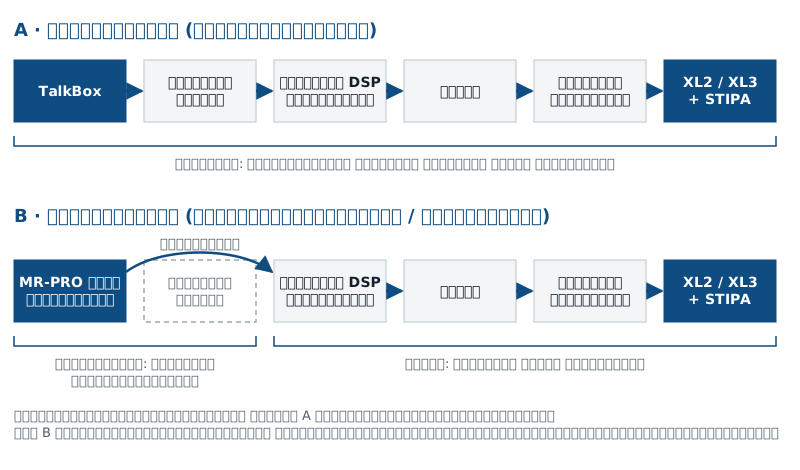
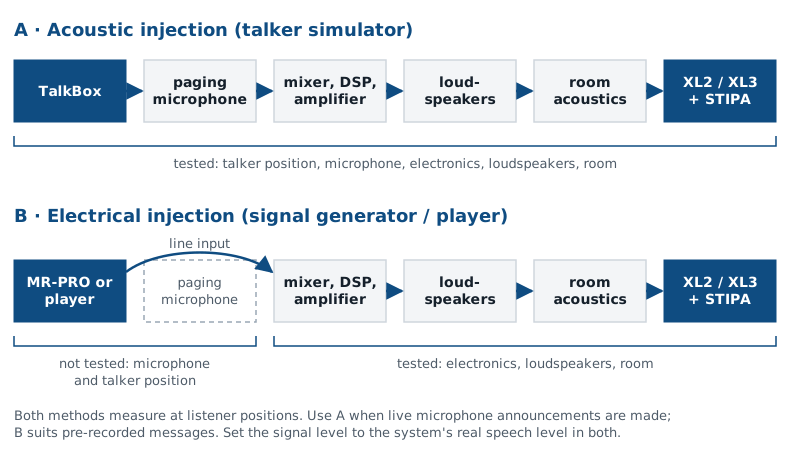
| ทางเสียง (ลำโพงจำลองผู้พูด)Acoustic (talker simulator) | ทางไฟฟ้า (เครื่องกำเนิดสัญญาณ)Electrical (signal generator) | |
|---|---|---|
| รวมอยู่ในการทดสอบIncluded in the test | ทางเสียง (ลำโพงจำลองผู้พูด)Acoustic (talker simulator)ตำแหน่งผู้พูด ไมโครโฟน ระบบขยาย ลำโพง และพื้นที่Talker position, microphone, electronics, loudspeakers and room | ทางไฟฟ้า (เครื่องกำเนิดสัญญาณ)Electrical (signal generator)ระบบขยาย ลำโพง และพื้นที่Electronics, loudspeakers and room |
| ไม่ได้ทดสอบNot tested | ทางเสียง (ลำโพงจำลองผู้พูด)Acoustic (talker simulator)–– | ทางไฟฟ้า (เครื่องกำเนิดสัญญาณ)Electrical (signal generator)ไมโครโฟนประกาศ เสียงรบกวนในห้องควบคุม และตำแหน่งการพูดPaging microphone, control-room noise and talking position |
| เหมาะกับSuits | ทางเสียง (ลำโพงจำลองผู้พูด)Acoustic (talker simulator)ระบบที่ประกาศสดผ่านไมโครโฟน และห้องที่ไม่มีระบบเสียงLive microphone announcements, and rooms without a sound system | ทางไฟฟ้า (เครื่องกำเนิดสัญญาณ)Electrical (signal generator)ข้อความที่บันทึกไว้ และการแยกหาปัญหาของระบบRecorded messages, and isolating system problems |
ตั้งระดับสัญญาณให้ถูกต้องSetting the signal level correctly
เพราะ STI ขึ้นกับระดับเสียง สัญญาณทดสอบต้องทำให้ระบบส่งเสียงออกมาเท่ากับตอนประกาศจริง ไม่ดังหรือเบากว่าBecause STI depends on level, the test signal must make the system produce the same output as a real announcement, no louder and no quieter.
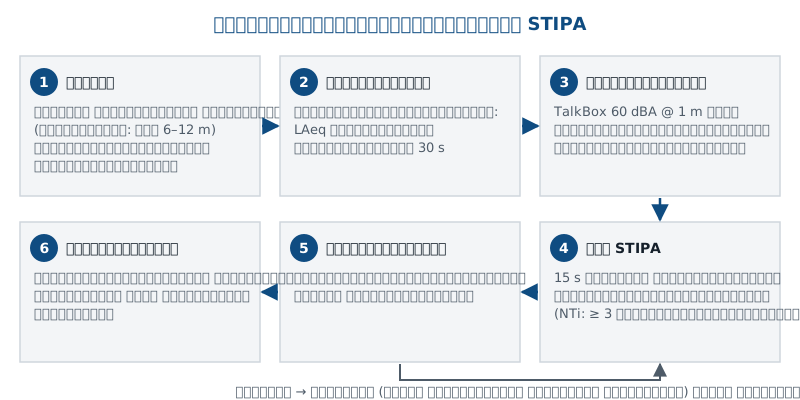
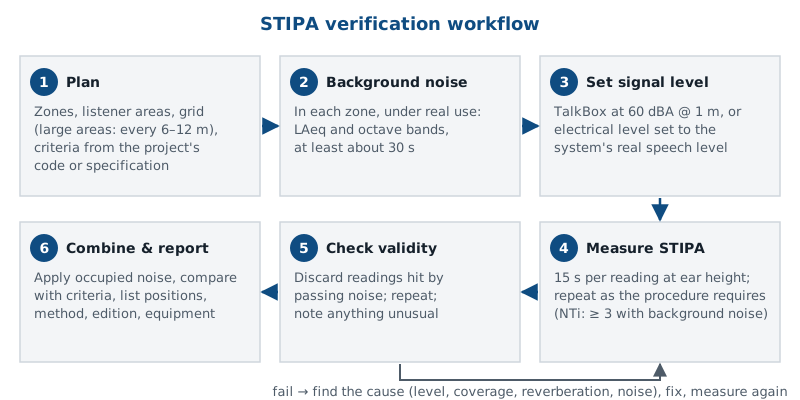
- ทางเสียง NTi Audio ระบุว่าระดับเสียงพูดปกติของคนเท่ากับ 60 dBA ที่ระยะ 1 m และ TalkBox เล่นสัญญาณ STIPA ที่ระดับนี้ตาม IEC 60268-16 วาง TalkBox ที่ระยะและมุมเดียวกับที่ผู้ประกาศพูดจริง และใช้การตั้งค่าเกนของระบบตามปกติAcoustic: NTi Audio states that a normal human talker corresponds to 60 dBA at 1 m, and the TalkBox plays STIPA at this level per IEC 60268-16. Place it at the same distance and angle as the real announcer, with the system gain at its normal setting.
- ทางไฟฟ้า ตั้งระดับสัญญาณเข้าให้ระบบส่งเสียงที่ตำแหน่งผู้ฟังเท่ากับระดับเสียงประกาศจริง (เช่น เทียบกับข้อความที่บันทึกไว้) ตามแนวทางของ IEC 60268-16 แล้วห้ามปรับระดับระหว่างวัดElectrical: set the input so the system produces, at listener positions, the same level as a real announcement (for example compared with the recorded message), following IEC 60268-16, and do not change it during the survey.
- ความดังที่เหมาะสม NTi Audio ระบุว่าความชัดเจนดีที่สุดเมื่อเสียงประกาศอยู่ราว 70–80 dB SPL และควรดังกว่าเสียงพื้นหลังอย่างน้อย 6 dB (ดีกว่าคือ 10–18 dB) เปิดดังเกินราว 80 dB ความชัดมีแนวโน้มลดลงSuitable loudness: NTi Audio states that intelligibility is best at announcement levels of about 70–80 dB SPL, at least 6 dB (better 10–18 dB) above the background noise; above about 80 dB, intelligibility tends to drop.
- สอบเทียบเครื่องวัด ก่อนและหลังงาน เพราะการรวมผลเสียงรบกวนต้องใช้ระดับเสียงสัมบูรณ์ที่ถูกต้องCalibrate the meter before and after, because the noise correction needs correct absolute levels.
ตารางจุดวัดและการวัดซ้ำMeasurement grid and repeat readings
แบ่งอาคารเป็นโซนตามการใช้งานและระบบลำโพง แล้ววางจุดวัดในบริเวณที่คนยืนหรือนั่งจริง ที่ระดับหูผู้ฟัง ในพื้นที่ใหญ่ NTi Audio แนะนำให้วัดซ้ำทุกประมาณ 6 ถึง 12 m ขึ้นกับขนาดพื้นที่ อย่าลืมจุดที่มักมีปัญหา เช่น ปลายทางเดิน บันไดหนีไฟ จุดกึ่งกลางระหว่างลำโพง และบริเวณใกล้เครื่องจักรDivide the building into zones by use and loudspeaker circuit, then place positions where people actually stand or sit, at listener ear height. In large areas NTi Audio suggests repeating the measurement about every 6 to 12 m, depending on the size of the space. Include the usual trouble spots: corridor ends, escape stairs, points midway between loudspeakers and areas near machinery.
IEC 60268-16 แนะนำ (ตามที่ NTi Audio สรุปไว้) ให้เฉลี่ยอย่างน้อย 3 ค่าต่อจุดเมื่อมีเสียงพื้นหลัง และผลแต่ละครั้งไม่ควรต่างกันเกิน 0.03 STI ถ้าต่างมากกว่านั้น ให้หาสาเหตุ เช่น เสียงที่เกิดขึ้นชั่วคราว แล้ววัดเพิ่ม บางมาตรฐานมีกฎต่างออกไป เช่น NTi Audio ระบุว่า VDE 0833-4 กำหนดให้วัด 3 ครั้งเฉพาะเมื่อค่าแรกต่ำกว่า 0.63 จึงต้องใช้กฎของมาตรฐานที่โครงการอ้างIEC 60268-16 recommends (as NTi Audio summarises it) averaging at least 3 values per position when background noise is present, with no more than 0.03 STI between them; if the spread is larger, find the cause, such as a passing noise, and take more readings. Some codes use different rules: NTi Audio notes that VDE 0833-4 requires 3 readings only if the first value is below 0.63. Follow the rule of the code the project refers to.
เสียงพื้นหลัง: วัดแยกแล้วรวมผลBackground noise: measure separately, then combine
มีสามทางเลือก: วัด STIPA ตรงในสภาพใช้งานจริง วัดตอนพื้นที่ว่างแล้วรวมผลกับเสียงพื้นหลังที่วัดแยกไว้ หรือใช้ชุดข้อมูลเสียงพื้นหลังที่กำหนดไว้ล่วงหน้า (เมื่อข้อกำหนดอนุญาต) ในสนามบิน ห้าง หรือโรงงานที่วัดตอนใช้งานจริงไม่ได้ วิธีที่สองนิยมที่สุดThere are three options: measure STIPA directly under operating conditions, measure in the empty space and combine with separately measured background noise, or use a predefined background-noise data set (where the specification allows it). In airports, shopping centres or factories where measuring during operation is impractical, the second option is the most common.
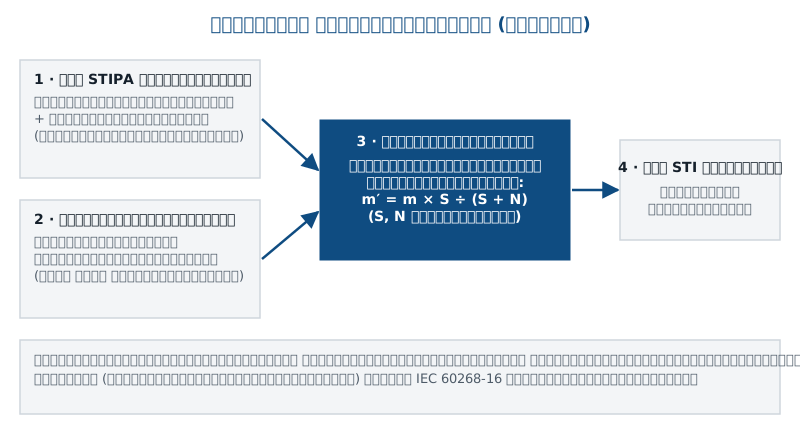
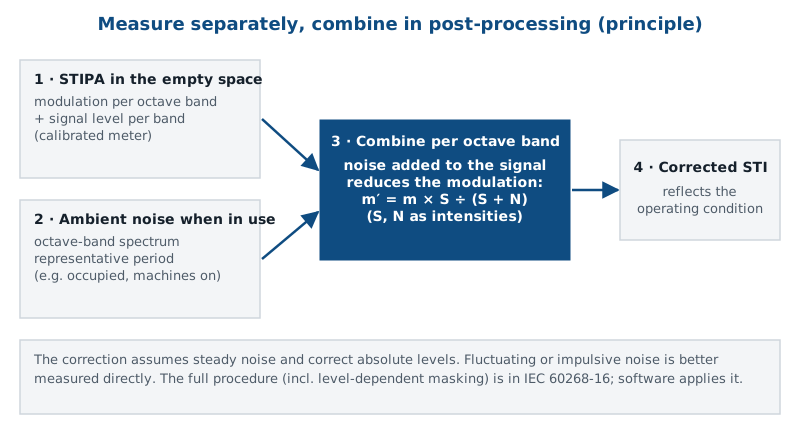
- วัดเสียงพื้นหลังในแต่ละโซน ในช่วงที่เป็นตัวแทนของการใช้งาน เช่น ตอนมีคน หรือเครื่องจักรทำงาน เก็บ LAeq และสเปกตรัมย่านออกเตฟ อย่างน้อยประมาณ 30 วินาทีMeasure the background noise in each zone at a representative time, such as with people present or machines running: LAeq and the octave-band spectrum, for at least about 30 seconds.
- วัด STIPA ตอนพื้นที่ว่างหรือเงียบ ที่จุดเดียวกันหรือจุดที่แทนกันได้ เครื่องบันทึกทั้งการมอดูเลตและระดับสัญญาณรายย่านMeasure STIPA when the space is empty or quiet, at the same or equivalent positions; the meter stores both the modulation and the signal level per band.
- ให้ซอฟต์แวร์รวมผล เช่น STI Reporting Tool ของ NTi Audio คำนวณผลของเสียงรบกวนต่อค่า STI แต่ละจุดLet the software combine them: NTi Audio's STI Reporting Tool, for example, calculates the effect of ambient noise on each STI result.
หลักการคือเสียงรบกวนที่เพิ่มเข้ามาในแต่ละย่านทำให้การมอดูเลตลดลงตามสัดส่วนของความเข้มสัญญาณต่อความเข้มรวม วิธีนี้ถือว่าเสียงรบกวนค่อนข้างคงที่ ถ้าเสียงรบกวนแกว่งมากหรือเป็นเสียงกระแทก ผลจากการคำนวณอาจต่างจากความจริง ควรพิจารณาวัดตรงในสภาพใช้งาน การรวมผลยังต้องการระดับเสียงสัมบูรณ์ที่ถูกต้องของทั้งสัญญาณและเสียงรบกวนThe principle is that noise added in each band reduces the modulation by the ratio of signal intensity to total intensity. It assumes fairly steady noise: if the noise fluctuates strongly or is impulsive, the calculated result may not match reality, and a direct measurement under operating conditions should be considered. The correction also needs correct absolute levels for both signal and noise.
ผู้คนไม่ได้เพิ่มเฉพาะเสียงรบกวน แต่ยังเพิ่มการดูดซับเสียงด้วย พื้นที่ที่มีคนหนาแน่นจึงมักก้องน้อยกว่าตอนว่างเล็กน้อย การวัดตอนว่างแล้วเพิ่มเสียงรบกวนจึงค่อนข้างระมัดระวังในแง่ของเสียงก้อง ให้ระบุสมมติฐานนี้ในรายงานPeople add not only noise but also absorption, so a crowded space is usually slightly less reverberant than an empty one. Measuring empty and adding the noise is therefore somewhat conservative with respect to reverberation; state this assumption in the report.
ขั้นตอนการทำงานโดยสรุปWorkflow at a glance
เกณฑ์ผ่านและการรายงานPass criteria and reporting
IEC 60268-16 กำหนดวิธีวัดและคำนวณ แต่ ค่าที่ต้องผ่าน มาจากมาตรฐานหรือข้อกำหนดของระบบนั้น เช่น มาตรฐานระบบเสียงแจ้งเหตุที่โครงการอ้างอิง (ตัวอย่างที่ NTi Audio ระบุ ได้แก่ ISO 7240-19, DIN EN 50849, CEN/TS 54-32, AS 1670.4) ซึ่งอาจกำหนดทั้งค่าเฉลี่ยของโซนและค่าต่ำสุดของแต่ละจุด คู่มือนี้ไม่กำหนดเกณฑ์ใด ๆ ให้ตรวจฉบับและเงื่อนไขที่โครงการใช้ก่อนเริ่มวัดIEC 60268-16 defines how to measure and calculate, but the values to pass come from the code or specification for the system, such as the voice-alarm standard the project refers to (NTi Audio names, for example, ISO 7240-19, DIN EN 50849, CEN/TS 54-32 and AS 1670.4), which may set both a zone average and a minimum for individual positions. This guide sets no criteria: check the edition and conditions the project uses before measuring.
- ผังโซนและตำแหน่งจุดวัด พร้อมผลแต่ละครั้ง ค่าเฉลี่ยของจุด และค่าของโซนZone plan and positions, with each reading, the position average and the zone value.
- วิธีป้อนสัญญาณ ระดับที่ตั้ง และเหตุผลที่เลือกInjection method, level set and why it was chosen.
- เสียงพื้นหลังที่ใช้รวมผล พร้อมสภาพตอนวัดBackground noise used for the correction, and the conditions when it was measured.
- ฉบับของ IEC 60268-16 ที่ใช้ อุปกรณ์ หมายเลขเครื่อง และผลการสอบเทียบThe IEC 60268-16 edition used, equipment, serial numbers and calibration checks.
- ผลเทียบเกณฑ์ จุดที่ไม่ผ่าน และสาเหตุที่น่าจะเป็นComparison with the criteria, failing positions and their likely causes.
อุปกรณ์ที่ใช้Equipment
ชุดวัดทั่วไป ได้แก่ แหล่งสัญญาณ STIPA ที่ถูกต้อง (เครื่องกำเนิดสัญญาณหรือไฟล์เสียงที่ได้รับการรับรอง) ลำโพงจำลองผู้พูดที่สอบเทียบระดับแล้ว เมื่อต้องทดสอบผ่านไมโครโฟน เครื่องวิเคราะห์ที่คำนวณ STIPA ตามฉบับมาตรฐานที่ต้องการ ไมโครโฟนวัดเสียง เครื่องสอบเทียบเสียง และซอฟต์แวร์รวมผลเสียงรบกวนและทำรายงานA generic chain: a correct STIPA signal source (a generator or an approved audio file), a level-calibrated talker simulator when the microphone must be included, an analyzer that computes STIPA to the required edition, a measurement microphone, a sound calibrator, and software for the noise correction and the report.
| ส่วนของระบบPart of the chain | ตัวเลือกจาก NTi Audio (ตามที่ NTi ระบุ)NTi Audio option (as stated by NTi) |
|---|---|
| เครื่องวิเคราะห์Analyzer | ตัวเลือกจาก NTi Audio (ตามที่ NTi ระบุ)NTi Audio option (as stated by NTi)XL2 + XL2 Speech Intelligibility STIPA Option (# 600 000 338) หรือ XL3 + XL3 STIPA Option (# 600 000 712 / 365: # 600 000 725) วัดตาม IEC 60268-16:2020 และรองรับฉบับเก่ากว่าXL2 + XL2 Speech Intelligibility STIPA Option (# 600 000 338) or XL3 + XL3 STIPA Option (# 600 000 712 / 365: # 600 000 725), measuring to IEC 60268-16:2020 with support for older editions |
| แหล่งสัญญาณทางเสียงAcoustic source | ตัวเลือกจาก NTi Audio (ตามที่ NTi ระบุ)NTi Audio option (as stated by NTi)TalkBox: เล่นสัญญาณ STIPA ที่ 60 dBA @ 1 m ตาม IEC 60268-16 วางหน้าไมโครโฟนประกาศ ใช้อะแดปเตอร์ไฟภายนอกTalkBox: plays STIPA at 60 dBA @ 1 m per IEC 60268-16 in front of the paging microphone; powered by an external adapter |
| แหล่งสัญญาณทางไฟฟ้าElectrical source | ตัวเลือกจาก NTi Audio (ตามที่ NTi ระบุ)NTi Audio option (as stated by NTi)Minirator MR-PRO ป้อนสัญญาณ STIPA เข้าอินพุตของระบบ (NTi ยังระบุเครื่องเล่นอื่นหรือไฟล์ใน USB ได้)Minirator MR-PRO feeds the STIPA signal into the system input (NTi also lists other players or a file on a USB drive) |
| ซอฟต์แวร์Software | ตัวเลือกจาก NTi Audio (ตามที่ NTi ระบุ)NTi Audio option (as stated by NTi)STI Reporting Tool (MS Excel) สำหรับ XL2 ทำรายงานและคำนวณผลของเสียงรบกวนSTI Reporting Tool (MS Excel) for the XL2: reports and ambient-noise calculation |
สะกดว่า STIPA ตาม IEC 60268-16 และ NTi Audio ข้อมูลที่เราตรวจสอบยืนยันว่า STI Reporting Tool ใช้กับ XL2 ส่วนการใช้กับ XL3 ยังไม่ได้ตรวจยืนยัน ให้สอบถามก่อนสั่งซื้อThe spelling is STIPA, as in IEC 60268-16 and NTi Audio's documents. The sources we checked confirm the STI Reporting Tool for the XL2; its use with the XL3 is not verified, so ask before ordering.
ข้อผิดพลาดที่พบบ่อยCommon mistakes
- ป้อนทางไฟฟ้าในระบบที่ประกาศสด ทำให้ไม่รู้ว่าไมโครโฟนหรือห้องควบคุมที่มีเสียงดังทำให้ความชัดลดลงElectrical injection in a live-microphone system, so the effect of the microphone or a noisy control room is never seen.
- ตั้งระดับสัญญาณสูงกว่าการประกาศจริง ทำให้ผลดีเกินจริงในพื้นที่ที่มีเสียงรบกวนSetting the signal louder than a real announcement, which flatters the result in noisy areas.
- วัดเฉพาะกลางห้อง ข้ามทางเดิน บันได และจุดระหว่างลำโพงMeasuring only mid-room and skipping corridors, stairs and points between loudspeakers.
- วัดครั้งเดียวต่อจุด หรือเก็บค่าที่ถูกเสียงชั่วคราวรบกวนไว้ในผลOne reading per position, or keeping readings disturbed by a passing noise.
- ไม่รวมเสียงรบกวนตอนใช้งาน ผลตอนพื้นที่ว่างมักดีกว่าตอนใช้งานจริงมากIgnoring operating noise: empty-space results are often much better than in real use.
- ใช้เกณฑ์จากความจำ แทนที่จะใช้ฉบับและเงื่อนไขที่โครงการอ้างอิงUsing criteria from memory instead of the edition and conditions the project refers to.
ตัวอย่างสถานการณ์: ทางเดินโรงเรียนExample scenario: a school corridor
โรงเรียนแห่งหนึ่งติดตั้งระบบเสียงประกาศพร้อมใช้แจ้งเหตุ ทางเดินยาว 60 m ผนังและพื้นแข็ง ลำโพงติดเพดานห่างกันเป็นระยะ ครูบอกว่าตอนพักเที่ยงฟังประกาศไม่ออก ข้อกำหนดของโครงการอ้างมาตรฐานระบบเสียงแจ้งเหตุฉบับหนึ่งเป็นเกณฑ์
ทีมวัดวัดเสียงพื้นหลังช่วงพักเที่ยงในทางเดินก่อน เก็บสเปกตรัมย่านออกเตฟ จากนั้นหลังเลิกเรียน วาง TalkBox หน้าไมโครโฟนในห้องธุรการ เพราะครูประกาศสดผ่านไมโครโฟน วางจุดวัดตามแนวทางเดินทุกประมาณ 6 m สลับตรงใต้ลำโพงและกึ่งกลางระหว่างลำโพง วัด 3 ครั้งต่อจุด แล้วรวมผลกับเสียงพื้นหลังตอนพักเที่ยงในซอฟต์แวร์
สมมติว่าจุดกึ่งกลางระหว่างลำโพงที่ปลายทางเดินได้ค่าต่ำกว่าเกณฑ์ ขณะที่ใต้ลำโพงผ่าน สาเหตุที่น่าจะเป็นคือเสียงก้องของทางเดินร่วมกับระยะลำโพงที่ห่างเกินไป ทางแก้อาจเป็นการเพิ่มลำโพงหรือเพิ่มวัสดุดูดซับที่เพดาน แล้ววัดซ้ำที่จุดเดิม ผลทั้งหมดในตัวอย่างนี้เป็นค่าสมมติA school has installed a PA system that is also used for alarms. A 60 m corridor has hard walls and floor, with ceiling loudspeakers at intervals. Teachers say announcements cannot be understood at lunchtime. The project specification refers to a voice-alarm standard as the criterion.
The team first measures the background noise in the corridor during the lunch break, storing the octave-band spectrum. After school, a TalkBox is placed in front of the microphone in the school office, because teachers announce live. Positions run along the corridor about every 6 m, alternating directly under a loudspeaker and midway between two. Each position gets 3 readings, and the software combines the results with the lunchtime noise.
Assume the midway positions at the far end of the corridor fall below the criterion while the positions under the loudspeakers pass. The likely cause is the corridor's reverberation combined with too wide a loudspeaker spacing; the fix might be extra loudspeakers or ceiling absorption, followed by re-measurement at the same positions. All results in this example are assumed.
คำถามที่พบบ่อยFrequently asked questions
ควรใช้ TalkBox หรือป้อนสัญญาณทางไฟฟ้าShould I use a TalkBox or electrical injection?
ถ้ามีการประกาศสดผ่านไมโครโฟน ให้ใช้ TalkBox เพื่อทดสอบรวมไมโครโฟนและตำแหน่งผู้พูด ถ้าระบบเล่นข้อความที่บันทึกไว้ ให้ป้อนทางไฟฟ้า หลายโครงการใช้ทั้งสองแบบIf live microphone announcements are made, use a TalkBox so the microphone and talking position are included. If the system plays recorded messages, inject electrically. Many projects use both.
ต้องวัดตอนคนเต็มพื้นที่หรือไม่Does the space have to be full when I measure?
ไม่จำเป็น ในทางปฏิบัติวัดเสียงพื้นหลังตอนใช้งานจริง แล้ววัด STIPA ตอนพื้นที่ว่าง และให้ซอฟต์แวร์รวมผล ยกเว้นเสียงรบกวนแกว่งมากหรือเป็นเสียงกระแทก ซึ่งควรพิจารณาวัดตรงNo. In practice the background noise is measured in real use, STIPA is measured with the space empty, and software combines them; with strongly fluctuating or impulsive noise, consider a direct measurement.
ค่า STI เท่าไรจึงผ่านWhat STI value is a pass?
ขึ้นกับมาตรฐานหรือข้อกำหนดที่โครงการอ้าง ซึ่งอาจกำหนดค่าเฉลี่ยของโซนและค่าต่ำสุดของแต่ละจุดแยกกัน ให้ใช้ฉบับที่ระบุในสัญญา NTi Audio ให้แนวทางทั่วไปว่าผลระหว่าง 0.5 ถึง 1 ถือว่าเพียงพอจนถึงดีมาก แต่ไม่ใช่เกณฑ์ตรวจรับIt depends on the code or specification the project refers to, which may set a zone average and a separate minimum per position; use the edition named in the contract. NTi Audio's general guidance is that 0.5 to 1 means sufficient to very good, but that is not an acceptance criterion.
วัดกี่จุดและห่างกันเท่าไรHow many positions, and how far apart?
ขึ้นกับขนาดและรูปร่างพื้นที่ ในพื้นที่ใหญ่ NTi Audio แนะนำทุกประมาณ 6–12 m และต้องรวมจุดที่มักแย่ที่สุด บางมาตรฐานกำหนดจำนวนหรือระยะไว้เองIt depends on the size and shape of the space. In large areas NTi Audio suggests about every 6–12 m, always including the likely worst spots; some codes set their own number or spacing.
ผลแต่ละครั้งที่จุดเดียวกันต่างกันมาก ทำอย่างไรReadings at one position differ a lot. What now?
ตามที่ NTi Audio สรุปแนวทางของ IEC 60268-16 ผลแต่ละครั้งไม่ควรต่างกันเกิน 0.03 STI ถ้าเกิน มักเกิดจากเสียงรบกวนชั่วคราวระหว่างวัด ให้ตัดค่านั้นและวัดเพิ่ม ถ้ายังแกว่ง ให้ตรวจเสียงรบกวนในพื้นที่และความเสถียรของระบบAs NTi Audio summarises the IEC 60268-16 guidance, readings should differ by no more than 0.03 STI. Larger spreads usually come from a passing noise: discard the reading and take more. If it still varies, check the area's noise and the system's stability.
XL2 หรือ XL3 วัด STIPA ได้เลยไหมCan the XL2 or XL3 measure STIPA out of the box?
ไม่ได้ ทั้งสองรุ่นต้องติดตั้งออปชัน STIPA ก่อน (XL2 # 600 000 338, XL3 # 600 000 712 หรือแบบ 365 # 600 000 725) และต้องมีแหล่งสัญญาณ STIPA เช่น TalkBox หรือ MR-PRONo. Both need the STIPA option (XL2 # 600 000 338; XL3 # 600 000 712, or 365 # 600 000 725) and a STIPA signal source such as the TalkBox or MR-PRO.