NTi Audio · Cloud & Software

Sound Power Reporter
ซอฟต์แวร์คำนวณและรายงานกำลังเสียงSound power calculation and reporting software

ซอฟต์แวร์บน PC ที่ทำรายงานการวัดกำลังเสียงครบถ้วน ออกแบบสำหรับผู้เชี่ยวชาญด้านอุตสาหกรรม ใช้ข้อมูลจากเครื่องวัดระดับเสียงและแสดงผลกราฟของทุกตำแหน่งวัดPC software with comprehensive reports for sound power measurements, designed for industrial professionals: it uses sound level meter data and returns graphical analysis of all measurement positions.

ซอฟต์แวร์คำนวณและรายงานกำลังเสียง
  • ตัวแทนจำหน่าย NTi Audio อย่างเป็นทางการในประเทศไทยOfficial NTi Audio distributor in Thailand
  • วิศวกรช่วยเลือกชุดตามงาน (Application Engineering)Application engineering
  • สาธิตและอบรมการใช้งานDemo & training
  • สอบเทียบและซัพพอร์ตทางเทคนิคCalibration & technical support

What the software does

Sound Power Reporter ทำอะไรWhat the Sound Power Reporter does

กำลังเสียง (Sound power) คือกำลังทั้งหมดที่แหล่งกำเนิดเสียงปล่อยออกมาทุกทิศทาง ซอฟต์แวร์รวมข้อมูลการวัดทั้งหมดและให้ผลกำลังเสียงเป็น dB (อ้างอิง 1 pW) เป็นซอฟต์แวร์ ไม่ใช่เครื่องมือวัดSound power is the total power a source emits in all directions. The software aggregates all measurement data and provides the sound power in dB (reference 1 pW). It is software, not a measuring instrument.

ISO 3741, ISO 3744, ISO 3746

มาตรฐานที่ซอฟต์แวร์รองรับSupported standards

ANSI-ASA S12.51 / S12.54 / S12.56

มาตรฐาน ANSI-ASAANSI-ASA standards

รายงานตามมาตรฐานStandardised reporting

เลือก LWA หรือ LWZ ได้Choice of LWA or LWZ

ข้อมูล 1/1 และ 1/3 ออกเตฟ1/1 and 1/3 octave data

รองรับทั้งสองความละเอียดBoth resolutions supported

เหมาะกับใครWho it is for

ใครใช้ และแก้ปัญหาอะไรWho uses it and what it solves

ระดับความดันเสียงเปลี่ยนตามระยะและห้อง แต่กำลังเสียงเป็นค่าของแหล่งกำเนิดเอง จึงใช้เปรียบเทียบและระบุในเอกสารผลิตภัณฑ์ได้ การคำนวณต้องรวมหลายตำแหน่งวัดและแก้ค่าเสียงพื้นหลังและห้อง ซอฟต์แวร์ทำขั้นตอนนี้และออกรายงานให้Sound pressure level changes with distance and room, but sound power belongs to the source itself, so it can be compared and declared in product documents. The calculation combines many positions with background and room corrections; the software does this and produces the report.

ผู้ผลิตเครื่องจักรและผลิตภัณฑ์Machine and product manufacturers

หาค่ากำลังเสียงของผลิตภัณฑ์ เช่น เครื่องจักร เครื่องใช้ไฟฟ้า และอุปกรณ์Determine the sound power of products such as machines, appliances and equipment

ฝ่ายวิศวกรรมและ QAEngineering and QA teams

เปรียบเทียบก่อน/หลังปรับปรุงการลดเสียงCompare before/after noise-reduction changes

ที่ปรึกษาด้านอะคูสติกAcoustic consultants

ทดสอบและออกรายงานกำลังเสียงให้ลูกค้าTest and report sound power for clients

หลักการHow it works

กำลังเสียงคำนวณจากการวัดความดันเสียงอย่างไรHow sound power is derived from sound pressure

ไมโครโฟนวัดได้เฉพาะความดันเสียง ณ จุดหนึ่ง การหากำลังเสียงจึงต้องวัดหลายจุดรอบแหล่งกำเนิดแล้วคำนวณพลังงานรวม มาตรฐานที่ซอฟต์แวร์รองรับใช้สองแนวทางA microphone only measures sound pressure at one point, so sound power is found by measuring at many points around the source and calculating the total energy. The standards the software supports use two approaches.

วิธีพื้นผิวล้อมรอบ (ISO 3744, ISO 3746)Enveloping surface (ISO 3744, ISO 3746)

กำหนดพื้นผิวสมมุติรอบเครื่อง เช่น ครึ่งทรงกลมหรือกล่องเหนือพื้นสะท้อน วัดระดับที่ตำแหน่งบนพื้นผิวนั้น หาค่าเฉลี่ย แล้วบวกค่าพื้นที่ผิว: LW ≈ Lp เฉลี่ย + 10 lg(S / 1 m²) − K1 − K2An imaginary surface is defined around the machine, such as a hemisphere or box over a reflecting floor. Levels are measured at positions on that surface, averaged, and the surface area is added: LW ≈ average Lp + 10 lg(S / 1 m²) − K1 − K2.

วิธีห้องก้องเสียง (ISO 3741)Reverberation room (ISO 3741)

วางเครื่องในห้องก้องเสียงที่สร้างตามข้อกำหนด เสียงกระจายทั่วห้อง ระดับเฉลี่ยในห้องร่วมกับปริมาตรและเวลาเสียงก้องของห้องให้ค่ากำลังเสียงที่ความแม่นยำสูงThe machine is placed in a qualified reverberation room where the sound is spread throughout. The room-average level, together with the room volume and reverberation time, gives the sound power at high accuracy.

K1 และ K2K1 and K2

K1 หักผลของเสียงพื้นหลังที่วัดขณะเครื่องปิด K2 หักผลของเสียงสะท้อนในห้อง ซึ่งคำนวณจากเวลาเสียงก้องและขนาดห้อง จึงต้องวัด RT ของห้องทดสอบด้วย ซอฟต์แวร์คำนวณทั้งสองค่าและแสดงในผลK1 removes the background noise measured with the machine off. K2 removes the effect of room reflections, calculated from the room's reverberation time and size, which is why the test room's RT is measured too. The software calculates and shows both.

ระดับความแม่นยำAccuracy grades

ISO 3741 เป็นระดับแม่นยำสูง (Precision) ISO 3744 ระดับวิศวกรรม (Engineering) และ ISO 3746 ระดับสำรวจ (Survey) มาตรฐาน ANSI-ASA S12.51, S12.54 และ S12.56 สอดคล้องกับทั้งสามฉบับตามลำดับISO 3741 is the precision grade, ISO 3744 the engineering grade and ISO 3746 the survey grade. ANSI-ASA S12.51, S12.54 and S12.56 align with these three respectively.

ขั้นตอนการทำงานWorkflow

จากข้อมูลการวัดสู่ค่ากำลังเสียงFrom measurement data to sound power

  1. วัดเสียงเครื่องจักร เสียงพื้นหลัง และ RT ของห้องทดสอบMeasure machine noise, background noise and test-room RT
  2. Measurements View: ลากข้อมูลเข้า จัดเป็นเสียงเครื่องจักร / เสียงพื้นหลังอัตโนมัติMeasurements view: drag & drop, auto-assigned to machine / background noise
  3. Calculations View: แก้ค่าเสียงพื้นหลัง K1 และค่าห้อง K2Calculations view: background correction K1 and room correction K2
  4. Results View: ตารางและกราฟ 50 Hz – 10 kHzResults view: table and chart 50 Hz – 10 kHz
  5. รายงาน LWA หรือ LWZReport with LWA or LWZ

กรณีวัดในสภาวะ Free field จะไม่มีการแก้ค่าห้อง (Room correction)For measurements in free-field conditions no room correction is applied.

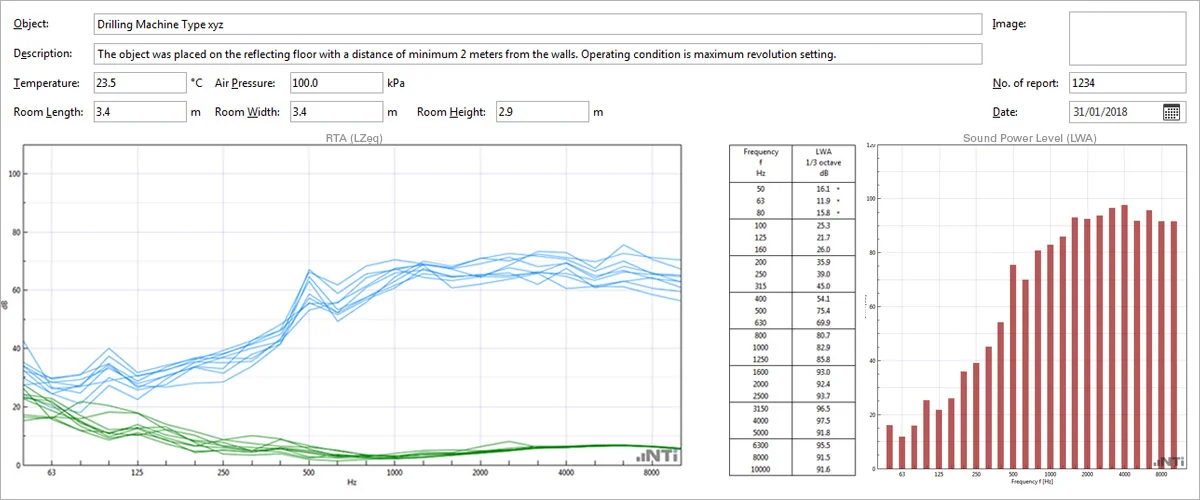
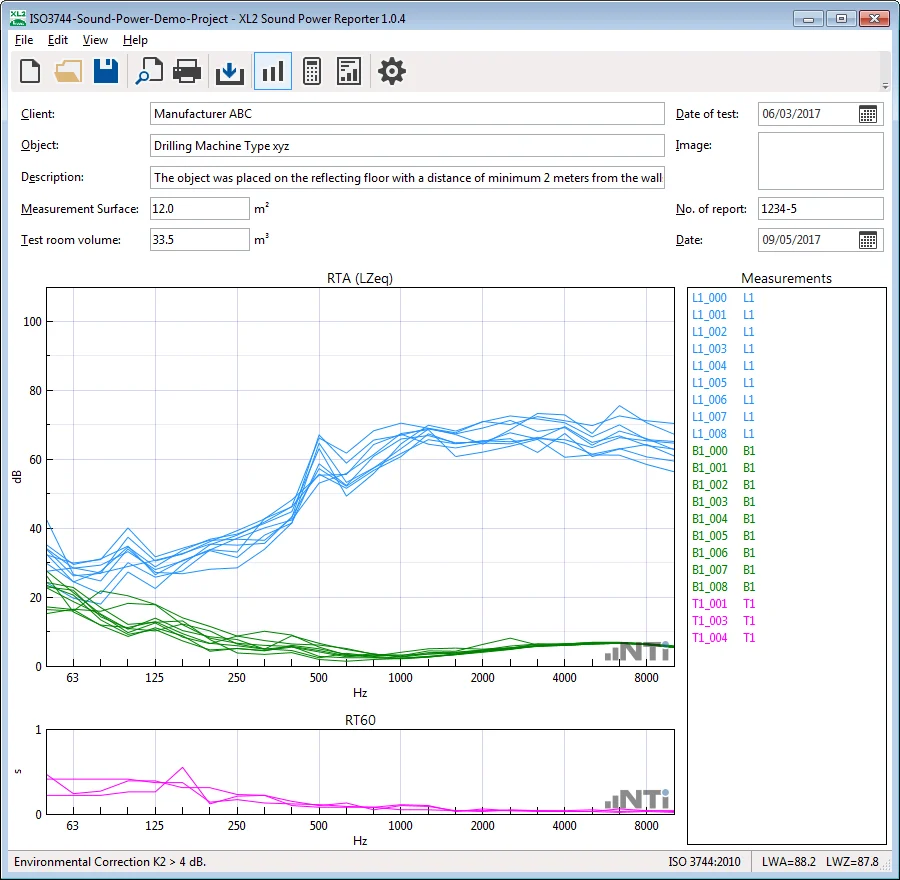
หน้าข้อมูลการวัดใน Sound Power ReporterSound Power Reporter measurements view
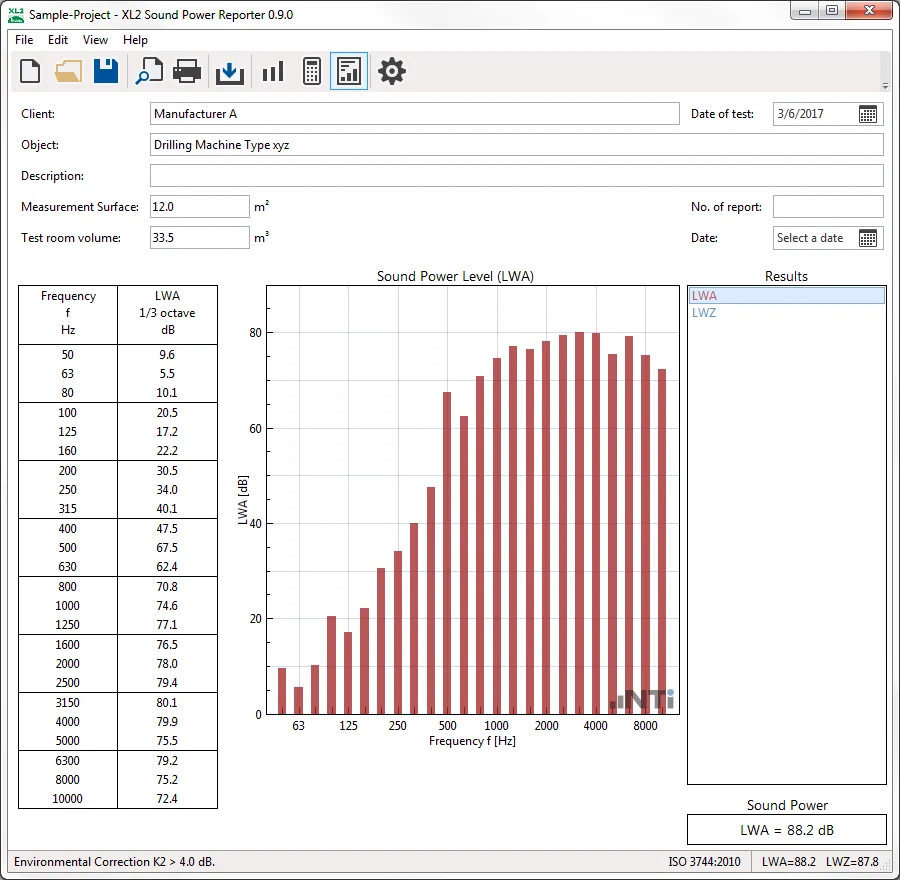
ผลระดับกำลังเสียงใน Sound Power ReporterSound Power Reporter results view

Sound Power Reporter: หน้าข้อมูลการวัด และผลระดับกำลังเสียง (ภาพหน้าจอ: NTi Audio)Sound Power Reporter: measurements and sound power results (screenshots: NTi Audio)

คู่มือเริ่มต้นใช้งานBeginner Guide

คู่มือเริ่มต้นใช้งาน Sound Power Reporter: รายงานกำลังเสียงฉบับแรกSound Power Reporter Beginner Guide: your first sound power report

ขั้นตอนและชื่อเมนูตามคู่มือ XL2 Sound Power Reporter V1.10.00 ของ NTi Audio ตัวอย่างคือวิธี ISO 3744 (engineering) ในพื้นที่ใกล้เคียงสนามเสียงอิสระเหนือพื้นสะท้อนSteps and menu names follow NTi Audio's XL2 Sound Power Reporter V1.10.00 manual; the example is the ISO 3744 engineering method in an essentially free field over a reflecting plane.

ต้องมีอะไรบ้างก่อนเริ่มWhat you need before you start

  • XL2: เฟิร์มแวร์ V3.33 ขึ้นไป Sound Power Option (ถาวร) หรือ Sound Power Reporter 365 และ XL2 Extended Acoustic Pack สำหรับเวลาเสียงก้องและกำลังเสียงแบบ 1/3 ออกเตฟXL2: firmware V3.33 or later, the permanent Sound Power Option or Sound Power Reporter 365, and the XL2 Extended Acoustic Pack for 1/3-octave reverberation time and sound power.
  • XL3: NTi ระบุว่า Sound Power Reporter ใช้กับ XL3 ได้ แต่เรายังไม่พบ Option ที่ต้องใช้หรือขั้นตอนนำเข้าข้อมูลที่ NTi เผยแพร่ ถ้าจะใช้กับ XL3 กรุณาติดต่อเราก่อนXL3: NTi lists Sound Power Reporter as compatible with the XL3, but we have not found the required option or a published import procedure; please contact us before using it with an XL3.
  • ไมโครโฟนวัดเสียง (ชุดในคู่มือใช้ M2230) สาย ASD เครื่องสอบเทียบ และคอมพิวเตอร์ Windows เครื่องวัดต้องเป็น class 1 ตาม IEC 61672-1A measurement microphone (the manual's system uses the M2230), ASD cable, calibrator and a Windows computer; the meter shall be class 1 per IEC 61672-1.
  • พื้นฐาน: กำลังเสียงกับความดันเสียง และ ISO 3740 seriesBackground: sound power vs sound pressure and the ISO 3740 series.
  1. STEP1

    เตรียมโฟลเดอร์และชื่อไฟล์บน XL2Prepare folders and file names on the XL2

    ส่งออก savenames.txt (L1, B1) ไปไว้ที่รากของการ์ด XL2 ตั้ง Autosave เป็น Off และสร้างหนึ่งโฟลเดอร์ต่อหนึ่งเครื่องที่ทดสอบในโฟลเดอร์ Projects แต่ละเครื่องคือหนึ่งโปรเจกต์Export savenames.txt (L1, B1) to the root of the XL2's card, set Autosave to Off, and make one folder per device under test in Projects; each device is one project.

    ในโปรแกรมIn the programในโปรแกรม: View → Settings → Mapping → Export... · บน XL2: Autosave: OffIn the program: View → Settings → Mapping → Export... · on the XL2: Autosave: Off

  2. STEP2

    กำหนดผิวครอบและตำแหน่งไมโครโฟนDefine the measurement surface and microphone positions

    ตามตัวอย่างในคู่มือ NTi สำหรับ ISO 3744: ผิวครอบทรงกล่องห่างจากเครื่องอย่างน้อยราว 1 m ใช้ไมโครโฟนอย่างน้อย 9 ตำแหน่ง (4 ที่มุมบน 4 ที่กลางด้านข้าง 1 ที่กลางด้านบน) และเพิ่มตามขนาดเครื่อง ไมโครโฟนตั้งฉากกับผิวครอบFollowing the ISO 3744 example in NTi's manual: a box-shaped surface at a recommended minimum of about 1 m from the device, with at least 9 microphone positions (4 at the top corners, 4 at the centres of the sides, 1 at the centre of the top), more for larger devices, microphones normal to the surface.

    ข้อควรระวังWatch outตำแหน่งจริงต้องเป็นไปตามมาตรฐานที่ใช้ ตัวอย่างนี้เป็นแนวทางจากคู่มือ NTiThe actual positions must follow the standard used; this example is guidance from NTi's manual.

  3. STEP3

    วัดเสียงพื้นหลัง (B1)Measure the background (B1)

    ปิดเครื่องที่ทดสอบแล้ววัดที่ทุกตำแหน่ง ตำแหน่งละ 20 วินาที ด้วย SLMeter RTA 1/3 ออกเตฟ ถ่วงน้ำหนัก Z ผู้วัดควรอยู่นอกพื้นที่วัดWith the device off, measure at every position, 20 seconds each, with SLMeter RTA in 1/3 octaves, Z-weighted; the operator should stay out of the measurement area.

    ในโปรแกรมIn the programXL2: SLMeter → Save Test → Sound-Power → B1XL2: SLMeter → Save Test → Sound-Power → B1

  4. STEP4

    วัดเสียงของเครื่อง (L1)Measure the device noise (L1)

    เปิดเครื่องในสภาพการทำงานที่กำหนด แล้ววัดที่ตำแหน่งเดิมทุกจุด ตำแหน่งละ 20 วินาทีRun the device in the specified operating condition and measure at the same positions, 20 seconds each.

    ในโปรแกรมIn the programXL2: SLMeter → Save Test → Sound-Power → L1XL2: SLMeter → Save Test → Sound-Power → L1

  5. STEP5

    วัดเวลาเสียงก้อง (ยกเว้นสนามเสียงอิสระ)Measure the reverberation time (not in a free field)

    ถ้าวัดในห้อง ให้วัดเวลาเสียงก้องแบบ 1/3 ออกเตฟที่สามตำแหน่ง ตำแหน่งละสองครั้ง แต่ละครั้งอย่างน้อยสามรอบเปิดปิด โดยรอบเปิดปิดยาวกว่าเวลาเสียงก้องที่คาดไว้ ค่านี้ใช้คำนวณค่าแก้ K2 ถ้าเป็นสนามเสียงอิสระ ไม่ต้องวัดและไม่ต้องใส่ปริมาตรห้องIn a room, measure the 1/3-octave reverberation time at three positions, twice each, with at least three on/off cycles per measurement and a cycle longer than the expected reverberation time; it is used for the K2 correction. In a free field, skip it and leave out the room volume.

    ในโปรแกรมIn the programXL2: ฟังก์ชัน RT60XL2: RT60 function

  6. STEP6

    สร้างโปรเจกต์ใหม่Create a new project

    เลือกมาตรฐาน ความละเอียดความถี่ ช่วงความถี่ ผลที่ต้องการ และหน่วย แล้วกด OKChoose the standard, frequency resolution, frequency range, results and unit, then press OK.

    ในโปรแกรมIn the programFile → New... → Standard, Resolution, Frequency Range, Results, Unit → OKFile → New... → Standard, Resolution, Frequency Range, Results, Unit → OK

  7. STEP7

    นำเข้าข้อมูลและตรวจการจัดข้อมูลImport the data and check the assignment

    ลากโฟลเดอร์ของเครื่องมาวางในช่องนำเข้า โฟลเดอร์ต้องมีไฟล์ RTA และ RT60 (.txt) และไฟล์ระบบ .xl2 โปรแกรมจัด L1 เป็นเสียงของเครื่องและ B1 เป็นเสียงพื้นหลังจากชื่อไฟล์ แก้ด้วยคลิกขวาแล้ว Assign To และลบค่าที่ผิดDrag the device folder into the drop field; it must contain the RTA and RT60 .txt files and the .xl2 system files. The program assigns L1 as device noise and B1 as background from the file names; correct with right-click → Assign To and delete false readings.

    ในโปรแกรมIn the programช่องนำเข้าข้อมูล · File → Import → Folder... / File... · คลิกขวา → Assign ToDrop field · File → Import → Folder... / File... · right-click → Assign To

  8. STEP8

    ตรวจค่าเฉลี่ยและค่าแก้Check the averages and corrections

    มุมมอง Calculations แสดงค่าเฉลี่ยของเสียงเครื่อง เสียงพื้นหลัง เวลาเสียงก้อง และค่าแก้ K1 (เสียงพื้นหลัง) และ K2 (สภาพห้อง) ปิดค่าที่ผิดปกติได้The Calculations view shows the averaged device noise, background, reverberation time and the corrections K1 (background) and K2 (room); outliers can be switched off.

    ในโปรแกรมIn the programView → Calculations → Correction K1 · Measurements SelectionView → Calculations → Correction K1 · Measurements Selection

  9. STEP9

    อ่านผลกำลังเสียงRead the sound power result

    มุมมอง Results แสดงตารางและกราฟในช่วงความถี่ที่เลือก (ภายใน 50 Hz–10 kHz) และค่าตัวเลขเดียว LWA หรือ LWZ ย่านที่มีเครื่องหมาย * คือย่านที่ใช้ค่าแก้เสียงพื้นหลังแบบคงที่The Results view shows the table and chart over the chosen range (within 50 Hz–10 kHz) and the single number LWA or LWZ. Bands marked * use a fixed background correction.

    ในโปรแกรมIn the programView → ResultsView → Results

  10. STEP10

    กรอกหัวรายงาน พิมพ์ และบันทึกFill in the header, print and save

    ใส่ผู้ว่าจ้าง ชื่องาน รายละเอียด พื้นที่ผิวครอบ และปริมาตรห้องทดสอบ (ไม่ต้องใส่ในสนามเสียงอิสระ) ค่าพื้นที่และปริมาตรใช้ในการคำนวณ พิมพ์รายงาน (ไฟล์ PDF ทำผ่าน PDF printer) และบันทึกโปรเจกต์เป็นไฟล์ .xlspEnter the client, object, description, measurement surface area and test-room volume (none in a free field); the area and volume are used in the calculation. Print the report (for a PDF, use a PDF printer) and save the project as an .xlsp file.

    ในโปรแกรมIn the programFile → Print Preview / Print · File → SaveFile → Print Preview / Print · File → Save

ชื่อเมนูตามคู่มือ XL2 Sound Power Reporter V1.10.00 (พฤษภาคม 2020) ซึ่งอ้างมาตรฐานฉบับปี 2010 ปัจจุบัน ISO 3744 มีฉบับ 2025 แล้ว ให้ตรวจว่าโปรแกรมรุ่นที่ใช้รองรับฉบับที่งานกำหนด NTi ไม่ได้ระบุเวอร์ชันปัจจุบันของโปรแกรมบนหน้าผลิตภัณฑ์Menu names follow the XL2 Sound Power Reporter V1.10.00 manual (May 2020), which cites the 2010 editions of the standards; ISO 3744 is now the 2025 edition, so check that your program version supports the edition the job requires. NTi does not state the current program version on the product page.

ค่าที่ต้องอ่านให้เป็นValues to understand

ค่าหลักในรายงาน Sound Power ReporterThe main values in a Sound Power Reporter report

ความหมายตามที่ NTi อธิบาย รายละเอียดทางอะคูสติกอยู่ในบทความที่ลิงก์ไว้Meanings as NTi describes them; the acoustics is in the linked articles.

ระดับกำลังเสียงSound power level LW · LWA · LWZ · dB re 1 pW

คืออะไรWhat it is
พลังงานเสียงทั้งหมดที่เครื่องแผ่ออกทุกทิศ ไม่ขึ้นกับระยะ LWA ถ่วงน้ำหนัก A ส่วน LWZ ไม่ถ่วงน้ำหนักThe total acoustic power the device radiates in all directions, independent of distance; LWA is A-weighted, LWZ unweighted.
ทำไมต้องสนใจWhy it matters
ใช้เปรียบเทียบเครื่องจักรหรือผลิตภัณฑ์ และใช้ในข้อกำหนดการแจ้งค่าเสียงUsed to compare machines or products and in noise declaration requirements.
เข้าใจผิดบ่อยCommon misunderstanding
ไม่ใช่ระดับที่คนได้ยินที่ตำแหน่งใดตำแหน่งหนึ่งIt is not the level a person hears at any particular position.
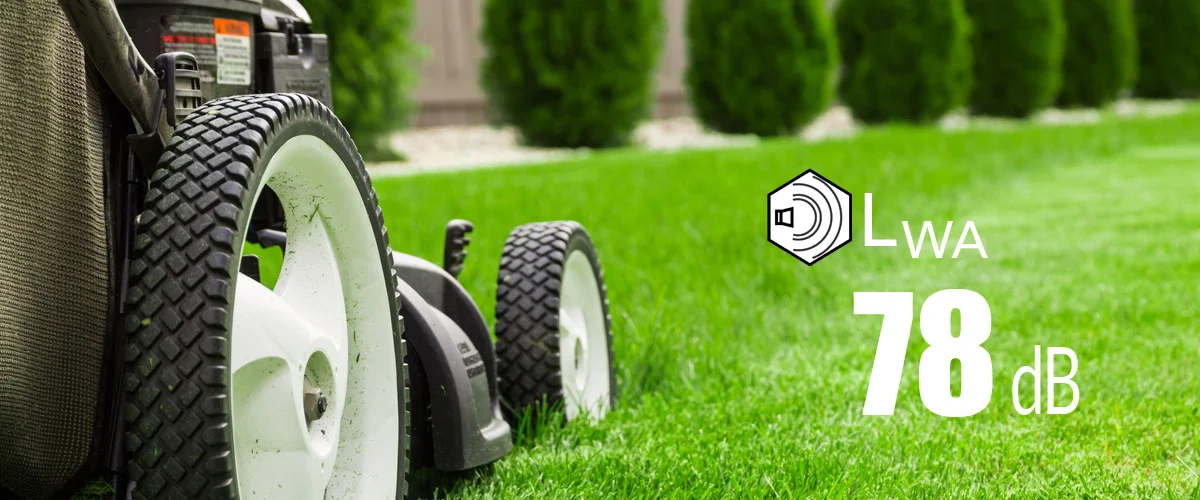
อ่านพื้นฐานเพิ่มเติม →Read the basics →

เสียงของเครื่องและเสียงพื้นหลังDevice noise and background L1 · Lb (B1) · dB

คืออะไรWhat it is
L1 คือ LZeq ที่แต่ละตำแหน่งไมโครโฟนขณะเครื่องทำงาน B1 คือค่าที่ตำแหน่งเดียวกันเมื่อปิดเครื่องL1 is the LZeq at each microphone position with the device running; B1 is the same with it off.
ทำไมต้องสนใจWhy it matters
ผลต่างของสองค่านี้กำหนดค่าแก้ K1Their difference sets the K1 correction.
อ่านพื้นฐานเพิ่มเติม →Read the basics →

ค่าแก้เสียงพื้นหลังBackground correction K1 · dB

คืออะไรWhat it is
ค่าแก้ผลของเสียงพื้นหลังต่อระดับที่วัดได้ แสดงใน CalculationsThe correction for background noise in the measured levels, shown in Calculations.
ทำไมต้องสนใจWhy it matters
ย่านที่เสียงพื้นหลังใกล้เสียงของเครื่องจะถูกแก้แบบคงที่และมีเครื่องหมาย *Bands where the background is close to the device noise get a fixed correction and are marked *.
เข้าใจผิดบ่อยCommon misunderstanding
ย่านที่มี * ไม่ใช่ค่าที่แม่นยำเท่าย่านอื่น ควรระบุในรายงานBands marked * are not as reliable as the others; say so in the report.

ค่าแก้สภาพแวดล้อมEnvironmental correction K2 · dB

คืออะไรWhat it is
ค่าแก้ผลของห้องทดสอบ คำนวณจากเวลาเสียงก้องและปริมาตรห้องThe correction for the test room, from its reverberation time and volume.
ทำไมต้องสนใจWhy it matters
ห้องที่ก้องทำให้ระดับที่วัดได้สูงกว่าที่เครื่องแผ่ออกจริงA reverberant room raises the measured level above what the device really radiates.
เข้าใจผิดบ่อยCommon misunderstanding
ในสนามเสียงอิสระไม่ใช้ K2 และไม่ต้องวัดเวลาเสียงก้องIn a free field K2 does not apply and no reverberation time is measured.

พื้นที่ผิวครอบMeasurement surface area S · m²

คืออะไรWhat it is
พื้นที่ของผิวที่ครอบเครื่องและใช้วางไมโครโฟนThe area of the surface enveloping the device, on which the microphones are placed.
ทำไมต้องสนใจWhy it matters
เป็นส่วนหนึ่งของการคำนวณกำลังเสียงจากความดันเสียงเฉลี่ย ถ้าใส่ผิด ผลก็ผิดPart of calculating sound power from the average sound pressure; a wrong value gives a wrong result.

ผลลัพธ์What it produces

ผลการคำนวณและรูปแบบรายงานResults and report formats

ผลการคำนวณResults

  • LWA และ LWZ: ระดับรวม 1/1 และ 1/3 ออกเตฟLWA and LWZ: broadband, 1/1 and 1/3 octave
  • ระดับเสียงเฉลี่ย ระดับเสียงพื้นหลังเฉลี่ย และ RT60 เฉลี่ยAverage noise level, average background level and average RT60
  • ค่าแก้เสียงพื้นหลัง K1 และค่าแก้ห้อง K2Background noise correction K1 and room correction K2

มาตรฐานStandards

  • ISO 3741, ISO 3744, ISO 3746 (Product Data ระบุฉบับ 2010)ISO 3741, ISO 3744, ISO 3746 (the Product Data names the 2010 editions)
  • ANSI-ASA S12.51, S12.54, S12.56

รูปแบบรายงานReport formats

  • PDF (ผ่าน PDF printer) และ XPSPDF (via a PDF printer) and XPS
  • คัดลอกข้อมูลไปรายงานของตัวเองได้Copy the data into your own reports

เลือกวิธีวัดChoosing the method

ควรวัดตามมาตรฐานใดWhich method should you use

ต้องประกาศค่าในเอกสารผลิตภัณฑ์Declaring a value in product documents

มักใช้ระดับวิศวกรรม เช่น ISO 3744 ในห้องหรือพื้นที่ที่ควบคุมได้ ถ้าผลิตภัณฑ์มี Noise test code หรือข้อกำหนดเฉพาะ ต้องทำตามนั้นก่อนThe engineering grade, e.g. ISO 3744 in a controlled room or area, is common. If the product has a noise test code or specific requirement, that comes first.

เปรียบเทียบหรือตรวจสอบในโรงงานComparison or checks in the plant

ISO 3746 ระดับสำรวจ ใช้สภาพแวดล้อมทั่วไปได้ เหมาะกับการเปรียบเทียบก่อน/หลังปรับปรุงหรือคัดกรองเบื้องต้น แต่ความไม่แน่นอนสูงกว่าThe ISO 3746 survey grade accepts ordinary environments; it suits before/after comparisons or screening, with a larger uncertainty.

ห้องปฏิบัติการที่มีห้องก้องเสียงA laboratory with a reverberation room

ISO 3741 ให้ความแม่นยำสูงสุดในกลุ่มนี้ แต่ต้องมีห้องก้องเสียงที่ผ่านเกณฑ์ของมาตรฐานISO 3741 gives the highest accuracy of the group but needs a reverberation room that meets the standard's criteria.

เลือก LicenseChoosing the licence

365 ใช้ได้ 1 ปีและนำเข้าข้อมูลที่วัดไว้ก่อนสมัครได้ Permanent (Sound Power Option ในเครื่อง XL2) เหมาะกับงานต่อเนื่อง บริษัทที่มีเครื่องวัด 3 เครื่องขึ้นไปดู 365 Company365 runs for one year and also imports data measured before the subscription; Permanent (the Sound Power Option in the XL2) suits ongoing work; companies with 3 or more instruments should look at 365 Company.

เตรียมก่อนวัดBefore you measure

สิ่งที่ต้องพร้อมก่อนวัดกำลังเสียงWhat must be ready before a sound power test

แหล่งกำเนิดและสภาวะการทำงานSource and operating condition

  • กำหนดสภาวะเดินเครื่องที่ทำซ้ำได้ เช่น ความเร็ว โหลด โหมดDefine a repeatable operating condition: speed, load, mode
  • รอให้เครื่องทำงานคงที่ก่อนเริ่มวัดLet the machine reach steady operation before measuring
  • กำหนดกล่องอ้างอิง (Reference box) รอบตัวเครื่องDefine the reference box around the machine

สภาพแวดล้อมการวัดTest environment

  • พื้นสะท้อนเสียงแข็ง และวัตถุสะท้อนเสียงอื่นอยู่ห่างพอA hard reflecting floor, with other reflecting objects far enough away
  • เสียงพื้นหลังต่ำกว่าเสียงเครื่องเพียงพอตามเกณฑ์ของมาตรฐานBackground noise sufficiently below the machine noise, per the standard's criteria
  • วัดเวลาเสียงก้องของห้องเพื่อใช้คำนวณ K2Measure the room's reverberation time for K2

อุปกรณ์Equipment

  • XL2 + XL2 Extended Acoustic Pack และไมโครโฟน M2230XL2 + XL2 Extended Acoustic Pack and M2230 microphone
  • Sound Calibrator ตรวจก่อนและหลังการวัดSound calibrator for checks before and after measuring
  • ขาตั้งและตลับเมตรสำหรับวางตำแหน่งไมโครโฟนTripod and tape measure to set the microphone positions

จำนวนตำแหน่งไมโครโฟน รูปทรงพื้นผิว และเกณฑ์ของห้องและเสียงพื้นหลังต่างกันในแต่ละมาตรฐานและระดับความแม่นยำ ให้ใช้ตามฉบับที่งานกำหนดMicrophone count, surface shape and room and background criteria differ between the standards and accuracy grades; follow the edition your work specifies.

ตัวอย่างสถานการณ์Example scenario

ขั้นตอนหน้างาน: กำลังเสียงของเครื่องปั่นไฟขนาดเล็กOn site: sound power of a small generator set

  1. วางเครื่องบนพื้นคอนกรีต กำหนดกล่องอ้างอิงและพื้นผิวการวัดPlace the unit on a concrete floor; define the reference box and measurement surface
  2. ทำเครื่องหมายตำแหน่งไมโครโฟนตามมาตรฐานMark the microphone positions per the standard
  3. สอบเทียบ XL2Check the XL2 with the calibrator
  4. เดินเครื่องที่โหลดกำหนด วัดสเปกตรัม 1/3 ออกเตฟทุกตำแหน่งRun at the defined load; measure 1/3-octave spectra at every position
  5. ปิดเครื่อง วัดเสียงพื้นหลังที่ตำแหน่งเดิมSwitch off; measure background at the same positions
  6. วัดเวลาเสียงก้องของพื้นที่Measure the space's reverberation time
  7. นำเข้า Sound Power Reporter ตรวจ K1, K2 และออกรายงาน LWAImport into the Sound Power Reporter; check K1, K2; report LWA

ตัวอย่างสถานการณ์ทั่วไป ไม่ใช่โครงการจริงของ GET BEST SOUND ถ้าวัดกลางแจ้งในสภาวะ Free field ไม่ต้องวัด RT เพราะไม่มีการแก้ค่าห้องA generic example, not a real GET BEST SOUND project. Outdoors in free-field conditions no RT measurement is needed, as no room correction applies.

ชุดวัดMeasurement kit

ชุดวัดกำลังเสียงตามที่ NTi Audio แนะนำSound power measurement kit as recommended by NTi Audio

เครื่อง XL2 วัดสเปกตรัมเสียงของอุปกรณ์ที่ทดสอบ พร้อมบันทึกเสียงแวดล้อมและเวลาเสียงก้องสำหรับการแก้ค่า แล้ว Sound Power Reporter รวมข้อมูลทั้งหมดThe XL2 measures the noise spectrum of the device under test and records the ambient noise and reverberation time for the corrections; the Sound Power Reporter aggregates all the data.

XL2 Sound Power Measurement Kit

  • XL2 Audio and Acoustic Analyzer
  • XL2 Extended Acoustic Pack for XL2
  • Sound Power Reporter 365 for XL2
  • ไมโครโฟน M2230, 1/2″ Windscreen 90 mm, ASD CableM2230 microphone, 1/2″ windscreen 90 mm, ASD cable
  • Mains Power Adapter, System CaseMains power adapter, system case

เพิ่มเติมตามงานOptional as required

  • XL2 Type Approval Option for XL2 สำหรับงานวัดที่ต้องการการรับรองXL2 Type Approval Option for XL2 for measurements that require certification
  • Sound Calibrator สำหรับสอบเทียบโดยผู้ใช้Sound calibrator for user calibrations

ความเข้ากันได้Compatibility

เครื่องวัด Option และระบบที่รองรับInstruments, options and system requirements

เครื่องวัดที่ NTi Audio ระบุInstrument named by NTi Audio

  • XL2 Audio and Acoustic Analyzer
  • หน้า XL3 ของ NTi Audio แสดงซอฟต์แวร์นี้ด้วย แต่ NTi Audio ระบุ Option ที่เครื่องต้องมีและรหัสสั่งซื้อไว้เฉพาะของ XL2 หากใช้กับ XL3 โปรดสอบถาม GET BEST SOUND เรื่อง Option และ License ก่อนสั่งซื้อNTi Audio's XL3 page also lists this software, but NTi Audio names the required instrument option and the order numbers for the XL2 only; for an XL3, confirm the option and licence with GET BEST SOUND before ordering

Option ที่เครื่องวัดต้องมีInstrument option required

  • XL2 Extended Acoustic Pack: ให้วัด RT60 และกำลังเสียงความละเอียด 1/3 ออกเตฟXL2 Extended Acoustic Pack: enables RT60 and sound power in 1/3 octave resolution

ระบบที่ต้องการSystem requirements

  • PC Windows Vista, 7, 8.x, 10, 11PC with Windows Vista, 7, 8.x, 10, 11
  • ติดตั้งได้หลายเครื่องคอมพิวเตอร์Can be installed on multiple PCs

LicenseLicensing

รูปแบบ LicenseLicence options

ตัวซอฟต์แวร์ใช้ได้ฟรีและทดลองกับข้อมูลตัวอย่างได้ ส่วนการนำเข้าข้อมูลจากเครื่องวัดต้องมี License สำหรับเครื่องนั้นThe software itself is free to use and can be tried with demo data; importing data from an instrument requires a licence for that instrument.

Sound Power Reporter 365

  • บริการรายปี: นำเข้าข้อมูลจากเครื่องวัด 1 เครื่องไม่จำกัดเป็นเวลา 1 ปี รวมข้อมูลที่บันทึกก่อนสมัครAnnual subscription: unlimited import from one instrument for one year, including data recorded before the subscription
  • สำหรับ XL2 — #600 000 435For the XL2 — #600 000 435

Sound Power Reporter 365 Company

  • บริการรายปีสำหรับบริษัทที่มีเครื่องวัด 3 เครื่องขึ้นไปAnnual company subscription for 3 or more instruments

Sound Power Reporter Permanent

  • License ถาวรสำหรับเครื่องวัด 1 เครื่องPermanently activated licence for one instrument
  • สำหรับ XL2: Sound Power Option ติดตั้งในเครื่อง — #600 000 434For the XL2: Sound Power Option installed in the meter — #600 000 434

ข้อจำกัดLimitations

สิ่งที่ซอฟต์แวร์ไม่ได้ทำWhat the software does not do

วิธีวัดความดันเสียงเท่านั้นSound pressure methods only

รองรับ ISO 3741, 3744, 3746 และ ANSI-ASA ที่ระบุ NTi Audio ไม่ได้ระบุวิธี Sound intensity (ISO 9614) หรือ ISO 3745Supports ISO 3741, 3744, 3746 and the ANSI-ASA standards listed; NTi Audio lists neither sound intensity methods (ISO 9614) nor ISO 3745

ต้องมีห้องหรือพื้นที่วัดที่เหมาะสมNeeds a suitable test environment

ความแม่นยำขึ้นกับห้องทดสอบ เสียงพื้นหลัง และตำแหน่งไมโครโฟนตามมาตรฐานที่เลือก ซอฟต์แวร์คำนวณจากข้อมูลที่วัดมาAccuracy depends on the test room, background noise and microphone positions required by the chosen standard; the software calculates from the measured data

Windows เท่านั้นWindows only

NTi Audio ระบุระบบปฏิบัติการ Windows เท่านั้นNTi Audio lists Windows operating systems only

ก่อนตัดสินใจBefore you decide

เมื่อไหร่ที่ Sound Power Reporter ไม่ใช่คำตอบWhen the Sound Power Reporter is not the answer

เสียงพื้นหลังสูงมากหรือวัดเครื่องที่ติดตั้งแล้วVery high background or an installed machine

เมื่อแยกเครื่องออกมาวัดไม่ได้และเสียงรอบข้างดัง วิธี Sound intensity ตาม ISO 9614 มักเหมาะกว่า ซึ่ง NTi Audio ไม่ได้ระบุสำหรับซอฟต์แวร์นี้When the machine cannot be isolated and the surroundings are loud, sound intensity methods to ISO 9614 are often better suited; NTi Audio does not list them for this software.

ต้องการระดับเสียงที่ตัวพนักงานYou need the level at the worker

การสัมผัสเสียงของพนักงานประเมินจากระดับความดันเสียงตาม ISO 9612 ไม่ใช่กำลังเสียงWorker noise exposure is assessed from sound pressure levels per ISO 9612, not from sound power.

ต้องการหาว่าเสียงมาจากชิ้นส่วนใดYou need to know which part is noisy

กำลังเสียงเป็นค่ารวมของทั้งเครื่อง การหาจุดกำเนิดเสียงใช้วิธีระบุตำแหน่งแหล่งกำเนิดเสียงSound power is a total for the whole machine; pinpointing the noisy part is a source-localisation task.

อ่านก่อนตัดสินใจLearn before you buy

ความรู้และคู่มือที่เกี่ยวข้องRelated knowledge and guides

กำลังเสียงกับความดันเสียงSound power vs sound pressure

ต่างกันอย่างไร และทำไมกำลังเสียงไม่ขึ้นกับห้องThe difference, and why sound power does not depend on the room

ดูรายละเอียด →Learn more →

คู่มือ: วัดกำลังเสียงของเครื่องจักรGuide: measuring machine sound power

ขั้นตอนหน้างานและข้อผิดพลาดที่พบบ่อยSite procedure and common mistakes

ดูรายละเอียด →Learn more →

ISO 3740 – 3747

มาตรฐานการหากำลังเสียงจากความดันเสียงSound power from sound pressure

ดูรายละเอียด →Learn more →

ISO 9614

การหากำลังเสียงด้วย Sound intensitySound power by sound intensity

ดูรายละเอียด →Learn more →

ตัวอย่างจาก NTi Audio: เครื่องดูดฝุ่นNTi Audio example: vacuum cleaner

วัดตาม ISO 3744 พร้อมค่าแก้ K1 / K2ISO 3744 with K1 / K2 corrections

ดูรายละเอียด →Learn more →

ISO 9612 และ ISO 11200ISO 9612 and ISO 11200

เสียงที่พนักงานสัมผัส กับเสียงที่เครื่องปล่อยออกWorker exposure vs machine emission

ดูรายละเอียด →Learn more →

FAQ

คำถามที่พบบ่อยFrequently asked questions

ต้องมีห้องไร้เสียงสะท้อนหรือไม่Do I need an anechoic room?

ไม่จำเป็นสำหรับ ISO 3744 และ ISO 3746 ซึ่งใช้พื้นที่ที่มีพื้นสะท้อนเสียงและแก้ผลของห้องด้วย K2 ห้องต้องผ่านเกณฑ์ของมาตรฐาน ถ้าไม่ผ่าน ผลอาจต้องลดระดับความแม่นยำNot for ISO 3744 and ISO 3746, which use a space with a reflecting floor and correct for the room with K2. The room must meet the standard's criteria; otherwise the result may drop to a lower accuracy grade.

ทำไมต้องวัดเวลาเสียงก้องด้วยWhy is reverberation time measured too?

ในห้องปิด เสียงสะท้อนทำให้ระดับที่ไมโครโฟนสูงกว่าที่เครื่องปล่อยจริง เวลาเสียงก้องใช้คำนวณค่าแก้ห้อง K2 ถ้าวัดในสภาวะ Free field จะไม่มีการแก้ค่านี้ บน XL2 การวัด RT60 ต้องมี XL2 Extended Acoustic PackIndoors, reflections raise the level at the microphone above what the machine alone produces. The reverberation time is used to calculate the room correction K2; in free-field conditions no such correction applies. On the XL2, RT60 needs the XL2 Extended Acoustic Pack.

LWA กับ LWZ ต่างกันอย่างไรWhat is the difference between LWA and LWZ?

LWA คือกำลังเสียงถ่วงน้ำหนัก A ซึ่งใกล้เคียงการได้ยินของคนและใช้บ่อยในเอกสารผลิตภัณฑ์ LWZ ไม่ถ่วงน้ำหนักความถี่ ใช้เมื่อต้องการข้อมูลทางวิศวกรรม เช่น ความถี่ต่ำ ซอฟต์แวร์รายงานได้ทั้งสองแบบLWA is A-weighted sound power, close to human hearing and the usual figure in product documents. LWZ has no frequency weighting and is used when engineering detail such as low frequencies matters. The software reports either.

ทดลองใช้ก่อนซื้อได้ไหมCan I try it before buying?

ได้ ตัวซอฟต์แวร์ใช้ได้ฟรีกับข้อมูลตัวอย่าง License จำเป็นเมื่อนำเข้าข้อมูลจากเครื่องวัดของคุณYes. The software is free to use with demo data; a licence is needed to import data from your own instrument.

ใช้กับเครื่องจักรขนาดใหญ่ที่ติดตั้งถาวรได้ไหมCan it be used on large, permanently installed machines?

ทำได้ถ้าจัดพื้นผิวการวัดและเกณฑ์เสียงพื้นหลังได้ตามมาตรฐาน ถ้าเครื่องอื่นรอบข้างดังจนแยกไม่ได้ ควรปรึกษาวิศวกรเรื่องวิธีอื่น เช่น Sound intensityYes, if the measurement surface and background criteria of the standard can be met. If surrounding machines are too loud to separate, talk to an engineer about other methods such as sound intensity.

Learn more

เรียนรู้เพิ่มเติมLearn more

บทความความรู้ มาตรฐาน และกรณีศึกษาที่อธิบายเรื่องนี้ตั้งแต่พื้นฐานKnowledge articles, standards and case studies that explain this from the basics

วิธีวัดกำลังเสียงของเครื่องจักรและอุปกรณ์How to measure the sound power of machines and equipment

วิธีการตรวจวัด: โจทย์ ขั้นตอน เครื่องมือ และการอ่านผลApplication guide: task, workflow, equipment and interpretation

กำลังเสียง (Sound power) ต่างจากความดันเสียงอย่างไรSound power vs sound pressure

กำลังเสียงคือคุณสมบัติของแหล่งเสียง ความดันเสียงคือสิ่งที่ได้ยิน ณ จุดหนึ่ง: ต่างกันอย่างไรและวัดอย่างไรSound power belongs to the source; sound pressure is what you hear at one point: the difference and how it is measured

ISO 3740–3747 — การหากำลังเสียงจากความดันเสียงISO 3740–3747 — Determining sound power from sound pressure

หาระดับกำลังเสียงของเครื่องจักรจากความดันเสียง: ISO 3741, 3744, 3745, 3746 และอื่น ๆSound power of machines from sound pressure: ISO 3741, 3744, 3745, 3746 and more

ตัวอย่างการวัดกำลังเสียงเครื่องดูดฝุ่นตามเกณฑ์ EUExample: measuring vacuum-cleaner sound power against the EU limit

ตัวอย่างการวัดจาก NTi AudioMeasurement example from NTi Audio

Engineering support

ต้องการวัดกำลังเสียงของเครื่องจักรหรือผลิตภัณฑ์?Need to measure the sound power of machines or products?

ทีมวิศวกร GET BEST SOUND ช่วยเลือกอุปกรณ์ จัดชุดระบบ และวางขั้นตอนการวัดให้ตรงกับงานของคุณGET BEST SOUND engineers help with product selection, system configuration and the measurement workflow for your work.

Gallery

ต้องการรายงานกำลังเสียงตามมาตรฐาน?Need standardised sound power reports?

ให้วิศวกร GET BEST SOUND ช่วยจัดชุดเครื่องวัดและ License ให้ตรงกับงานLet GET BEST SOUND engineers configure the analyzer and licence for your work.

โทรศัพท์Phone062-195-1909
อีเมลEmailgetbestsoundthailand@gmail.com
Line Official@x2525