NTi Audio · Cloud & Software

Data Explorer
ซอฟต์แวร์วิเคราะห์และทำรายงานข้อมูลระดับเสียงNoise data analysis and reporting software

ซอฟต์แวร์บน PC สำหรับวิเคราะห์ข้อมูลระดับเสียงที่บันทึกจาก XL3 หรือ XL2 (ไม่ใช่เครื่องมือวัด) สำหรับที่ปรึกษาด้านอะคูสติกและผู้เชี่ยวชาญงานวัดเสียงPC software for analysing sound level data recorded by an XL3 or XL2 (not a measuring instrument), for acoustic consultants and noise measurement professionals.

ซอฟต์แวร์วิเคราะห์และทำรายงานข้อมูลระดับเสียง
  • ตัวแทนจำหน่าย NTi Audio อย่างเป็นทางการในประเทศไทยOfficial NTi Audio distributor in Thailand
  • วิศวกรช่วยเลือกชุดตามงาน (Application Engineering)Application engineering
  • สาธิตและอบรมการใช้งานDemo & training
  • สอบเทียบและซัพพอร์ตทางเทคนิคCalibration & technical support

What the software does

Data Explorer ทำอะไรWhat Data Explorer does

แสดงผล วิเคราะห์ และจัดการข้อมูลการวัดจำนวนหลายล้านจุด และสร้างรายงานตามรูปแบบที่ต้องการได้รวดเร็วVisualise, analyse and manage millions of data points, and create customised reports quickly.

แสดงข้อมูลหลายล้านจุดMillions of data points

Zoom และ Pan ได้เร็วFast zoom and pan

เล่นเสียงตามกราฟAudio playback synced to the graph

ฟังเสียงที่บันทึกตรงกับช่วงเวลาListen to the recording for the matching time period

Marker คำนวณทันทีMarkers with on-the-fly calculation

รวมถึง Exclude MarkerIncluding exclude markers

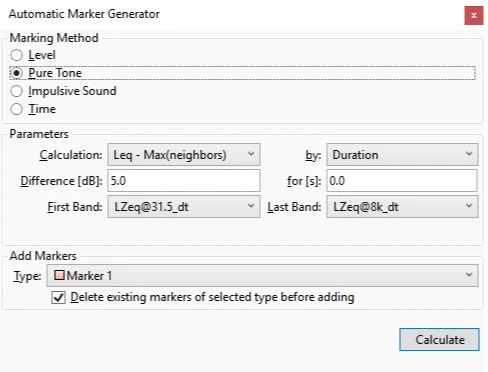
Marker อัตโนมัติAutomatic markers

ตรวจจับ Tone และ ImpulseTonal and impulsive detection

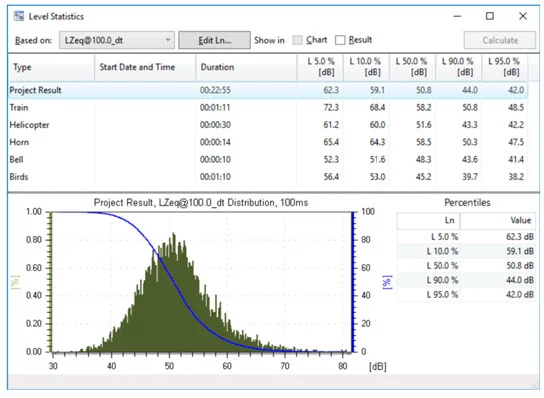
ค่า Percentile LnPercentile levels Ln

ระดับรวม 1/1 และ 1/3 ออกเตฟBroadband, 1/1 and 1/3 octave

Rating level Lr

พร้อม Penalty อัตโนมัติWith automated penalties

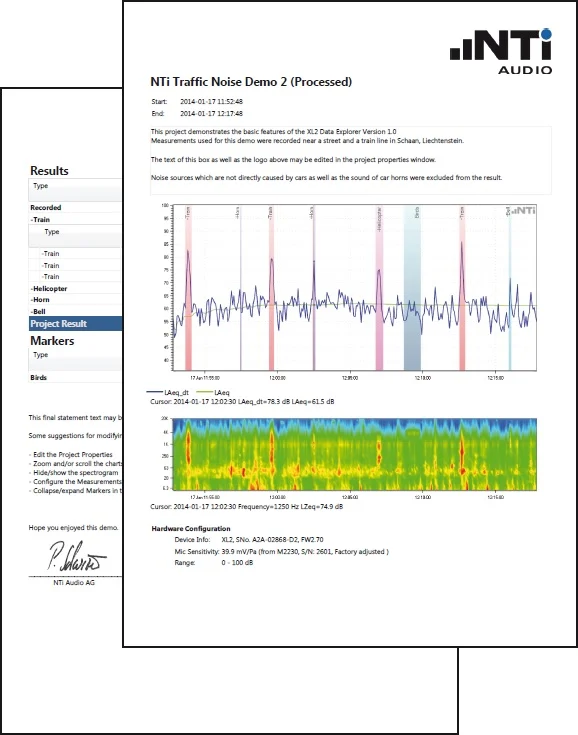
รายงานตามรูปแบบที่ต้องการCustomised reporting

ใส่โลโก้บริษัทได้Add your company logo

เหมาะกับใครWho it is for

ใครใช้ Data Explorer และแก้ปัญหาอะไรWho uses Data Explorer and what it solves

การวัดเสียงระยะยาวให้ข้อมูลหลายล้านค่าและไฟล์เสียงจำนวนมาก การหาช่วงที่มีปัญหา ตัดเสียงรบกวนที่ไม่เกี่ยวข้อง และคำนวณค่าประเมินด้วยมือใช้เวลานาน Data Explorer ช่วยฟังเสียง ทำ Marker และคำนวณค่าในที่เดียวLong-term noise measurements produce millions of values and many audio files. Finding the relevant periods, removing unrelated sources and calculating assessment values by hand takes time; Data Explorer does the listening, marking and calculation in one place.

ขั้นตอนการทำงานWorkflow

จากข้อมูลการวัดสู่รายงานFrom measurement data to report

  1. XL3 / XL2 บันทึกระดับเสียงและไฟล์เสียงXL3 / XL2 logs levels and audio
  2. นำเข้าข้อมูล (License ต่อเครื่องวัด)Import the data (licence per instrument)
  3. ดูกราฟ Spectrogram และฟังเสียงView the spectrogram and listen to the audio
  4. Marker: ด้วยมือ อัตโนมัติ และ ExcludeMarkers: manual, automatic, exclude
  5. คำนวณ Ln, Lr, Lden และช่วง AuditCalculate Ln, Lr, Lden, audit intervals
  6. รายงาน / ส่งออก ExcelReport / Excel export
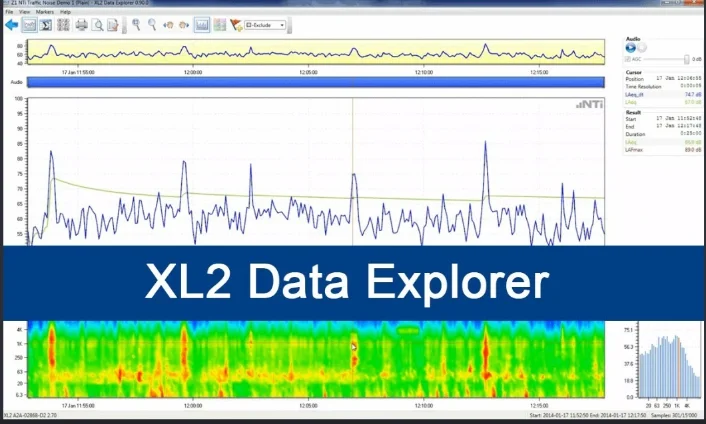
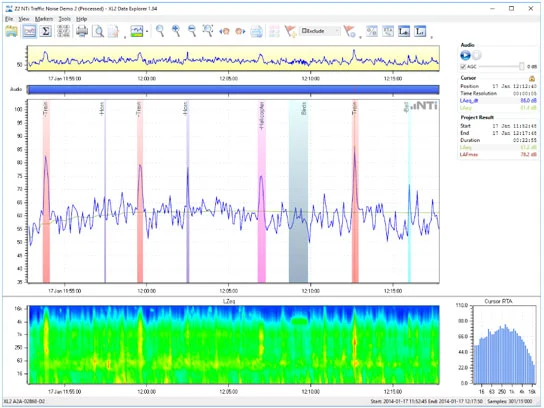
กราฟระดับเสียงพร้อมเล่นไฟล์เสียงใน Data ExplorerData Explorer level view with audio playback
การตรวจเสียงโทนและเสียงกระแทกใน Data ExplorerData Explorer tonality and impulsiveness detection

Data Explorer: กราฟระดับเสียงพร้อมเล่นไฟล์เสียง และการตรวจเสียงโทนและเสียงกระแทก (ภาพหน้าจอ: NTi Audio)Data Explorer: level view with audio playback, and tonality / impulsiveness detection (screenshots: NTi Audio)

คู่มือเริ่มต้นใช้งานBeginner Guide

คู่มือเริ่มต้นใช้งาน Data Explorer: จากการวัดถึงรายงานแรกData Explorer Beginner Guide: from measurement to your first report

ขั้นตอนนี้เรียบเรียงจากหน้าผลิตภัณฑ์และบทความความรู้ของ NTi Audio เอกสารที่ NTi เผยแพร่ต่อสาธารณะไม่ได้ระบุชื่อเมนูและปุ่มของ Data Explorer ไว้ คู่มือนี้จึงบอกว่าต้องทำอะไร ส่วนตำแหน่งในโปรแกรมให้ดูจากความช่วยเหลือในตัวโปรแกรมThese steps are compiled from NTi Audio's product page and know-how articles. NTi's public documents do not list Data Explorer's menu and button names, so this guide says what to do; for where it is in the program, use the help built into the software.

ต้องมีอะไรบ้างก่อนเริ่มWhat you need before you start

  • เครื่องวัด XL3 หรือ XL2 ที่มี Option สำหรับงานนี้ NTi ระบุว่าการใช้งานเต็มรูปแบบต้องมี Extended Noise Measurement (XL3) หรือ XL2 Extended Acoustic PackAn XL3 or XL2 with the right option: NTi states that full functionality needs Extended Noise Measurement (XL3) or the XL2 Extended Acoustic Pack.
  • คอมพิวเตอร์ Windows (Vista, 7, 8.x, 10 หรือ 11) ไม่มีเวอร์ชัน macOSA Windows PC (Vista, 7, 8.x, 10 or 11); there is no macOS version.
  • License ของ Data Explorer สำหรับเครื่องวัดเครื่องนั้น (365, 365 Company หรือ Permanent) ตัวโปรแกรมใช้ฟรี แต่การนำเข้าข้อมูลจากเครื่องวัดต้องมี LicenseA Data Explorer licence for that instrument (365, 365 Company or Permanent): the program itself is free, but importing data from an instrument needs a licence.
  • พื้นฐานที่ช่วยให้อ่านผลได้ถูก: Leq, Lmax และ Lpeak และ ค่า PercentileBackground that helps you read the results: Leq, Lmax and Lpeak and percentile levels.
  1. STEP1

    วางแผนการตั้งค่าเครื่องวัดก่อนออกไปวัดPlan the instrument settings before you measure

    Data Explorer วิเคราะห์ได้เฉพาะค่าที่เครื่องวัดบันทึกไว้ ให้บันทึกค่าที่เกณฑ์ประเมินต้องใช้ ถ้าจะคำนวณ Percentile จาก LAF ใน Data Explorer NTi แนะนำให้ตั้งช่วงบันทึกเป็น 100 ms และเพิ่ม LAFmax ในค่าที่บันทึก ถ้าต้องการฟังเสียงหรือประเมิน Tone ด้วย FFT ต้องเปิดการบันทึกเสียงด้วยData Explorer can only analyse what the instrument logged, so log the values your assessment needs. For LAF-based percentiles in Data Explorer, NTi recommends a 100 ms log interval with LAFmax added to the logged values. Turn on audio recording if you want to listen or assess tones by FFT.

    ข้อควรระวังWatch outตรวจว่ามี Option ที่ต้องใช้ในเครื่องก่อนเริ่ม ค่าที่ไม่ได้บันทึกกู้คืนภายหลังไม่ได้Check that the required option is installed before you start: values that were not logged cannot be recovered later.

  2. STEP2

    วัดและบันทึกข้อมูลประกอบMeasure and keep supporting records

    ตรวจเครื่องด้วย Sound calibrator ก่อนและหลังวัด แล้วเริ่มการวัด ระหว่างวัดให้จดเหตุการณ์ที่เกิดขึ้นพร้อมเวลา เช่น รถวิ่งผ่าน สุนัขเห่า หรือเครื่องจักรเปิดปิด เพื่อใช้ทำ Marker ภายหลัง XL3 บันทึกข้อมูลทั้งหมดเป็นไฟล์ TXT บนการ์ด SD ส่วน XL2 บันทึกเป็นไฟล์ข้อความและไฟล์เสียง WAVCheck the meter with a sound calibrator before and after, then start the measurement. Note what happens and when, such as passing cars, barking dogs or machines switching on and off, so you can mark those periods later. The XL3 stores all data as TXT files on its SD card; the XL2 stores plain-text logs and WAV audio.

  3. STEP3

    ติดตั้ง Data Explorer และลองกับข้อมูลตัวอย่างInstall Data Explorer and try the demo data

    ดาวน์โหลดจากหน้าผลิตภัณฑ์ของ NTi Audio (เวอร์ชันปัจจุบันตามไฟล์คือ 2.50) ติดตั้งบนเครื่อง Windows ได้หลายเครื่อง ครั้งแรกให้ลองกับข้อมูลตัวอย่างที่ NTi ให้มา เพื่อทำความรู้จักหน้าจอก่อนใช้ข้อมูลจริงDownload it from NTi Audio's product page (the current version, per the file name, is 2.50). It may be installed on several Windows computers. The first time, try the demo data NTi provides to get to know the screen before using real data.

  4. STEP4

    เปิดใช้ License ของเครื่องวัดMake sure the instrument is licensed

    การนำเข้าข้อมูลเปิดใช้ด้วย License ที่ผูกกับเครื่องวัดแต่ละเครื่อง XL2 และ XL3 มีรหัสสินค้า License แยกกัน แบบ 365 เป็นรายปีและนำเข้าข้อมูลที่บันทึกไว้ก่อนเริ่มสมาชิกได้ด้วย แบบ Permanent เป็นแบบถาวร และ XL3 มีชุด XL3 Environmental Noise Bundle ที่รวม Extended Noise Measurement กับ License Data Explorer แบบถาวรImporting is enabled by a licence tied to each individual instrument, and the XL2 and XL3 have separate licence order numbers. The 365 licence is annual and can also import data recorded before the subscription; the Permanent licence is permanent; and the XL3 Environmental Noise Bundle combines Extended Noise Measurement with a permanent Data Explorer licence.

    ข้อควรระวังWatch outวิธีเปิดใช้ License ไม่ได้อธิบายไว้ในเอกสารสาธารณะของ NTi ถ้าไม่แน่ใจ ติดต่อเราหรือตัวแทน NTi ก่อนออกไปวัดHow the licence is activated is not described in NTi's public documents; if unsure, contact us or your NTi representative before the measurement.

  5. STEP5

    คัดลอกข้อมูลจากเครื่องวัดCopy the data from the instrument

    XL3: ดาวน์โหลดไฟล์ผ่าน USB-C ได้แม้ขณะที่การวัดยังดำเนินอยู่ หรือถอดการ์ด SD XL2: ต่อ USB เป็น mass storage หรือถอดการ์ด SD เก็บโฟลเดอร์ของการวัดทั้งชุดไว้ด้วยกัน ทั้งไฟล์ข้อความและไฟล์เสียงXL3: download over USB-C, even while a measurement is running, or take out the SD card. XL2: connect by USB as mass storage, or take out the SD card. Keep each measurement's folder together, text files and audio.

  6. STEP6

    นำเข้าการวัดและดูกราฟImport the measurement and explore the chart

    นำเข้าการวัดเข้า Data Explorer แล้วดูในมุมมองกราฟ ซึ่งแสดงระดับที่บันทึก เครื่องเล่นเสียง spectrogram และสเปกตรัมความถี่ เลือกระดับที่จะแสดงจากเมนูแบบเลื่อนลง แสดงย่าน 1/3 ออกเตฟเทียบเวลาได้ ซูมและเลื่อนดูทั้งช่วงการวัดได้เร็ว และฟังเสียงที่ตรงกับเวลาบนกราฟในช่วงที่น่าสงสัยImport the measurement into Data Explorer and use the chart view, which shows the logged levels, an audio player, the spectrogram and the frequency spectrum. Choose the levels to display from the drop-down menu, show 1/3-octave bands against time, zoom and pan quickly over the whole measurement, and listen to the time-aligned audio for suspicious periods.

  7. STEP7

    ทำ MarkerSet markers

    ใส่ Marker พร้อมข้อความในช่วงที่สนใจ ใช้ Exclude Markers ตัดช่วงที่เป็นเสียงอื่นที่ไม่เกี่ยวข้องออก หรือให้โปรแกรมสร้าง Marker อัตโนมัติจากระดับเสียง Tone Impulse หรือช่วงเวลา ตามมาตรฐานที่เลือก เช่น ISO 1996-2:2017 หรือ BS 4142:2014Add markers with a text description to periods of interest, remove unrelated sounds with Exclude Markers, or let the program create automatic markers from levels, tones, impulses or time periods for the chosen standard, such as ISO 1996-2:2017 or BS 4142:2014.

    ข้อควรระวังWatch outใช้บันทึกเหตุการณ์ที่จดไว้หน้างานยืนยันก่อนตัดช่วงใดออก และระบุในรายงานว่าตัดอะไรออกเพราะอะไรCheck each exclusion against your on-site notes, and state in the report what was excluded and why.

  8. STEP8

    คำนวณค่าที่ต้องรายงานCalculate the values to report

    คำนวณ Percentile ทั้งช่วงการวัดหรือเฉพาะช่วงที่ทำ Marker ประเมิน Tone ด้วย FFT จากไฟล์เสียงตามวิธีทางวิศวกรรมของ ISO 1996-2:2017, DIN 45681 และ BS 4142:2014 คำนวณ Rating level (Lr) พร้อม Penalty สำหรับ Tone ความเป็นอิมพัลส์ และช่วงกลางคืน ตาม BS 4142, DIN 45645 หรือ DM 16 marzo 1998 และค่า Lden, Ldn, Lday, Levening, Lnight รวมทั้งตารางแยกตามช่วงเวลา (audit interval) 1–60 นาทีCalculate percentiles for the whole measurement or for marked periods, assess tones by FFT from the audio using the engineering methods of ISO 1996-2:2017, DIN 45681 and BS 4142:2014, calculate the rating level (Lr) with penalties for tone, impulsiveness and night-time per BS 4142, DIN 45645 or DM 16 marzo 1998, and the Lden, Ldn, Lday, Levening and Lnight values, plus audit-interval tables of 1–60 minutes.

    ข้อควรระวังWatch outPercentile จาก Data Explorer อาจต่างจากค่าบนเครื่อง XL2 เล็กน้อย เพราะ Data Explorer คำนวณจากข้อมูลที่บันทึกทุก 100 ms ส่วนเครื่องใช้ข้อมูลดิบทุก 1 msPercentiles from Data Explorer can differ slightly from those on the XL2, because Data Explorer works from the 100 ms logged data while the meter uses its 1 ms raw samples.
  9. STEP9

    ทำรายงานและส่งออกCreate the report and export

    ใส่ชื่อรายงาน ความเห็น และโลโก้บริษัท ข้อมูลวันที่วัด การสอบเทียบ และการตั้งค่าเครื่องจะถูกใส่ให้อัตโนมัติ ส่งออกตารางผลไปยัง Excel ได้ และส่งช่วงที่ทำ Marker ออกเป็นโปรเจกต์แยกเพื่อให้ผู้อื่นประเมินต่อได้Add a report title, comments and your company logo; the measurement date, calibration and instrument set-up are added automatically. Tables can be exported to Excel, and marked periods can be exported as separate projects for other parties to evaluate.

ชื่อเมนู รูปแบบไฟล์รายงาน และวิธีเปิดใช้ License ยังไม่ได้ยืนยันจากเอกสารที่ NTi เผยแพร่ต่อสาธารณะ (อยู่ในรายการตรวจสอบของเรา) ส่วนฟังก์ชันและมาตรฐานที่ระบุในขั้นตอนเป็นไปตามหน้าผลิตภัณฑ์ของ NTi AudioMenu names, the report file format and licence activation are not yet confirmed from NTi's public documents (they are on our verification list); the functions and standards named in the steps follow NTi Audio's product page.

ค่าที่ต้องอ่านให้เป็นValues to understand

ค่าหลักใน Data Explorer หมายถึงอะไรWhat the main Data Explorer values mean

อธิบายสั้น ๆ พอให้อ่านผลได้ถูก รายละเอียดอยู่ในบทความที่ลิงก์ไว้Short explanations so you read the results correctly; the detail is in the linked articles.

ระดับเสียงเทียบเท่าแบบถ่วงน้ำหนัก AA-weighted equivalent level LAeq · dB

คืออะไรWhat it is
ระดับเสียงเฉลี่ยแบบพลังงานตลอดช่วงเวลาที่เลือกThe energy-average level over the chosen period.
ทำไมต้องสนใจWhy it matters
เป็นจุดเริ่มต้นของ Rating level และเกณฑ์เสียงสิ่งแวดล้อมส่วนใหญ่It is the starting point of the rating level and of most environmental criteria.
เข้าใจผิดบ่อยCommon misunderstanding
ค่าเฉลี่ยสูงขึ้นมากได้จากเหตุการณ์ดังสั้น ๆ เพียงไม่กี่ครั้ง จึงต้องดูกราฟประกอบเสมอA few short loud events can raise it a lot, so always look at the chart as well.
อ่านพื้นฐานเพิ่มเติม →Read the basics →

ระดับสูงสุดแบบ FastMaximum level, Fast LAFmax · dB

คืออะไรWhat it is
ระดับสูงสุดแบบถ่วงน้ำหนัก A และถ่วงน้ำหนักเวลา Fast ในช่วงเวลาหนึ่งThe highest A-weighted, Fast time-weighted level in a period.
ทำไมต้องสนใจWhy it matters
NTi แนะนำให้บันทึก LAFmax ทุก 100 ms เพื่อให้ Data Explorer คำนวณ Percentile แบบ LAF ได้NTi recommends logging LAFmax every 100 ms so Data Explorer can compute LAF-based percentiles.
เข้าใจผิดบ่อยCommon misunderstanding
ค่าสูงสุดแบบถ่วงน้ำหนักเวลาไม่ใช่ค่ายอด (peak)A maximum time-weighted level is not the peak level.
อ่านพื้นฐานเพิ่มเติม →Read the basics →

ค่า PercentilePercentile levels Ln (L90, L10, L01) · dB

คืออะไรWhat it is
ระดับที่ถูกเกินเป็นเวลา n% ของช่วงการวัด L90 ใช้แทนเสียงพื้นหลัง L01 ใกล้กับระดับสูงสุดThe level exceeded for n% of the time. L90 approximates the background noise; L01 approximates the maximum levels.
ทำไมต้องสนใจWhy it matters
ใช้แยกเสียงพื้นหลังออกจากเสียงเป็นครั้งคราว และคำนวณใหม่ได้หลังตัดช่วงด้วย MarkerSeparates background from occasional sound, and can be recalculated after periods are excluded with markers.
เข้าใจผิดบ่อยCommon misunderstanding
ค่าจาก Data Explorer กับค่าบนเครื่องอาจต่างกันเล็กน้อย เพราะใช้ข้อมูลคนละความละเอียดValues from Data Explorer and from the meter can differ slightly, because they use data of different resolution.
อ่านพื้นฐานเพิ่มเติม →Read the basics →

Rating level Lr · dB

คืออะไรWhat it is
ค่าที่ใช้ประเมินความรบกวนของเสียงอุตสาหกรรมหรือสิ่งแวดล้อม เริ่มจาก LAeq แล้วบวก Penalty สำหรับ Tone ความเป็นอิมพัลส์ และช่วงเวลาของวันThe value used to assess how disturbing industrial or environmental noise is: it starts from LAeq and adds penalties for tonal and impulsive character and the time of day.
ทำไมต้องสนใจWhy it matters
เป็นค่าที่เทียบกับเกณฑ์ในมาตรฐานอย่าง BS 4142 หรือ DIN 45645It is the value compared with criteria in standards such as BS 4142 or DIN 45645.
เข้าใจผิดบ่อยCommon misunderstanding
Penalty และสูตรขึ้นกับมาตรฐานที่เลือก ต้องระบุมาตรฐานที่ใช้ในรายงานเสมอThe penalties and the formula depend on the standard chosen; always name it in the report.
อ่านพื้นฐานเพิ่มเติม →Read the basics →

ค่ากลางวัน–กลางคืนDay–night values Lden · Ldn · Lday · Levening · Lnight · dB

คืออะไรWhat it is
ค่าเฉลี่ยระยะยาวแยกตามช่วงเวลาของวัน ที่ Data Explorer คำนวณให้Long-term averages by period of the day, calculated by Data Explorer.
ทำไมต้องสนใจWhy it matters
ใช้ในเกณฑ์และแผนที่เสียงสิ่งแวดล้อมหลายแบบUsed in many environmental noise criteria and maps.
เข้าใจผิดบ่อยCommon misunderstanding
ช่วงเวลาและค่าบวกเพิ่มของแต่ละช่วงกำหนดโดยข้อกำหนดที่ใช้ ตรวจให้ตรงก่อนรายงานThe period times and any added weightings are set by the applicable rules; check them before reporting.
อ่านพื้นฐานเพิ่มเติม →Read the basics →

ฟังก์ชันหลักKey functions

วิเคราะห์ คำนวณ และทำรายงานAnalysis, calculation and reporting

Level View พร้อมเล่นเสียงLevel view with audio playback

  • กราฟระดับเสียง เครื่องเล่นเสียง Spectrogram และสเปกตรัมความถี่Level graph, audio player, spectrogram and frequency spectrum
  • ใส่คำอธิบายช่วงที่สนใจ และตัดแหล่งเสียงที่ไม่ต้องการออกด้วย Exclude Marker; ช่วงที่ Mark ถูกรวมในรายงานAnnotate periods of interest and remove unwanted sources with exclude markers; marked periods are included in the report

วิเคราะห์ข้อมูลยืดหยุ่นFlexible data analysis

  • เลือกแสดงค่าได้หนึ่งค่าหรือหลายค่า หรือย่าน 1/3 ออกเตฟเทียบกับเวลาSelect one or more levels, or a range of 1/3 octave bands, against time
  • ฟังไฟล์เสียงด้วย Gain แบบกำหนดเองหรืออัตโนมัติListen with manual or automatic gain control

Level Statistics

  • ค่า Percentile ของระดับรวม และย่าน 1/1 และ 1/3 ออกเตฟPercentiles for wideband, 1/1 and 1/3 octave band levels
  • คำนวณทั้งการวัดหรือเฉพาะช่วงที่ Mark โดยไม่รวมช่วงที่ ExcludeCalculated for the whole measurement or for marked periods only, leaving out excluded periods

ตรวจจับ Tone และ ImpulseTonality and impulsiveness detection

  • สร้าง Marker อัตโนมัติจากระดับ Tone Impulse หรือช่วงเวลา ตาม ISO 1996-2:2017, BS 4142:2014, DM 16 marzo 1998, Arrêté du 23/01/97 และมาตรฐานอื่นAutomatic markers from levels, tones, impulses or time periods per ISO 1996-2:2017, BS 4142:2014, DM 16 marzo 1998, Arrêté du 23/01/97 and other standards
  • คำนวณ FFT จากไฟล์เสียงเพื่อประเมิน Tone ตามวิธีใน ISO 1996-2:2017, DIN 45681 และ BS 4142:2014FFT calculated from the audio file to assess tones using the methods of ISO 1996-2:2017, DIN 45681 and BS 4142:2014
  • ส่งออกแต่ละช่วงที่ Mark เป็นโปรเจกต์ใหม่ให้ผู้อื่นประเมินต่อได้Each marked period can be exported as a new project for third parties

Rating Level

  • Rating level Lr พร้อม Penalty อัตโนมัติสำหรับ Tone, Impulse และกลางคืน ตาม BS4142, DIN 45645 และ DM 16 marzo 1998Rating level Lr with automated tone, impulse and night-time penalties per BS4142, DIN 45645 and DM 16 marzo 1998
  • ค่า Lden, Ldn, Lday, Levening, LnightLden, Ldn, Lday, Levening, Lnight values

Audit Interval และรายงานAudit intervals and report

  • แบ่งข้อมูลเป็นช่วง Audit 1, 2, 5, 10, 15, 30 หรือ 60 นาที และส่งออกตารางไป ExcelAudit intervals of 1, 2, 5, 10, 15, 30 or 60 minutes; table export to Excel
  • รายงานใส่หัวข้อ ความเห็น และโลโก้บริษัท พร้อมข้อมูลวันที่วัด การสอบเทียบ และการตั้งค่าเครื่องอัตโนมัติReports with your titles, comments and logo; measurement date, calibration and instrument set-up added automatically

ความเข้ากันได้Compatibility

เครื่องวัด Option และระบบที่รองรับInstruments, options and system requirements

เครื่องวัดที่รองรับSupported instruments

  • XL3 Acoustic Analyzer
  • XL2 Audio and Acoustic Analyzer
  • Noise Locator NL1: ข้อมูลทิศทางที่บันทึกร่วมกับ XL3Noise Locator NL1: direction data logged with the XL3

Option เพื่อใช้ฟังก์ชันได้เต็มที่Options for full functionality

  • XL2 Extended Acoustic Pack
  • XL3 Extended Noise Measurement

ข้อมูลจากระบบเฝ้าระวังData from monitoring systems

  • MeasurEye: ดึงข้อมูลทั้งหมดของ XL3 มาวิเคราะห์ต่อMeasurEye: retrieve all XL3 data for post-processing

ผลลัพธ์ที่ได้What it produces

  • รายงานพร้อมหัวข้อ ความเห็น และโลโก้บริษัทReports with your titles, comments and logo
  • ตารางผลและช่วงที่ Mark ส่งออกไป ExcelResult tables and marked periods exported to Excel
  • ช่วงที่ Mark ส่งออกเป็นโปรเจกต์ใหม่Marked periods exported as new projects

ระบบที่ต้องการSystem requirements

  • PC Windows Vista, 7, 8.x, 10, 11PC with Windows Vista, 7, 8.x, 10, 11
  • ติดตั้งได้หลายเครื่องคอมพิวเตอร์ เพื่อแบ่งงานให้ทีมและลูกค้าCan be installed on multiple computers for team members and clients

LicenseLicensing

รูปแบบ LicenseLicence options

ตัวซอฟต์แวร์ใช้ได้ฟรีและทดลองกับข้อมูลตัวอย่างได้ ส่วนการนำเข้าข้อมูลจากเครื่องวัดต้องมี License สำหรับเครื่องนั้นThe software itself is free to use and can be tried with demo data; importing data from an instrument requires a licence for that instrument.

Data Explorer 365

  • บริการรายปี: นำเข้าข้อมูลจากเครื่องวัด 1 เครื่องไม่จำกัดเป็นเวลา 1 ปี รวมข้อมูลที่บันทึกก่อนสมัครAnnual subscription: unlimited import from one instrument for one year, including data recorded before the subscription

Data Explorer 365 Company

  • บริการรายปีสำหรับบริษัทที่มีเครื่องวัด 3 เครื่องขึ้นไปAnnual company subscription for 3 or more instruments

Data Explorer Permanent

  • License ถาวรสำหรับเครื่องวัด 1 เครื่องPermanently activated licence for one instrument

XL3 Environmental Noise Bundle

  • XL3 Extended Noise Measurement Option + Data Explorer (ถาวรทั้งคู่) — #600 000 741XL3 Extended Noise Measurement Option + Data Explorer (both permanent) — #600 000 741

เลือก LicenseChoosing a licence

License แบบไหนเหมาะกับคุณWhich licence suits you

License ผูกกับเครื่องวัด ไม่ใช่กับคอมพิวเตอร์ คำถามหลักจึงเป็น: มีเครื่องวัดกี่เครื่อง และจะนำเข้าข้อมูลบ่อยแค่ไหน แนวทางด้านล่างเป็นของ GET BEST SOUND จากเงื่อนไขที่ NTi Audio ระบุLicences belong to the instrument, not the computer, so the key questions are how many instruments you have and how often you import data. The guidance below is GET BEST SOUND's, based on the conditions NTi Audio states.

โปรเจกต์เป็นครั้งคราว → Data Explorer 365Occasional projects → Data Explorer 365

นำเข้าได้ไม่จำกัด 1 ปี รวมข้อมูลที่บันทึกไว้ก่อนสมัคร จึงเหมาะเมื่อมีงานวิเคราะห์เข้ามาเป็นช่วง ๆUnlimited import for one year, including data recorded before the subscription, which suits analysis work that comes in batches.

ใช้เครื่องเดิมทุกปี → PermanentSame instrument every year → Permanent

License ถาวรสำหรับเครื่องวัด 1 เครื่อง เหมาะกับผู้ที่ทำงานประเมินเสียงต่อเนื่องด้วยเครื่องเดิมA permanent licence for one instrument, for anyone assessing noise continuously with the same meter.

ซื้อ XL3 ใหม่สำหรับงานสิ่งแวดล้อม → XL3 Environmental Noise BundleBuying a new XL3 for environmental work → XL3 Environmental Noise Bundle

รวม XL3 Extended Noise Measurement Option และ Data Explorer แบบถาวร (# 600 000 741) ได้ทั้งค่าที่ต้องบันทึกและซอฟต์แวร์ในครั้งเดียวCombines the XL3 Extended Noise Measurement Option and Data Explorer, both permanent (# 600 000 741): the values to log and the software in one purchase.

มีเครื่องวัดตั้งแต่ 3 เครื่อง → 365 CompanyThree or more instruments → 365 Company

บริการรายปีสำหรับบริษัทที่มีเครื่องวัด 3 เครื่องขึ้นไป ซอฟต์แวร์ติดตั้งได้หลายคอมพิวเตอร์ในทีมThe annual company subscription for 3 or more instruments; the software can be installed on several computers in the team.

ก่อนออกไปวัดBefore you measure

ตั้งค่าเครื่องวัดให้ Data Explorer ใช้ข้อมูลได้เต็มที่Set up the instrument so Data Explorer has what it needs

Data Explorer วิเคราะห์ได้เฉพาะสิ่งที่เครื่องวัดบันทึกไว้ ค่าที่ไม่ได้บันทึกกู้คืนภายหลังไม่ได้ จึงควรวางแผนการตั้งค่าก่อนเริ่มวัดData Explorer can only analyse what the instrument recorded; values that were not logged cannot be recovered later, so plan the settings before the measurement starts.

ค่าที่ต้องบันทึกValues to log

  • เลือกระดับรวมและสเปกตรัมที่เกณฑ์ประเมินต้องใช้ และช่วงบันทึกที่ละเอียดพอChoose the broadband levels and spectra the assessment needs, and a fine enough log interval
  • ค่า Percentile ต้องมี XL2 Extended Acoustic Pack หรือ Extended Noise Measurement (XL3); ใน XL3 การบันทึกทุก 100 ms ก็อยู่ใน Option นี้Percentiles need the XL2 Extended Acoustic Pack or Extended Noise Measurement (XL3); on the XL3, 100 ms logging is also part of that option

ไฟล์เสียงAudio

  • เปิดการบันทึกเสียง เพื่อฟังระบุแหล่งเสียงและใช้ FFT ประเมิน Tone จากไฟล์เสียงEnable audio recording so sources can be identified by listening and tones assessed by FFT from the audio file
  • XL3: การบันทึกเสียงแบบไม่บีบอัดอยู่ใน Extended Noise MeasurementXL3: uncompressed audio is part of Extended Noise Measurement

บันทึกประกอบSupporting records

  • ตรวจระดับด้วย Sound calibrator ก่อนและหลังวัด รายงานของ Data Explorer ดึงข้อมูลการสอบเทียบและการตั้งค่าเครื่องให้อัตโนมัติCheck the level with a sound calibrator before and after; Data Explorer reports add calibration and instrument set-up automatically
  • จดเหตุการณ์หน้างานพร้อมเวลา เพื่อใช้ทำ Marker ภายหลังNote on-site events with their times for marking later

ตัวอย่างสถานการณ์: โรงงานถูกร้องเรียนเรื่องเสียงกลางคืน XL3 วัดที่หน้าบ้านผู้ร้องเรียน 7 วันพร้อมบันทึกเสียง ใน Data Explorer วิศวกรฟังช่วงที่ระดับสูง ใช้ Exclude Marker ตัดเสียงรถและสุนัข ให้ซอฟต์แวร์ตรวจหา Tone จากพัดลมระบายอากาศ แล้วคำนวณ Rating level พร้อม Penalty ตามมาตรฐานที่ตกลงใช้ในงานExample scenario: a plant receives night-time noise complaints. An XL3 measures outside the complainant's home for 7 days with audio recording. In Data Explorer the engineer listens to the high-level periods, removes passing cars and barking dogs with exclude markers, lets the software detect a tone from an extract fan, and calculates the rating level with penalties per the standard agreed for the project.

ข้อจำกัดLimitations

สิ่งที่ Data Explorer ไม่ได้ทำWhat Data Explorer does not do

ไม่ใช่เครื่องมือวัดหรือระบบเฝ้าระวังNot an instrument or monitoring system

วิเคราะห์ข้อมูลที่บันทึกแล้วบน PC ไม่มี Dashboard สดหรือการแจ้งเตือน สำหรับงานออนไลน์ใช้ MeasurEye (XL3)It analyses recorded data on a PC, with no live dashboard or alerts. For online monitoring use MeasurEye (XL3)

ผลขึ้นกับข้อมูลที่เครื่องบันทึกResults depend on what was logged

ค่าที่วิเคราะห์ได้ขึ้นกับค่าที่ XL2 / XL3 บันทึกไว้และไฟล์เสียง NTi Audio ระบุว่าต้องมี Option ข้างต้นเพื่อใช้ฟังก์ชันได้เต็มที่What can be analysed depends on the levels and audio the XL2 / XL3 recorded; NTi Audio states the options above are needed for full functionality

Windows เท่านั้นWindows only

NTi Audio ระบุระบบปฏิบัติการ Windows เท่านั้นNTi Audio lists Windows operating systems only

ข้อมูลการสั่นสะเทือนVibration data

หน้า XL2 Vibration Meter ระบุ Data Explorer เป็นซอฟต์แวร์ที่ใช้ได้ แต่ NTi Audio ไม่ได้อธิบายฟังก์ชันวิเคราะห์การสั่นสะเทือนใน Data Explorer ปรึกษาวิศวกรก่อนใช้กับงานสั่นสะเทือนThe XL2 Vibration Meter page lists Data Explorer as software, but NTi Audio describes no vibration-specific analysis in Data Explorer; ask an engineer before relying on it for vibration work

การประเมินยังเป็นของผู้วัดThe assessment remains yours

ซอฟต์แวร์คำนวณตามวิธีที่เลือก การเลือกมาตรฐาน ค่ากำหนด และการตีความผลเป็นหน้าที่ของผู้ประเมินThe software calculates by the method you choose; selecting the standard, limits and interpretation is the assessor's task

Learn more

เรียนรู้เพิ่มเติมLearn more

บทความความรู้ มาตรฐาน และกรณีศึกษาที่อธิบายเรื่องนี้ตั้งแต่พื้นฐานKnowledge articles, standards and case studies that explain this from the basics

การเฝ้าระวังเสียงระยะยาวและการตรวจสอบเรื่องร้องเรียนเสียงดังLong-term noise monitoring and noise complaint investigation

วิธีการตรวจวัด: โจทย์ ขั้นตอน เครื่องมือ และการอ่านผลApplication guide: task, workflow, equipment and interpretation

การบันทึกข้อมูลและการวัดระยะยาวLogging and long-term measurements

ช่วงบันทึกข้อมูล สิ่งที่ต้องบันทึก ไฟล์เสียง และตัวทำเครื่องหมายLogging intervals, what to record, audio and markers

Leq, Lmax, Lmin และ Lpeak คืออะไรLeq, Lmax, Lmin and Lpeak explained

ค่าเฉลี่ย ค่าสูงสุด ค่าต่ำสุด และค่ายอดของเสียง แต่ละค่าบอกอะไรAverage, maximum, minimum and peak: what each sound level value tells you

ค่าเปอร์เซ็นไทล์ (L90, L10) และเสียงพื้นหลังPercentile levels (L90, L10) and background noise

L90 L10 L50 คืออะไร และทำไม L90 มักใช้เป็นตัวบ่งชี้เสียงพื้นหลังWhat L90, L10 and L50 mean, and why L90 is often used as a background noise indicator

Engineering support

ต้องการคำแนะนำเรื่อง License หรือขั้นตอนวิเคราะห์ข้อมูล?Need advice on licensing or your analysis workflow?

ทีมวิศวกร GET BEST SOUND ช่วยเลือกอุปกรณ์ จัดชุดระบบ และวางขั้นตอนการวัดให้ตรงกับงานของคุณGET BEST SOUND engineers help with product selection, system configuration and the measurement workflow for your work.

อ่านก่อนตัดสินใจLearn before you buy

ความรู้ที่ช่วยใช้ Data Explorer ได้ดีขึ้นBackground that makes Data Explorer more useful

FAQ

คำถามที่พบบ่อยFrequently asked questions

ทดลองใช้ก่อนซื้อได้ไหม?Can I try it before buying?

ได้ NTi Audio ระบุว่าตัวซอฟต์แวร์ใช้ได้ฟรีและทดลองกับข้อมูลตัวอย่างได้ License จำเป็นเมื่อต้องนำเข้าข้อมูลจากเครื่องวัดของคุณYes. NTi Audio states the software is free to use and can be tried with demo data; a licence is needed to import data from your own instrument.

วิเคราะห์ข้อมูลที่บันทึกไว้ก่อนซื้อ License ได้ไหม?Can I analyse data recorded before I bought the licence?

ได้สำหรับ Data Explorer 365: NTi Audio ระบุว่านำเข้าได้ไม่จำกัดรวมถึงข้อมูลที่บันทึกก่อนสมัครYes with Data Explorer 365: NTi Audio states unlimited import, including data recorded before the subscription.

ติดตั้งในคอมพิวเตอร์หลายเครื่องได้ไหม?Can it be installed on several computers?

ได้ NTi Audio ระบุว่าติดตั้งได้หลายเครื่องเพื่อแบ่งงานให้ทีมและลูกค้า License ผูกกับเครื่องวัด ใช้กับ Windows Vista ถึง Windows 11Yes. NTi Audio states it can be installed on several computers for team members and clients; the licence is tied to the instrument. It runs on Windows Vista to Windows 11.

ใช้บน Mac ได้ไหม?Does it run on a Mac?

NTi Audio ระบุระบบปฏิบัติการ Windows เท่านั้นNTi Audio lists Windows operating systems only.

ต้องมี Option ของเครื่องวัดไหม?Does the instrument need an option?

NTi Audio ระบุว่าต้องมี XL2 Extended Acoustic Pack หรือ XL3 Extended Noise Measurement เพื่อใช้ฟังก์ชันได้เต็มที่ เพราะค่าอย่าง Percentile และไฟล์เสียงแบบไม่บีบอัดมาจาก Option เหล่านี้ ส่งรายการ Option ของเครื่องให้เราตรวจก่อนสั่งซื้อNTi Audio states the XL2 Extended Acoustic Pack or XL3 Extended Noise Measurement is needed for full functionality, since values such as percentiles and uncompressed audio come from these options. Send us your instrument's option list to check before ordering.

Gallery

ต้องการใช้ Data Explorer กับเครื่องวัดของคุณ?Want to use Data Explorer with your instrument?

ให้วิศวกร GET BEST SOUND ช่วยเลือก License และ Option ที่เครื่องวัดต้องมีLet GET BEST SOUND engineers help choose the licence and the instrument options you need.

โทรศัพท์Phone062-195-1909
อีเมลEmailgetbestsoundthailand@gmail.com
Line Official@x2525