NTi Audio · Cloud & Software
MeasurEye
ระบบคลาวด์สำหรับเฝ้าระวังและวิเคราะห์ข้อมูลสิ่งแวดล้อมCloud platform for environmental monitoring and insights
ศูนย์กลางบนคลาวด์ที่รวบรวม จัดเก็บอย่างปลอดภัย และแจ้งเตือนข้อมูลเสียง การสั่นสะเทือน สภาพอากาศ และคุณภาพอากาศจากหลายเครื่องมือในที่เดียว สำหรับไซต์ก่อสร้าง โรงงาน และชุมชน (เป็นซอฟต์แวร์ ไม่ใช่เครื่องมือวัด)A cloud hub that collects, secures and alerts on noise, vibration, weather and air-quality data from several instruments in one place, for construction sites, manufacturing facilities and communities (software, not a measuring instrument).
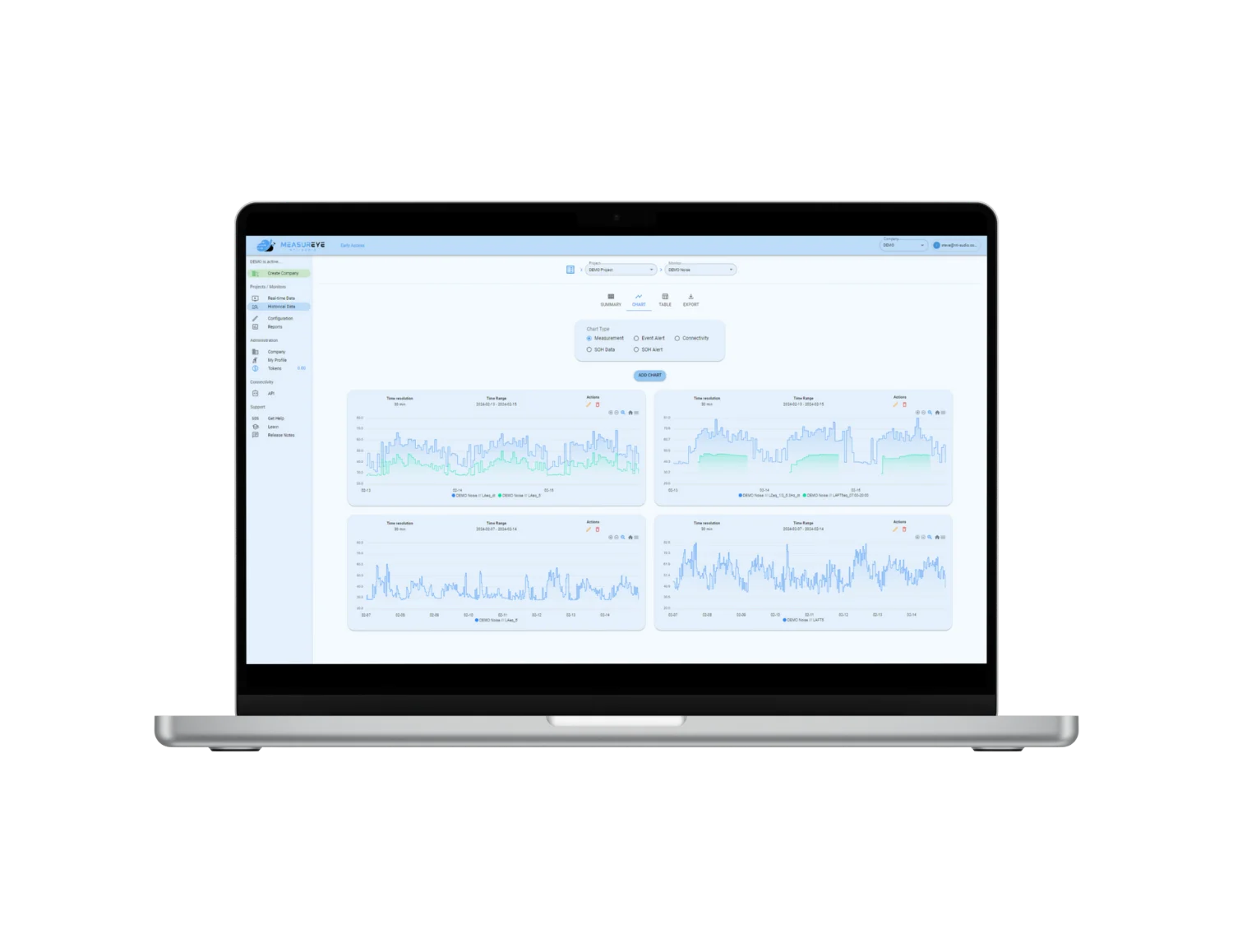
What is MeasurEye
MeasurEye คืออะไรWhat is MeasurEye?
MeasurEye เป็นแอปพลิเคชันบนเว็บที่รับข้อมูลจากเครื่องวัดที่ติดตั้งหน้างาน แสดงผลแบบเรียลไทม์ ประเมินเหตุการณ์ตามเงื่อนไขที่ตั้งไว้ และส่งการแจ้งเตือนและรายงานทางอีเมล ทำให้เฝ้าระวังได้ตลอด 24 ชั่วโมงโดยไม่ต้องมีคนอยู่ที่จุดวัดMeasurEye is a web application that receives data from instruments installed on site, shows it live, evaluates events against the conditions you set, and sends alerts and reports by e-mail, so a site can be monitored 24 hours a day without anyone standing at the measuring point.
ไม่ต้องมีคนเฝ้าจุดวัดNo one needed at the measuring point
พร้อมข้อมูลย้อนหลังPlus historical data
ทางอีเมลเมื่อเกินค่าที่กำหนดBy e-mail when limits are exceeded
พร้อมคะแนนความเชื่อมั่นWith a confidence score
แบตเตอรี่ แหล่งจ่ายไฟ GPSBattery, power supply, GPS
ส่งถึงอีเมลตามรอบที่เลือกDelivered by e-mail for the period you choose
เหมาะกับใครWho it is for
ใครใช้ MeasurEye และแก้ปัญหาอะไรWho uses MeasurEye and what it solves
งานเฝ้าระวังที่มีหลายจุดวัดและหลายชนิดข้อมูล มักมีข้อมูลกระจายอยู่ในเครื่องแต่ละเครื่อง และแจ้งเตือนผิดพลาดเพราะไม่ได้ดูสภาพอากาศประกอบ MeasurEye รวมข้อมูลไว้ในโปรเจกต์เดียว และตั้งเงื่อนไขข้ามเซนเซอร์ได้Monitoring with several positions and data types often leaves the data spread across individual instruments, and alarms go off wrongly because weather is not taken into account. MeasurEye combines the data in one project and allows conditions across sensors.
ไซต์ก่อสร้างConstruction sites
เฝ้าระวังเสียงและการสั่นสะเทือนจากงานก่อสร้าง พร้อมแจ้งเตือนเมื่อเกินค่าMonitor construction noise and vibration with alerts on exceedances
โรงงานอุตสาหกรรมManufacturing facilities
ติดตามเสียงรอบโรงงานต่อเนื่อง และหาแหล่งเสียงด้วยข้อมูลทิศทางContinuous noise tracking around the plant, with direction data to find sources
ชุมชนCommunities
ข้อมูลเสียง สภาพอากาศ และคุณภาพอากาศสำหรับพื้นที่ชุมชนNoise, weather and air-quality data for communities
บริการวัดเสียงสิ่งแวดล้อมEnvironmental noise measurement service
ให้ GET BEST SOUND วัดและเฝ้าระวังเสียงสิ่งแวดล้อมให้Have GET BEST SOUND measure and monitor environmental noise for you
ดูบริการ →See the service →แหล่งข้อมูลData sources
เครื่องมือที่ส่งข้อมูลเข้า MeasurEyeInstruments that feed MeasurEye
ข้อมูล 5 ประเภทจากเครื่องมือที่ NTi Audio ระบุ รวมอยู่ในโปรเจกต์เดียวกัน จึงดูและประเมินร่วมกันได้ MeasurEye ไม่รวมฮาร์ดแวร์: เครื่องวัดแต่ละตัวซื้อแยกFive kinds of data from the instruments NTi Audio lists, combined in one project so they can be viewed and evaluated together. MeasurEye includes no hardware: each instrument is bought separately.
ระดับเสียง — XL3Noise levels — XL3
เครื่องวัดระดับเสียง XL3 ส่งระดับเสียงและสเปกตรัม 1/1 และ 1/3 ออกเตฟ ทุก 1 วินาทีThe XL3 sound level meter supplies noise levels and 1/1 and 1/3 octave spectra every second
ทิศทางเสียง — NL1Noise direction — NL1
Noise Locator NL1 ต่อกับ XL3 และเพิ่มทิศทางและมุมเงยที่เสียงเข้ามาThe Noise Locator NL1, connected to the XL3, adds the direction and elevation the noise comes from
การสั่นสะเทือน — GSS 5GVVibration — GSS 5GV
GSS 5GV Vibration Monitor สำหรับโครงสร้างและความสบายของผู้อยู่อาศัยThe GSS 5GV Vibration Monitor for structures and occupant comfort
สภาพอากาศ — Weather StationWeather — weather station
Vaisala WXT532, WXT533, WXT536 และ LCJ CV7: ลม อุณหภูมิ ฝน ความชื้น ความกดอากาศVaisala WXT532, WXT533, WXT536 and LCJ CV7: wind, temperature, rain, humidity, air pressure
คุณภาพอากาศ — AQ Guard Smart 1000Air quality — AQ Guard Smart 1000
Palas AQ Guard Smart 1000 วัดฝุ่นละออง PM1, PM2.5, PM4, PM10, TSPPalas AQ Guard Smart 1000 for particulate matter PM1, PM2.5, PM4, PM10, TSP
การเชื่อมต่อและการใช้งานConnection and delivery
เครื่องมือเชื่อมกับ MeasurEye อย่างไรHow instruments reach MeasurEye
แอปพลิเคชันบนเว็บWeb application
ใช้งานผ่านเว็บเบราว์เซอร์ที่ app.measureye.com ไม่ต้องติดตั้งซอฟต์แวร์บน PC NTi Audio ไม่ได้ระบุความต้องการของระบบเพิ่มเติมUsed in a web browser at app.measureye.com, with no PC installation. NTi Audio states no further system requirements
XL3
XL3 เชื่อมต่อเครือข่ายผ่าน LAN หรือ Wi-Fi สำหรับหน้างานที่ไม่มีเครือข่าย NTi Audio มี G160 4G/LTE Gateway สำหรับเฝ้าระวังเสียงระยะไกลด้วย XL3The XL3 connects over LAN or Wi-Fi. For sites without a network, NTi Audio offers the G160 4G/LTE Gateway for remote noise monitoring with the XL3
GSS 5GV
สื่อสารผ่านเครือข่ายมือถือหรือ Wi-Fi และส่งข้อมูลเข้า MeasurEye หรือแพลตฟอร์มของตัวเองผ่าน MQTT โมดูลสื่อสารเปลี่ยนได้ (Bluetooth + 4G หรือ Bluetooth + Wi-Fi ตาม Product Data) จึงยืนยันโมดูลและเครือข่ายที่หน้างานก่อนสั่งซื้อCommunicates over the mobile network or Wi-Fi and sends data to MeasurEye or your own platform via MQTT. The communication module is interchangeable (Bluetooth + 4G or Bluetooth + Wi-Fi per the Product Data), so the module and the site network are confirmed before ordering
ลิงก์เครื่องเข้ากับโปรเจกต์Link devices to a project
เมื่อลิงก์เครื่องเข้ากับโปรเจกต์ ข้อมูลจะอัปเดตทุกวินาที พร้อมข้อมูลย้อนหลัง รายงานอัตโนมัติ และการกำหนดสิทธิ์ผู้ใช้Once devices are linked to a project, data updates every second, with historical views, automatic reports and user access control
ระบบที่สมบูรณ์Complete system
แต่ละจุดวัดต้องมีอะไรบ้างWhat each monitoring point needs
MeasurEye เป็นส่วนสุดท้ายของห่วงโซ่ ก่อนข้อมูลจะขึ้นแพลตฟอร์ม แต่ละจุดวัดต้องมีเครื่องวัด อุปกรณ์กันสภาพอากาศ ไฟ และเครือข่ายที่ทำงานได้ต่อเนื่อง ขาดส่วนใดส่วนหนึ่ง ข้อมูลก็ขาดหายMeasurEye is the last link in the chain. Before any data reaches the platform, each monitoring point needs an instrument, weather protection, power and a network that keep working without interruption; if one link fails, the data stops.
จุดวัดเสียงNoise point
- XL3 + ไมโครโฟนวัดเสียงพร้อมชุดป้องกันสภาพอากาศ (เช่น M2340 + WP40-90 ในการติดตั้ง NL1 ทั่วไป)XL3 + measurement microphone with weather protection (e.g. M2340 + WP40-90 in the typical NL1 set-up)
- NL1 ถ้าต้องการทิศทางของเสียงNL1 if the noise direction is needed
- Sound calibrator สำหรับตรวจระดับก่อนและหลังการเฝ้าระวังA sound calibrator to check the level before and after monitoring
จุดวัดการสั่นสะเทือนVibration point
- GSS 5GV Vibration Monitor ยึดกับโครงสร้างที่ต้องการประเมินGSS 5GV Vibration Monitor fixed to the structure being assessed
- เลือกมาตรฐานประเมินและเกณฑ์แจ้งเตือนก่อนติดตั้งChoose the assessment standard and alert criteria before installation
สภาพอากาศและคุณภาพอากาศ (ถ้าต้องการ)Weather and air quality (if needed)
- Vaisala WXT532 / 533 / 536 หรือ LCJ CV7 สำหรับลมและฝนVaisala WXT532 / 533 / 536 or LCJ CV7 for wind and rain
- Palas AQ Guard Smart 1000 สำหรับฝุ่นละอองPalas AQ Guard Smart 1000 for particulate matter
ไฟและกล่องกันสภาพอากาศPower and enclosure
- ไฟบ้านหรือแบตเตอรี่/โซลาร์ พร้อมไฟสำรองสำหรับงานยาวMains or battery/solar, with backup for long projects
- กล่องกันน้ำและฝุ่น และการยึดป้องกันการขโมยหรือรบกวนA weather-proof enclosure and fixings that deter theft or tampering
เครือข่ายNetwork
- XL3: LAN หรือ Wi-Fi; หน้างานที่ไม่มีเครือข่ายใช้ G160 4G/LTE GatewayXL3: LAN or Wi-Fi; on sites without a network, the G160 4G/LTE Gateway
- ตรวจความแรงของสัญญาณมือถือที่จุดติดตั้งจริงก่อนวันติดตั้งCheck mobile signal strength at the actual location before installation day
แพลตฟอร์มและการวิเคราะห์Platform and analysis
- บัญชี MeasurEye (NTi ระบุว่าใช้ฟรี) และผู้รับอีเมลแจ้งเตือนA MeasurEye account (free according to NTi) and alert recipients
- License Data Explorer ถ้าต้องวิเคราะห์ข้อมูล XL3 เชิงลึกและทำรายงานตามมาตรฐานA Data Explorer licence for expert XL3 analysis and standards-based reports
ความถี่ของข้อมูลData intervals
ข้อมูลแต่ละประเภทเข้าระบบบ่อยแค่ไหนHow often each data type is captured
| ข้อมูลData | ตัวอย่างค่าที่ส่งExample values | ช่วงเวลาInterval |
|---|---|---|
| ระดับเสียงและสเปกตรัมNoise and spectrum | ตัวอย่างค่าที่ส่งExample valuesระดับรวม, 1/1 และ 1/3 ออกเตฟ; ทิศทาง/มุมเงยจาก NL1Broadband, 1/1 and 1/3 octave; NL1 direction/elevation | ช่วงเวลาInterval1 s |
| สภาพอากาศWeather | ตัวอย่างค่าที่ส่งExample valuesลม อุณหภูมิ ฝน ความชื้น ความกดอากาศWind, temperature, rain, humidity, pressure | ช่วงเวลาInterval1 s |
| การสั่นสะเทือน (ความสบายของผู้อยู่อาศัย)Vibration (occupant) | ตัวอย่างค่าที่ส่งExample valuesAWk, AWm, VDV, สเปกตรัม 1/3 ออกเตฟAWk, AWm, VDV, 1/3 octave spectrum | ช่วงเวลาInterval10 s |
| การสั่นสะเทือน (โครงสร้าง)Vibration (structural) | ตัวอย่างค่าที่ส่งExample valuesPPV, ความถี่เด่น, PVSPPV, dominant frequency, PVS | ช่วงเวลาInterval60 s |
| คุณภาพอากาศAir quality | ตัวอย่างค่าที่ส่งExample valuesPM1, PM2.5, PM4, PM10, TSP | ช่วงเวลาInterval60 s |
| State of Health, GPS | ตัวอย่างค่าที่ส่งExample valuesแบตเตอรี่ หน่วยความจำ แหล่งจ่ายไฟ ตำแหน่ง GPSBattery, storage, power supply, GPS position | ช่วงเวลาInterval60 s |
ฟังก์ชันหลักKey functions
แสดงผล ประเมิน แจ้งเตือน และรายงานVisualisation, evaluation, alerts and reporting
แสดงผลแบบเรียลไทม์Real-time views
- มุมมอง Grid, Chart, Map, State of Health, Alerts และ XLGrid, chart, map, State of Health, alerts and XL views
- เห็นหลายสถานีวัดบนแผนที่เดียวกันSee several stations on one map
ข้อมูลย้อนหลังHistorical data
- มุมมอง Summary, Charts และ TableSummary, charts and table views
- ดึงข้อมูลทั้งหมดจาก XL3 ไปวิเคราะห์เชิงลึกใน Data ExplorerRetrieve all XL3 data for expert post-processing in Data Explorer
IndicatorIndicators
- Indicator จากข้อมูลดิบมากกว่า 800 รายการ เช่น LAeq และ LAFmax ตามช่วงเวลา800+ raw-data indicators, such as interval LAeq and LAFmax
- Indicator แบบ Gliding, Period และ Aggregated: ค่าต่ำสุด สูงสุด เฉลี่ย Percentile และ Dose/ExposureGliding, period and aggregated indicators: min, max, average, percentiles and dose/exposure
Event และการแจ้งเตือนEvents and alerts
- ตั้ง Event แบบเดี่ยวหรือแบบรวมหลายเงื่อนไข ข้ามหลายเซนเซอร์ เช่น แจ้งเมื่อเสียงเกินค่าเฉพาะตอนลมต่ำกว่าเกณฑ์ และกำหนดตามช่วงเวลาของวันหรือวันในสัปดาห์Simple or combined events across several sensors, e.g. a noise exceedance only when wind is below a threshold, scheduled by time of day or day of week
- แจ้งเตือนทางอีเมลเมื่อเกินค่ากำหนด และแจ้ง State of Health (แบตเตอรี่ ไฟ GPS)E-mail alerts when limits are exceeded, plus State of Health alerts (battery, power supply, GPS)
ฟังเสียงและ AI จำแนกเสียงListening and AI classification
- ฟังเสียงที่เกิดขึ้นหน้างานในแต่ละ Event ที่เกินค่าListen to what happened on site for each exceedance event
- AI ให้คะแนนความเชื่อมั่นตามประเภทเสียง เช่น เสียงพูด เครื่องจักร การจราจร (เป็นตัวเลือกเสริม)Optional AI classification gives confidence scores for classes such as speech, machinery and traffic
รายงานและผู้ใช้งานReports and users
- รายงานตามรอบส่งเข้าอีเมลอัตโนมัติ พร้อมข้อมูลการวัดและการแจ้งเตือนในช่วงที่เลือกPeriodic reports e-mailed automatically, with measurement data and alerts for the chosen period
- จัดการผู้ใช้และสิทธิ์การเข้าถึงข้อมูลUser management and data access rights
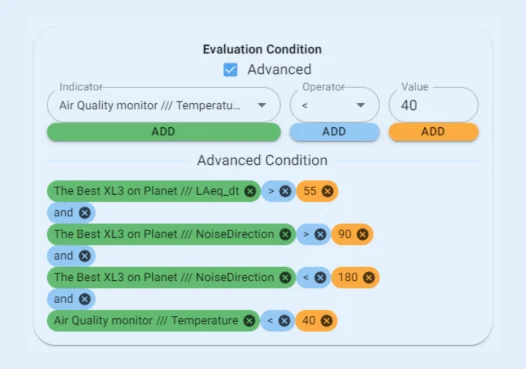
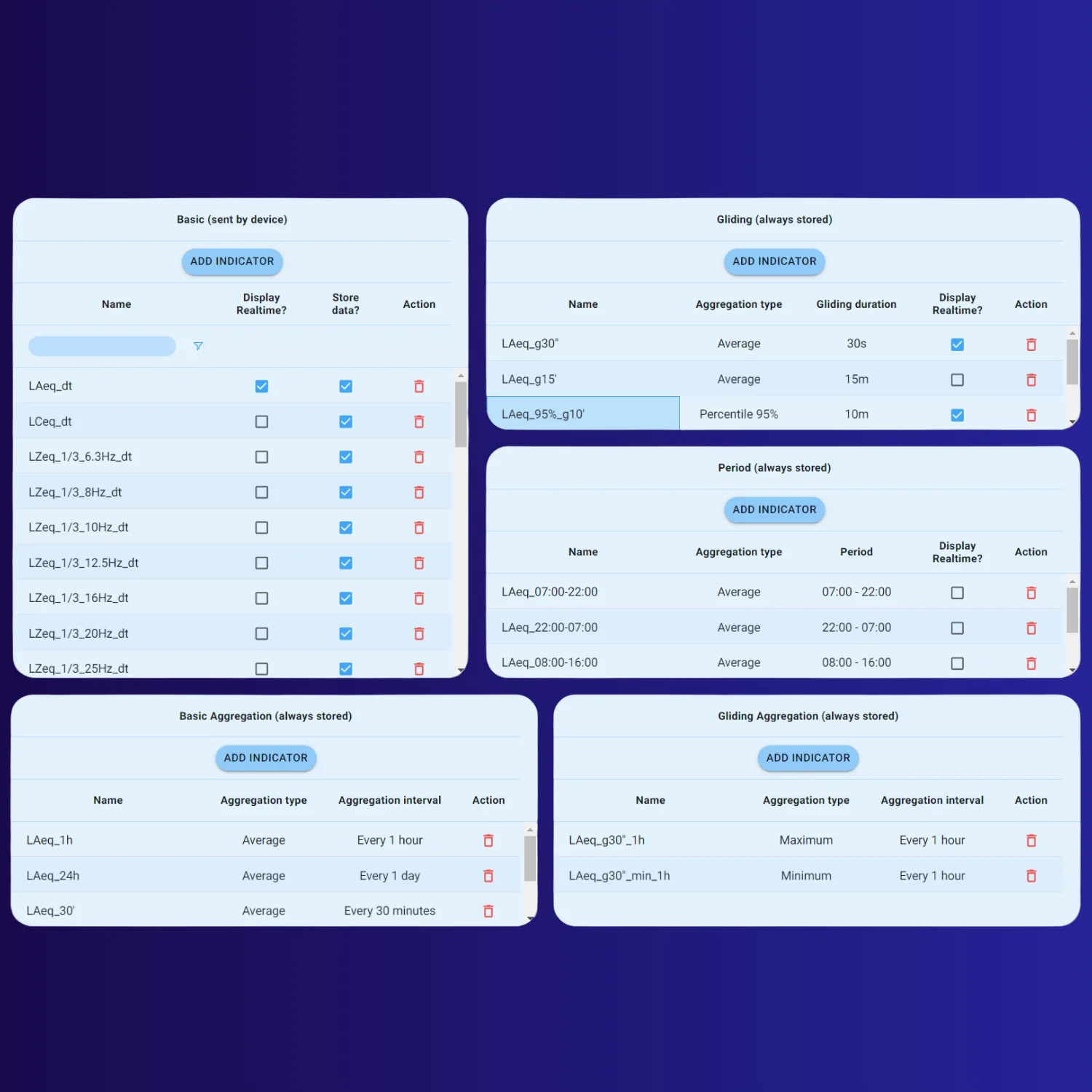
หน้าจอ MeasurEye: การประเมินเหตุการณ์แบบรวม และค่าเฉลี่ยช่วงเวลาเลื่อน (ภาพหน้าจอ: NTi Audio)MeasurEye screens: combined event evaluation and gliding-period values (screenshots: NTi Audio)
ขั้นตอนการทำงานWorkflow
จากการวัดหน้างานสู่รายงานFrom on-site measurement to report
- วัด: เครื่องมือหน้างานบันทึกข้อมูลMeasure: instruments on site capture the data
- ลิงก์เครื่องเข้ากับโปรเจกต์ใน MeasurEyeLink the devices to a MeasurEye project
- แสดงผล: Grid, Chart, Map แบบเรียลไทม์Visualise: live grid, chart and map views
- ประเมิน: Indicator และ EventEvaluate: indicators and events
- แจ้งเตือนทางอีเมล (+ AI จำแนกเสียง)Alert by e-mail (+ AI noise classification)
- รายงานตามรอบ / วิเคราะห์ต่อใน Data ExplorerPeriodic reports / further analysis in Data Explorer
วางแผนโปรเจกต์Planning a project
ออกแบบการแจ้งเตือนให้มีความหมายDesigning alerts that mean something
ระบบเฝ้าระวังที่แจ้งเตือนบ่อยเกินไปจะถูกเพิกเฉย ส่วนระบบที่แจ้งช้าเกินไปก็ไม่ช่วยป้องกันปัญหา การวางแผนก่อนติดตั้งทำให้แต่ละอีเมลแจ้งเตือนนำไปสู่การตัดสินใจได้A monitoring system that alerts too often gets ignored; one that alerts too late prevents nothing. Planning before installation makes every alert e-mail lead to a decision.
1. เริ่มจากเกณฑ์1. Start from the criteria
กำหนดก่อนว่าจะเทียบกับค่าอะไร ช่วงเวลาใด และค่าเฉลี่ยช่วงไหน เช่น LAeq 15 นาทีช่วงกลางวัน หรือ PPV ต่อเหตุการณ์ แล้วเลือก Indicator ให้ตรงกับเกณฑ์นั้นDecide first what you compare against, in which time period and over which averaging time, e.g. a 15-minute daytime LAeq or PPV per event, then pick the matching indicator.
2. ใช้ระดับเตือนล่วงหน้า2. Use an early-warning level
แนวปฏิบัติทั่วไปคือตั้งระดับเตือนต่ำกว่าเกณฑ์ เพื่อให้ผู้รับผิดชอบหน้างานมีเวลาปรับการทำงานก่อนเกินค่าจริงCommon practice is to set a warning level below the limit, so the site team has time to adjust the work before the limit itself is exceeded.
3. กรองเหตุการณ์ที่ไม่เกี่ยวข้อง3. Filter out irrelevant events
รวมเงื่อนไขข้ามเซนเซอร์ เช่น แจ้งเฉพาะเมื่อลมต่ำกว่าเกณฑ์ กำหนดตามเวลาของวัน และใช้ทิศทางจาก NL1 แยกเสียงจากทิศของไซต์งานออกจากเสียงถนนCombine conditions across sensors, e.g. only when wind is below a threshold, schedule by time of day, and use NL1 direction to separate noise from the site's direction from road traffic.
4. กำหนดผู้รับและสิ่งที่ต้องทำ4. Define recipients and actions
ระบุว่าใครได้รับอีเมลแต่ละแบบ และต้องทำอะไรเมื่อได้รับ ฟังเสียงยืนยันก่อนสรุปแหล่งเสียง และบันทึกการดำเนินการไว้ประกอบรายงานState who receives each alert and what they must do. Listen to the audio before concluding on the source, and log the action taken for the report.
ตัวอย่างสถานการณ์: งานก่อสร้างติดกับอาคารพักอาศัย ติดตั้ง XL3 + NL1 ที่ขอบเขตไซต์ฝั่งอาคาร และ GSS 5GV ที่ฐานรากของอาคารข้างเคียง พร้อม Weather Station ตั้ง Event เสียงเฉพาะช่วงเวลาทำงาน เมื่อเสียงมาจากทิศไซต์และลมอ่อน และตั้ง Event PPV แยกต่างหาก รายงานรายสัปดาห์ส่งเข้าอีเมลผู้จัดการโครงการอัตโนมัติExample scenario: a construction project next to a residential building. An XL3 + NL1 stands at the site boundary facing the building, a GSS 5GV sits on the neighbouring building's foundation, and a weather station completes the set. A noise event triggers only during working hours, when the noise comes from the site's direction and the wind is light; a separate PPV event watches the vibration. A weekly report is e-mailed automatically to the project manager.
การใช้งานLicensing
เริ่มใช้งาน MeasurEyeGetting started with MeasurEye
ใช้งานฟรีFree to use
- NTi Audio ระบุว่า MeasurEye ใช้งานได้ฟรีNTi Audio states that MeasurEye is free to use
- สร้างบัญชีและทดลองกับโปรเจกต์ DEMO ได้Create an account and explore with the DEMO project
รายการที่ซื้อแยกBought separately
- เครื่องมือวัด (XL3, NL1, GSS 5GV, Weather Station, เครื่องวัดคุณภาพอากาศ)Instruments (XL3, NL1, GSS 5GV, weather station, air-quality terminal)
- อุปกรณ์สื่อสาร กล่องกันสภาพอากาศ และแหล่งจ่ายไฟCommunication hardware, weather-protected enclosures and power
- Option ของเครื่องวัด และ License Data Explorer ถ้าต้องการวิเคราะห์เชิงลึกInstrument options, and a Data Explorer licence for expert analysis
NTi Audio ไม่ได้ระบุแพ็กเกจพรีเมียม ขีดจำกัดข้อมูล หรือ Option ของ XL3 ที่ต้องมีสำหรับ MeasurEye ปรึกษาวิศวกรเพื่อจัดชุดให้ตรงกับงานNTi Audio does not state premium tiers, data limits or XL3 options needed for MeasurEye; ask our engineers to put together the right set for your project.
ข้อจำกัดLimitations
สิ่งที่ MeasurEye ไม่ได้ทำWhat MeasurEye does not do
ไม่ใช่เครื่องมือวัดNot a measuring instrument
คุณภาพของข้อมูลขึ้นกับเครื่องวัด ไมโครโฟน การสอบเทียบ และตำแหน่งติดตั้งหน้างานData quality depends on the instruments, microphones, calibration and installation on site
ไม่ใช่ซอฟต์แวร์วิเคราะห์เชิงลึกNot an expert post-processing tool
การวิเคราะห์ละเอียด เช่น Rating level และรายงานตามมาตรฐาน ทำใน Data Explorer จากข้อมูล XL3Detailed analysis such as rating levels and standards-based reports is done in Data Explorer from the XL3 data
AI เป็นข้อมูลประกอบAI is guidance
ผลจำแนกเสียงเป็นคะแนนความเชื่อมั่น ควรฟังเสียงยืนยันก่อนสรุปแหล่งเสียงClassification results are confidence scores; listen to the audio before concluding on the source
อ่านก่อนตัดสินใจLearn before you buy
ความรู้สำหรับงานเฝ้าระวังBackground for monitoring projects
คู่มือ: เฝ้าระวังเสียงระยะยาวGuide: long-term noise monitoring
วางสถานี ตั้งเกณฑ์ และตรวจสอบเรื่องร้องเรียนStations, criteria and complaint investigation
อ่านคู่มือ →Read the guide →คู่มือ: การสั่นสะเทือนจากงานก่อสร้างGuide: construction vibration
วัดและเฝ้าระวังการสั่นสะเทือนในอาคารMeasuring and monitoring vibration in buildings
อ่านคู่มือ →Read the guide →การประเมินเสียงในสิ่งแวดล้อมEnvironmental noise assessment
ค่าประเมินและปัจจัยที่มีผล เช่น สภาพอากาศAssessment values and influences such as weather
อ่านบทความ →Read the article →ความเข้มเสียงและทิศทางของเสียงSound intensity and direction of arrival
หลักการเบื้องหลังข้อมูลทิศทางจาก NL1The principle behind NL1 direction data
อ่านบทความ →Read the article →DIN 4150
มาตรฐานการสั่นสะเทือนในอาคารThe standard series on vibration in buildings
อ่านเรื่องมาตรฐาน →Read about the standard →Learn more
เรียนรู้เพิ่มเติมLearn more
บทความความรู้ มาตรฐาน และกรณีศึกษาที่อธิบายเรื่องนี้ตั้งแต่พื้นฐานKnowledge articles, standards and case studies that explain this from the basics
วิธีการตรวจวัด: โจทย์ ขั้นตอน เครื่องมือ และการอ่านผลApplication guide: task, workflow, equipment and interpretation
การเฝ้าระวังเสียงอัตโนมัติและเรื่องร้องเรียนเสียงดังUnattended noise monitoring and noise complaintsสถานีวัดเสียงทำงานเองได้อย่างไร และทำไมค่าเฉลี่ยต่ำก็ยังมีคนร้องเรียนHow monitoring stations work, and why people complain even when the average is low
การประเมินเสียงรบกวนในสิ่งแวดล้อมEnvironmental noise assessmentLAeq กลางวันกลางคืน ระดับประเมิน บทลงโทษ และการหาแหล่งเสียงDay and night LAeq, rating level, penalties and finding sources
ISO 1996 — การอธิบาย การวัด และการประเมินเสียงในสิ่งแวดล้อมISO 1996 — Description, measurement and assessment of environmental noiseวิธีบรรยาย วัด และประเมินเสียงในชุมชน: ระดับประเมิน การแก้ค่า และผลของสภาพอากาศDescribing, measuring and assessing community noise: rating levels, adjustments and weather
Engineering support
ต้องการวางระบบเฝ้าระวังบน MeasurEye?Planning a monitoring system on MeasurEye?
ทีมวิศวกร GET BEST SOUND ช่วยเลือกอุปกรณ์ จัดชุดระบบ และวางขั้นตอนการวัดให้ตรงกับงานของคุณGET BEST SOUND engineers help with product selection, system configuration and the measurement workflow for your work.
FAQ
คำถามที่พบบ่อยFrequently asked questions
MeasurEye มีค่าใช้จ่ายไหม?Does MeasurEye cost anything?
NTi Audio ระบุว่า MeasurEye ใช้งานได้ฟรี สร้างบัญชีและทดลองกับโปรเจกต์ DEMO ได้ ส่วนเครื่องมือวัดและอุปกรณ์หน้างานเป็นรายการแยกNTi Audio states that MeasurEye is free to use; you can create an account and explore the DEMO project. The instruments and on-site equipment are separate items.
ใช้กับ XL2 ได้ไหม?Does it work with the XL2?
NTi Audio ไม่ได้ระบุ XL2 ในรายการเครื่องมือของ MeasurEyeNTi Audio does not list the XL2 among MeasurEye devices.
ตั้งการแจ้งเตือนได้อย่างไร?How do alerts work?
ตั้ง Indicator และ Event ที่ส่งการแจ้งเตือนทางอีเมลเมื่อเกินค่า และรวมหลายเงื่อนไขได้ เช่น แจ้งเมื่อเสียงเกินค่าเฉพาะตอนลมต่ำกว่าเกณฑ์ เพื่อลดการแจ้งเตือนที่ไม่มีความหมายYou set indicators and events that send e-mail alerts when limits are exceeded, and can combine conditions, e.g. a noise exceedance only when wind is below a threshold, so alarms stay meaningful.
ฟังเสียงช่วงที่เกินค่าได้ไหม?Can I listen to exceedances?
ได้ เมื่อเกิด Event ที่เกินค่า สามารถฟังเสียงที่เกิดขึ้นหน้างาน และ AI Classification ช่วยบอกว่าแหล่งเสียงหลักน่าจะเป็นอะไรYes. When an exceedance event is created you can listen to what happened on site, and AI classification indicates the likely main noise source.
ทำรายงานจาก MeasurEye อย่างไร?How are reports produced?
MeasurEye สร้างรายงานตามรอบที่เลือกและส่งเข้าอีเมลอัตโนมัติ พร้อมข้อมูลการวัดและการแจ้งเตือน หากต้องการวิเคราะห์เชิงลึกให้ดึงข้อมูล XL3 เข้า Data ExplorerMeasurEye generates reports for the period you choose and e-mails them automatically, with measurement data and alerts. For expert analysis, retrieve the XL3 data into Data Explorer.
ถ้าเครือข่ายหน้างานขาด ข้อมูลจะเป็นอย่างไร?What if the site network fails?
MeasurEye แสดงได้เฉพาะข้อมูลที่ส่งมาถึง การบันทึกยังขึ้นกับเครื่องวัดหน้างาน NTi Audio ไม่ได้ระบุพฤติกรรมการเก็บและส่งข้อมูลย้อนหลังของทุกอุปกรณ์บนหน้า MeasurEye จึงควรเลือกเครือข่ายที่เสถียร ตั้งการแจ้ง State of Health และให้เราตรวจรายละเอียดของอุปกรณ์ที่ใช้MeasurEye can only show data that reaches it; recording still depends on the instruments on site. The MeasurEye page does not describe the buffering and back-fill behaviour of every device, so choose a stable network, enable State of Health alerts and let us check the details of the devices you use.
ใช้เฉพาะการสั่นสะเทือน โดยไม่มีจุดวัดเสียงได้ไหม?Can I use it for vibration only, without a noise point?
ได้ในแง่การออกแบบระบบ: โปรเจกต์หนึ่งรวมข้อมูลจากอุปกรณ์ที่ลิงก์ไว้ ซึ่งอาจเป็น GSS 5GV อย่างเดียว เลือกอุปกรณ์ตามปัญหาที่ต้องเฝ้าระวังYes, in terms of system design: a project combines the data of the devices linked to it, which can be GSS 5GV units only. Choose the devices by the problem you need to monitor.
ข้อมูลใน MeasurEye ใช้เป็นผลตามมาตรฐานได้เลยไหม?Is MeasurEye data automatically standards-compliant?
ความถูกต้องของผลมาจากเครื่องวัด การสอบเทียบ ตำแหน่งติดตั้ง และวิธีประเมินที่เลือก MeasurEye รวบรวมและแสดงข้อมูล การประเมินตามมาตรฐานและการตีความยังเป็นหน้าที่ของผู้วัด สำหรับรายงานเชิงลึกใช้ Data Explorer กับข้อมูล XL3Validity comes from the instruments, calibration, installation and the chosen assessment method. MeasurEye collects and presents the data; the standards-based assessment and interpretation remain the measurer's task. For detailed reports use Data Explorer with the XL3 data.
Gallery
ต้องการเฝ้าระวังเสียงและการสั่นสะเทือนแบบออนไลน์?Need online noise and vibration monitoring?
ให้วิศวกร GET BEST SOUND ช่วยเลือกเครื่องมือและวางระบบ MeasurEye ให้ตรงกับไซต์งานของคุณLet GET BEST SOUND engineers choose the instruments and set up MeasurEye for your site.