NTi Audio · Cloud & Software

Sound Insulation Reporter
ซอฟต์แวร์รายงานการกันเสียงของอาคารBuilding sound insulation reporting software

ซอฟต์แวร์บน PC ที่ให้รายงานมาตรฐานครบสำหรับการกันเสียงผ่านอากาศ เสียงกระแทก และผนังภายนอกอาคาร จากข้อมูลที่วัดด้วยเครื่องวิเคราะห์อะคูสติก และแสดงผลกราฟของทุกตำแหน่งวัดPC software that provides all the standard reports for airborne, impact and facade sound insulation from acoustic analyzer data, with graphical analysis of all measurement positions.

ซอฟต์แวร์รายงานการกันเสียงของอาคาร
  • ตัวแทนจำหน่าย NTi Audio อย่างเป็นทางการในประเทศไทยOfficial NTi Audio distributor in Thailand
  • วิศวกรช่วยเลือกชุดตามงาน (Application Engineering)Application engineering
  • สาธิตและอบรมการใช้งานDemo & training
  • สอบเทียบและซัพพอร์ตทางเทคนิคCalibration & technical support

What the software does

Sound Insulation Reporter ทำอะไรWhat the Sound Insulation Reporter does

ออกแบบสำหรับที่ปรึกษาด้านอะคูสติก ใช้ข้อมูลจากเครื่องวิเคราะห์อะคูสติกและให้ผลการวิเคราะห์เป็นกราฟของทุกตำแหน่งวัด เป็นซอฟต์แวร์ ไม่ใช่เครื่องมือวัดDesigned for acoustic consultants: it uses data from the acoustic analyzer and returns graphical analysis for all measurement positions. It is software, not a measuring instrument.

การกันเสียงผ่านอากาศAirborne sound insulation
การกันเสียงกระแทกImpact sound insulation
การกันเสียงของผนังภายนอกอาคารFacade sound insulation
รายงานตามมาตรฐานStandardised reporting
วัดห้องต้นทางและห้องรับเสียงพร้อมกันParallel sending and receiving room measurements

เหมาะกับใครWho it is for

ใครใช้ และแก้ปัญหาอะไรWho uses it and what it solves

การวัดการกันเสียงตามมาตรฐานมีข้อมูลหลายชุด: ห้องต้นทาง ห้องรับเสียง เสียงพื้นหลัง และเวลาเสียงก้อง ในหลายตำแหน่ง การคำนวณและจัดรายงานเองใช้เวลาและเสี่ยงผิดพลาด ซอฟต์แวร์จัดข้อมูล คำนวณ และทำรายงานตามมาตรฐานที่เลือกA standard sound insulation test produces many data sets: sending room, receiving room, background noise and reverberation time at several positions. Calculating and compiling the report by hand takes time and risks errors; the software sorts the data, calculates and reports to the chosen standard.

ที่ปรึกษาด้านอะคูสติกอาคารBuilding acoustics consultants

ทดสอบผนังและพื้นในอาคารจริง และออกรายงานให้ลูกค้าField tests of walls and floors, with reports for clients

ผู้รับเหมาและผู้พัฒนาโครงการContractors and developers

ตรวจสอบว่าผนัง พื้น และผนังภายนอกเป็นไปตามข้อกำหนดCheck that walls, floors and facades meet the specification

บริการอะคูสติกอาคารBuilding acoustics service

ให้ GET BEST SOUND วัดการกันเสียงและทำรายงานให้Have GET BEST SOUND measure sound insulation and report for you

ดูบริการ →See the service →

หลักการHow it works

ผลการกันเสียงในสนามคำนวณจากอะไรHow a field sound insulation result is built

ก่อนเลือกซอฟต์แวร์ ควรเข้าใจว่าค่าที่อยู่ในรายงานมาจากข้อมูลชุดใดบ้าง เพราะทุกชุดต้องวัดที่หน้างาน ซอฟต์แวร์ไม่สามารถสร้างข้อมูลที่ไม่ได้วัดมาBefore choosing the software it helps to know which data sets end up in the report: every one of them has to be measured on site, and the software cannot create data that was never measured.

1. ผลต่างระดับเสียงระหว่างสองห้อง1. Level difference between two rooms

เปิดเสียงทดสอบดังในห้องต้นทาง วัดระดับเฉลี่ย L1 แล้ววัดระดับที่ผ่านมาถึงห้องรับเสียง L2 รายย่าน 1/3 ออกเตฟ ผลต่าง D = L1 − L2 คือค่าพื้นฐานที่สุดของการกันเสียงผ่านอากาศ ยิ่ง D มาก ผนังหรือพื้นยิ่งกันเสียงได้ดีA loud test sound is played in the sending room; the average level L1 is measured there and the level that reaches the receiving room, L2, is measured band by band in 1/3 octaves. The difference D = L1 − L2 is the most basic airborne insulation quantity: the larger D, the better the wall or floor insulates.

2. ปรับตามห้องรับเสียง2. Normalising to the receiving room

ห้องรับเสียงที่ก้องมากจะทำให้ L2 สูงขึ้นแม้ผนังเหมือนเดิม จึงต้องวัดเวลาเสียงก้อง T ของห้องรับเสียงด้วย แล้วปรับเป็นค่ามาตรฐาน เช่น DnT = D + 10 lg(T / 0.5 s) หรือคำนวณ R′ = D + 10 lg(S / A) จากพื้นที่ผนังกั้น S และพื้นที่ดูดซับเสียงสมมูล A ของห้องรับเสียง (A = 0.16 V / T จากปริมาตร V และเวลาเสียงก้อง T)A reverberant receiving room raises L2 even when the wall is the same, so the receiving room's reverberation time T is measured too and the result is normalised, e.g. DnT = D + 10 lg(T / 0.5 s), or R′ = D + 10 lg(S / A) is calculated from the partition area S and the receiving room's equivalent absorption area A (A = 0.16 V / T, from its volume V and reverberation time T).

3. แก้ค่าเสียงพื้นหลัง3. Background noise correction

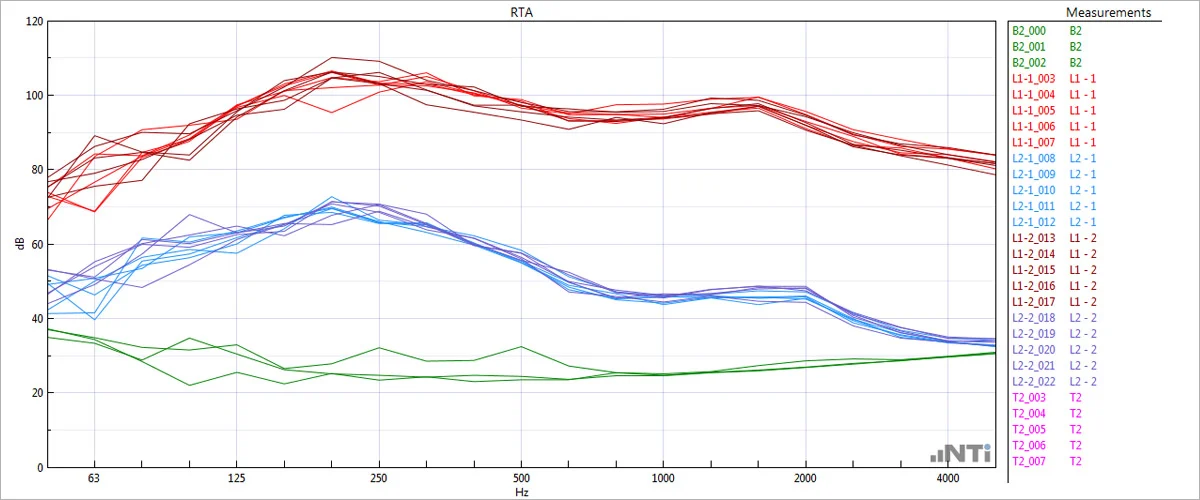
ในห้องรับเสียงจะมีเสียงพื้นหลังจากระบบปรับอากาศ ถนน หรือคนในอาคารเสมอ ต้องวัดแยกไว้ ถ้าระดับเสียงทดสอบสูงกว่าเสียงพื้นหลังไม่พอ มาตรฐานกำหนดวิธีแก้ค่าและการทำเครื่องหมายผลในย่านนั้น ซอฟต์แวร์แสดงย่านที่ถูกแก้ค่าด้วยพื้นที่สีใน Calculations ViewThe receiving room always has some background noise from air conditioning, traffic or occupants, and it is measured separately. If the test signal is not far enough above it, the standard prescribes how to correct and mark the affected bands; the software shows corrected bands as coloured areas in the Calculations view.

4. ค่าตัวเลขเดียว4. Single-number rating

ผลรายย่านความถี่ถูกเทียบกับเส้นอ้างอิงตาม ISO 717 เพื่อให้ได้ค่าตัวเลขเดียว เช่น DnT,w หรือ R′w และค่าปรับสเปกตรัม C, Ctr สำหรับเสียงกระแทกคือ L′nT,w และ CI ค่าเหล่านี้คือสิ่งที่มักระบุในข้อกำหนดโครงการThe band results are compared with the ISO 717 reference curve to give a single number such as DnT,w or R′w, with the spectrum adaptation terms C and Ctr; for impact sound it is L′nT,w and CI. These are the values project specifications usually quote.

สูตรข้างต้นเป็นรูปแบบทั่วไปตาม ISO 16283 เพื่ออธิบายหลักการ จำนวนตำแหน่งแหล่งกำเนิดเสียงและไมโครโฟน ระยะห่างขั้นต่ำ และเกณฑ์เสียงพื้นหลังให้ใช้ตามมาตรฐานฉบับที่งานของคุณกำหนดThe formulas above are the general ISO 16283 forms, given to explain the principle. Use the number of source and microphone positions, minimum distances and background criteria from the standard edition your project specifies.

ประเภทการกันเสียงSound insulation types

การกันเสียง 3 แบบ มาตรฐาน และแหล่งกำเนิดเสียงThree types of sound insulation, standards and sources

รายการมาตรฐานและแหล่งกำเนิดเสียงตาม Product Data ของ NTi Audio (07/2021) แยกตามประเภทการวัดStandards and sound sources per measurement type, as listed in NTi Audio's Product Data (07/2021).

Airborne

การกันเสียงผ่านอากาศ: โครงสร้างกั้นเสียงที่เดินทางผ่านอากาศ เช่น เสียงพูดหรือเสียงจราจร ได้ดีเพียงใดAirborne sound insulation: how well structures block sound travelling through the air, such as voices or traffic.

  • ISO 16283-1 (รวมห้องเล็กกว่า 25 m³), ISO 140-4, ISO 10140, ISO 717-1, ISO 12999-1ISO 16283-1 (incl. rooms < 25 m³), ISO 140-4, ISO 10140, ISO 717-1, ISO 12999-1
  • ASTM E336, ASTM E413, BB93, DIN 4109, Approved Document E (England/Wales), GB/T 19889.4, NEN 5077:2019, SIA 181:2006, SIA 181:2020
  • แหล่งกำเนิดเสียง: ลำโพงSource: loudspeaker

Impact

การกันเสียงกระแทก: เสียงจากการกระแทก เช่น เสียงเดิน โดยใช้แหล่งกำเนิดเสียงกระแทกมาตรฐานImpact sound insulation: noise caused by impacts such as footsteps, using a standardised tapping source.

  • ISO 16283-2 (รวมห้องเล็กกว่า 25 m³), ISO 140-7, ISO 10140, ISO 717-2, ISO 12999-1ISO 16283-2 (incl. rooms < 25 m³), ISO 140-7, ISO 10140, ISO 717-2, ISO 12999-1
  • ASTM E1007, ASTM E989, BB93, DIN 4109, Approved Document E (England/Wales), GB/T 19889.7, NEN 5077:2019, SIA 181:2006, SIA 181:2020
  • แหล่งกำเนิดเสียง: Tapping Machine หรือ Rubber BallSource: tapping machine or rubber ball

Facade

การกันเสียงของผนังภายนอกอาคาร (Facade)Facade sound insulation.

  • ISO 16283-3 (รวมห้องเล็กกว่า 25 m³), ISO 140-5, ISO 717-1, ISO 12999-1ISO 16283-3 (incl. rooms < 25 m³), ISO 140-5, ISO 717-1, ISO 12999-1
  • ASTM E966, ASTM E1332, DIN 4109, GB/T 19889.5, NEN 5077:2019, SIA 181:2006, SIA 181:2020
  • แหล่งกำเนิดเสียง: ลำโพง หรือเสียงจราจรถนน รถไฟ และอากาศยานSource: loudspeaker, or road, railway and aircraft traffic

ฉบับปีของมาตรฐานแต่ละฉบับดูได้ใน Product Data ของ NTi Audio และอาจเปลี่ยนตามเวอร์ชันซอฟต์แวร์ ตรวจสอบกับ GET BEST SOUND ก่อนระบุในสัญญาEdition years are given in NTi Audio's Product Data and may change with software versions; check with GET BEST SOUND before quoting them in a contract.

ขั้นตอนการทำงานWorkflow

จากการวัดสู่รายงานมาตรฐานFrom measurement to standardised report

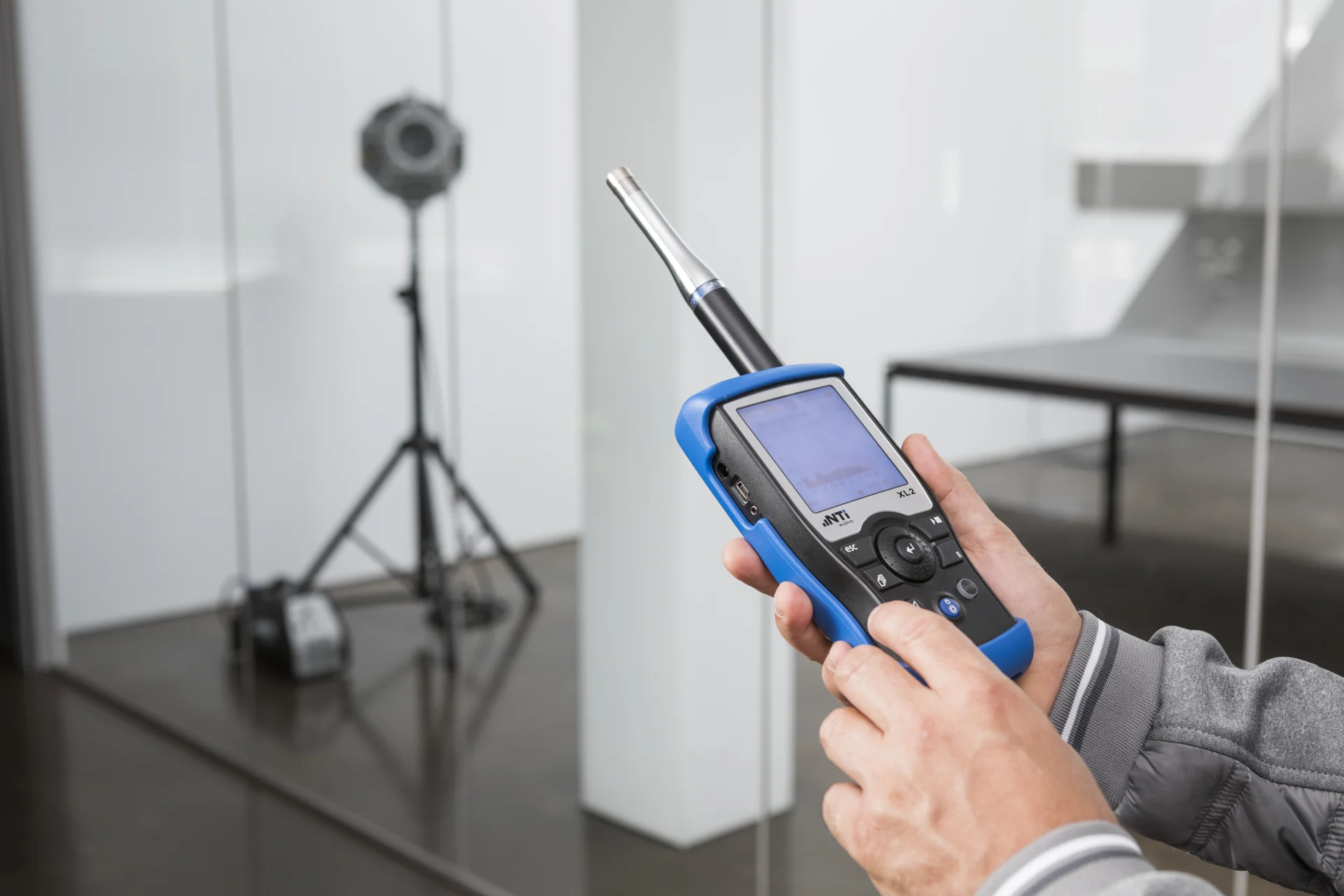
  1. วัดในห้องต้นทางและห้องรับเสียงด้วย XL3 / XL2Measure in sending and receiving rooms with XL3 / XL2
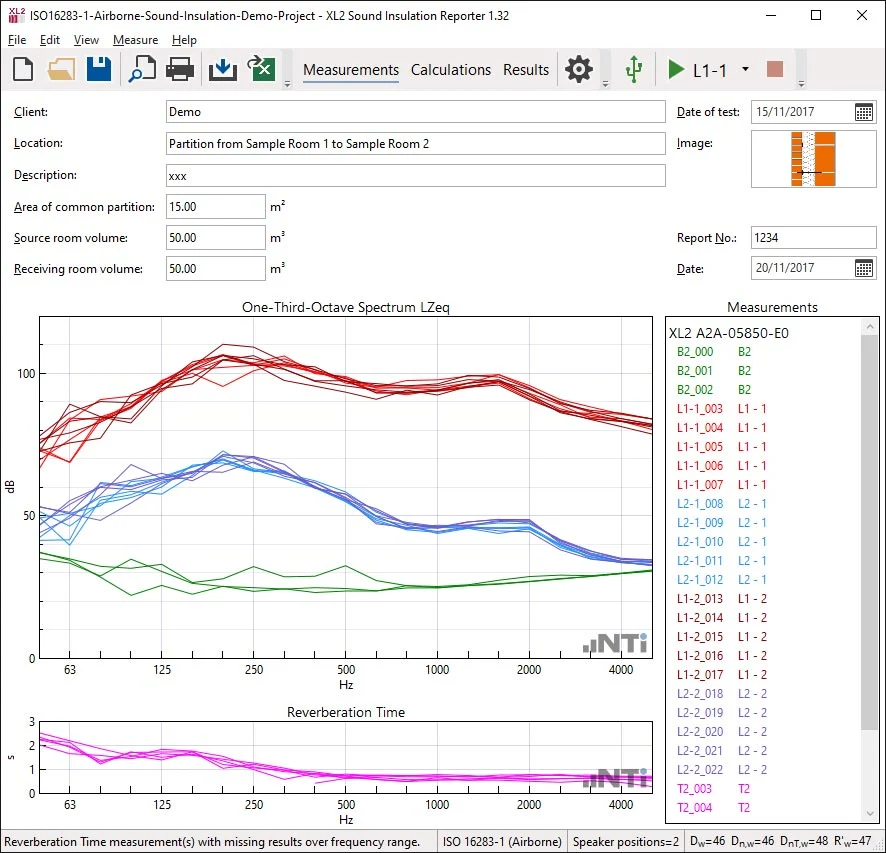
  2. Measurements View: ลากข้อมูลเข้าหรือวัดแบบรีโมตMeasurements view: drag & drop or remote measurement
  3. จัดข้อมูลตามห้องและตำแหน่งลำโพงอัตโนมัติData assigned to rooms and speaker positions automatically
  4. Calculations View: แก้ค่าเสียงพื้นหลังCalculations view: background noise correction
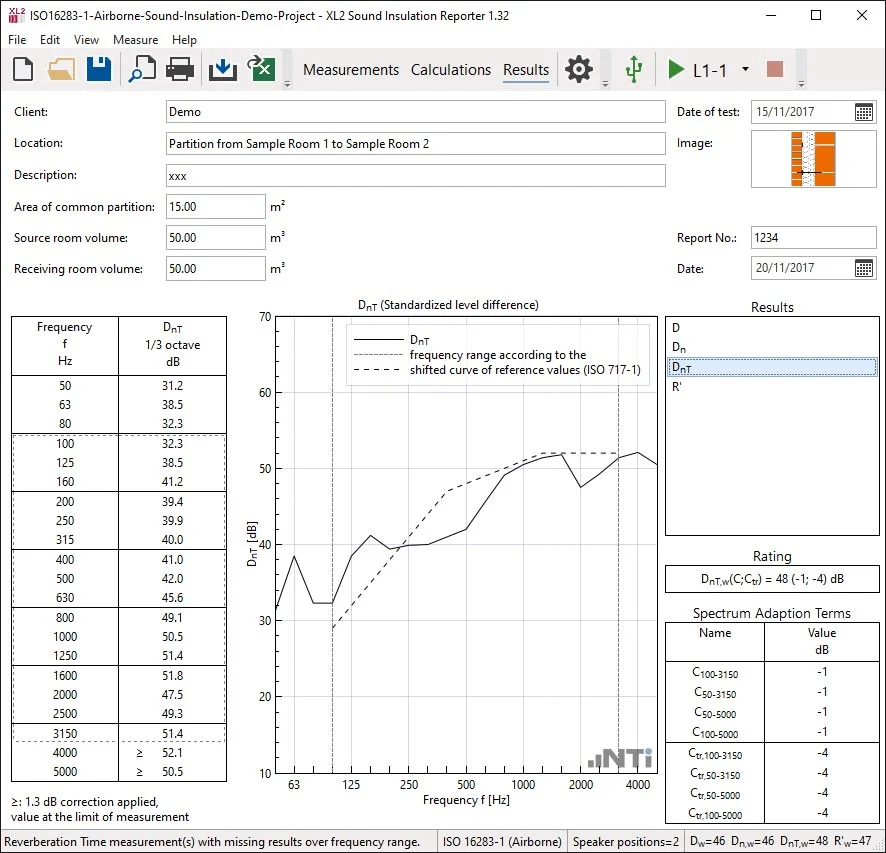
  5. Results View: ตารางและกราฟ 50 Hz – 5 kHzResults view: table and chart 50 Hz – 5 kHz
  6. รายงานตามมาตรฐานStandardised report

ผลลัพธ์แสดงค่า Single number rating และ Spectrum corrections ตามที่มาตรฐานกำหนดResults show the single number rating and spectrum corrections as required by the standard.

หน้าข้อมูลการวัดใน Sound Insulation ReporterSound Insulation Reporter measurements view
หน้าผลการประเมินใน Sound Insulation ReporterSound Insulation Reporter results view

Sound Insulation Reporter: หน้าข้อมูลการวัด และผลการประเมินค่าตัวเลขเดียว (ภาพหน้าจอ: NTi Audio)Sound Insulation Reporter: measurements and single-number rating results (screenshots: NTi Audio)

คู่มือเริ่มต้นใช้งานBeginner Guide

คู่มือเริ่มต้นใช้งาน Sound Insulation Reporter: ผนังกั้นแรกของคุณSound Insulation Reporter Beginner Guide: your first partition

ตัวอย่างนี้คือการวัดเสียงผ่านอากาศ (airborne) ของผนังกั้นหนึ่งผืน ขั้นตอนและชื่อเมนูตามคู่มือ Sound Insulation Reporter for XL3 & XL2 ของ NTi AudioThe example is an airborne measurement of one partition. Steps and menu names follow NTi Audio's Sound Insulation Reporter for XL3 & XL2 user manual.

ต้องมีอะไรบ้างก่อนเริ่มWhat you need before you start

  • XL3: XL3 Sound Insulation Option (หรือชุด XL3 Sound Insulation Bundle) และเฟิร์มแวร์ V1.46 ขึ้นไป การวัดเวลาเสียงก้องแบบ 1/3 ออกเตฟใน XL3 ต้องมี XL3 Sound Insulation Option หรือ Reverberation Time Option ถ้าไม่มีจะวัดได้เฉพาะออกเตฟ ซึ่งจำกัดมาตรฐานที่เลือกได้XL3: the XL3 Sound Insulation Option (or the XL3 Sound Insulation Bundle) and firmware V1.46 or later. 1/3-octave reverberation time on the XL3 needs the XL3 Sound Insulation Option or the Reverberation Time Option; without them only octaves are measured, which limits the standards you can use.
  • XL2: XL2 Extended Acoustic Pack (สำหรับเวลาเสียงก้องแบบ 1/3 ออกเตฟ) และ XL2 Sound Insulation Option (ถาวร) หรือ Sound Insulation Reporter 365 เพื่อเปิดการนำเข้าข้อมูล เฟิร์มแวร์ขั้นต่ำสำหรับการนำเข้าคือ V4.03 ถ้าจะวัดสองห้องพร้อมกันผ่านโปรแกรมต้องมี XL2 Remote Measurement OptionXL2: the XL2 Extended Acoustic Pack (for 1/3-octave reverberation time) and the permanent XL2 Sound Insulation Option or Sound Insulation Reporter 365 to enable import; firmware V4.03 or later for import. Measuring both rooms at once from the software needs the XL2 Remote Measurement Option.
  • ลำโพงรอบทิศและแอมป์ (เช่น DS3 กับ PA3) ไมโครโฟนวัดเสียง Sound calibrator และคอมพิวเตอร์ WindowsAn omnidirectional loudspeaker and amplifier (such as the DS3 and PA3), a measurement microphone, a sound calibrator and a Windows computer.
  • พื้นฐาน: การกันเสียงในอาคาร และ ISO 16283Background: building sound insulation and ISO 16283.
  1. STEP1

    เลือกห้องต้นเสียงและห้องรับเสียงChoose the source and receiving rooms

    NTi แนะนำให้ใช้ห้องที่เล็กกว่า (หรือห้องที่เป็นทรงกล่อง) เป็นห้องรับเสียง ตรวจเครื่องด้วย calibrator ตอนเริ่มและจบงานของแต่ละวัน และให้ผู้วัดออกจากห้องระหว่างวัดNTi recommends the smaller (or box-shaped) room as the receiving room. Check the meter with a calibrator at the start and end of each day, and leave the room while measuring.

  2. STEP2

    วัดเสียงพื้นหลังในห้องรับเสียง (B2)Measure the background in the receiving room (B2)

    ปิดลำโพงแล้ววัดระดับเสียงพื้นหลัง B2 ในห้องรับเสียงก่อน วัดแบบถ่วงน้ำหนัก Z เป็นสเปกตรัม ราว 15 วินาทีต่อตำแหน่ง ถ้าเสียงพื้นหลังไม่คงที่ให้วัดนานขึ้น เช่น 30 วินาทีWith the loudspeaker off, measure the background level B2 in the receiving room first: a Z-weighted spectrum, about 15 seconds per position, longer (for example 30 seconds) if the background is unsteady.

    ในโปรแกรมIn the programXL3 ที่มี Option: เมนู Sound Insulation → หน้า Select measurement · XL2: SLMeter (RTA 1/3 ออกเตฟ, Z) → Save Test → Sound-InsulXL3 with the option: Sound Insulation menu → Select measurement page · XL2: SLMeter (RTA 1/3 octave, Z) → Save Test → Sound-Insul

  3. STEP3

    วัดระดับเสียงในห้องต้นเสียงและห้องรับเสียง (L1, L2)Measure the source and receiving room levels (L1, L2)

    เปิดสัญญาณทดสอบแล้ววัด L1 ในห้องต้นเสียงและ L2 ในห้องรับเสียงสำหรับตำแหน่งลำโพงแต่ละจุด อย่างน้อยสองตำแหน่งลำโพง ใช้ไมโครโฟนห้าตำแหน่งต่อห้อง ห่างกันอย่างน้อย 0.7 m ห่างผนังอย่างน้อย 0.5 m ห่างลำโพงอย่างน้อย 1.0 m และไม่วางเป็นตารางสม่ำเสมอ (ตามแนวทางในภาคผนวกของคู่มือ NTi)Play the test signal and measure L1 in the source room and L2 in the receiving room for each loudspeaker position, with at least two loudspeaker positions. Use five microphone positions per room, at least 0.7 m apart, 0.5 m from boundaries and 1.0 m from the loudspeaker, not on a regular grid (per the appendix of NTi's manual).

    ข้อควรระวังWatch outสัญญาณในห้องรับเสียงควรสูงกว่าเสียงพื้นหลังอย่างน้อย 6 dB (ดีกว่าคือ 10 dB) ทุกย่าน 50 Hz–5 kHz ย่านที่ต่ำกว่านั้นจะถูกแก้ค่าตามมาตรฐานและกลายเป็นค่าที่ถูกจำกัดด้วยการวัดThe receiving-room signal should be at least 6 dB (better 10 dB) above background in every band from 50 Hz to 5 kHz; bands below that are corrected per the standard and become limits of measurement.

  4. STEP4

    วัดเวลาเสียงก้องในห้องรับเสียง (T2)Measure the reverberation time in the receiving room (T2)

    วัดเวลาเสียงก้องในห้องรับเสียงที่สามตำแหน่งไมโครโฟน อย่างน้อยสองครั้ง (ดีกว่าคือสามครั้ง) ต่อตำแหน่ง ช่วงเปิดปิดสัญญาณต้องยาวกว่าเวลาเสียงก้องที่คาดไว้ บน XL3 เลือก T20 หรือ T30 ในหน้า Settings ก่อนเริ่มวัดMeasure the reverberation time in the receiving room at three microphone positions, at least two (better three) decays per position, with a signal on/off cycle longer than the expected reverberation time. On the XL3, choose T20 or T30 on the Settings page before starting.

    ในโปรแกรมIn the programXL3: Sound Insulation → Settings (ระยะเวลาวัด 6/15/30/60 s, T20 / T30) · XL2: ฟังก์ชัน RT60XL3: Sound Insulation → Settings (duration 6/15/30/60 s, T20 / T30) · XL2: RT60 function

  5. STEP5

    สร้างผนังกั้นใหม่ในโปรแกรมCreate a new partition in the software

    เปิดโปรแกรมแล้วสร้างผนังกั้นใหม่ เลือกมาตรฐาน ชนิดการวัด (Airborne, Impact หรือ Facade) จำนวนตำแหน่งลำโพง หน่วย ผลที่ต้องการ และรูปแบบค่าตัวเลขเดียว (ขั้นละ 1 dB หรือ 0.1 dB พร้อมความไม่แน่นอน ซึ่งมีเฉพาะบางมาตรฐาน) แล้วกด OKOpen the program and create a new partition: choose the standard, the type (Airborne, Impact or Facade), the number of loudspeaker positions, the unit, the results and the rating format (1 dB steps, or 0.1 dB steps with uncertainty for some standards), then press OK.

    ในโปรแกรมIn the programFile → New Partition... → Standard, Airborne / Impact / Facade, Speaker positions, Unit, Results, Rating Format → OKFile → New Partition... → Standard, Airborne / Impact / Facade, Speaker positions, Unit, Results, Rating Format → OK

    ข้อควรระวังWatch outในเวอร์ชัน 1.50 ขึ้นไปโปรแกรมเปิดที่ Site View ซึ่งรวมหลายผนังกั้น ถ้าจะทำทีละผนังกั้นแบบเดิมให้คลิก New PartitionsFrom version 1.50 the program opens in the Site View, which holds several partitions; to work one partition at a time as before, click New Partitions.
  6. STEP6

    นำเข้าข้อมูลการวัดImport the measurement data

    ลากโฟลเดอร์ของผนังกั้นทั้งโฟลเดอร์จากการ์ดหน่วยความจำมาวางในช่องนำเข้า โฟลเดอร์ต้องมีทั้งไฟล์ข้อมูล .txt และไฟล์ระบบ (.xl3si สำหรับ XL3 หรือ .xl2 สำหรับ XL2) โปรแกรมจัดข้อมูลเข้าตำแหน่งให้อัตโนมัติจากชื่อไฟล์ เช่น L1-1 คือห้องต้นเสียง ตำแหน่งลำโพง 1 และแปลงข้อมูลที่วัดแบบ A หรือ C เป็น Z ให้Drag the whole partition folder from the memory card into the drop field. The folder must contain the .txt data files and the system files (.xl3si for the XL3, .xl2 for the XL2). The program assigns data automatically from the file names, for example L1-1 = source room, loudspeaker position 1, and converts A- or C-weighted data to Z.

    ในโปรแกรมIn the programช่อง “Drop measurement files or folder here” · หรือ File → Import → Folder... / File...“Drop measurement files or folder here” field · or File → Import → Folder... / File...

    ข้อควรระวังWatch outหนึ่งโฟลเดอร์ต่อหนึ่งผนังกั้น เพราะแต่ละผนังกั้นคือหนึ่งโปรเจกต์ และโปรแกรมตรวจ License ออนไลน์ระหว่างนำเข้าOne folder per partition, because each partition is one project; the program checks the licence online during import.

  7. STEP7

    ตรวจการจัดข้อมูลและค่าเฉลี่ยCheck the assignment and the averages

    ตรวจว่าข้อมูลแต่ละชุดอยู่ถูกตำแหน่ง แก้ด้วยคลิกขวาแล้ว Assign To ลบค่าที่ผิดออกจากรายการ Measurements แล้วเปิดมุมมอง Calculations เพื่อดูค่าเฉลี่ย L1, L2, B2 และ T2 ของแต่ละตำแหน่งลำโพง และปิดค่าที่ผิดปกติCheck that each dataset is in the right place, correct it with right-click → Assign To, and delete false readings from the Measurements list. Then open the Calculations view to check the averaged L1, L2, B2 and T2 per loudspeaker position, and switch off outliers.

    ในโปรแกรมIn the programคลิกขวา → Assign To · View → Measurements / Calculationsright-click → Assign To · View → Measurements / Calculations

  8. STEP8

    อ่านผลและค่าตัวเลขเดียวRead the results and the single number

    มุมมอง Results แสดงตารางและกราฟ 50 Hz–5 kHz ค่าตัวเลขเดียว (เช่น DnT,w หรือ R'w) พร้อมค่าปรับ C และ Ctr ค่าตัวเลขเดียวคือค่าของเส้นอ้างอิงที่เลื่อนแล้วที่ 500 Hz ตาม ISO 717 ตั้ง Rating Target เพื่อให้แสดงผ่าน/ไม่ผ่านได้The Results view shows the table and chart from 50 Hz to 5 kHz and the single number (such as DnT,w or R'w) with the C and Ctr terms; the single number is the shifted reference curve's value at 500 Hz per ISO 717. Set a Rating Target to show pass / fail.

    ในโปรแกรมIn the programView → Results · Edit → Rating Target...View → Results · Edit → Rating Target...

    ข้อควรระวังWatch outย่านที่มีเครื่องหมาย ≤ หรือ ≥ คือย่านที่ระดับในห้องรับเสียงสูงกว่าเสียงพื้นหลังไม่ถึง 6 dB โปรแกรมใช้ค่าแก้คงที่ 1.3 dB และผลในย่านนั้นเป็นค่าจำกัดของการวัดBands marked ≤ or ≥ are where the receiving-room level was less than 6 dB above background: the program applies the fixed 1.3 dB correction and the result there is a limit of measurement.

  9. STEP9

    กรอกข้อมูลหัวรายงานFill in the report header

    ใส่ผู้ว่าจ้าง ชื่องาน รายละเอียด พื้นที่ผนังกั้น S และปริมาตรห้อง พื้นที่และปริมาตรไม่ได้เป็นแค่ข้อมูลในรายงาน แต่ใช้ในการคำนวณด้วยEnter the client, object, description, the partition area S and the room volumes. The area and volumes are not just report text: they are used in the calculation.

  10. STEP10

    พิมพ์รายงาน ส่งออก และบันทึกPrint, export and save

    ดูตัวอย่างก่อนพิมพ์แล้วพิมพ์รายงาน ถ้าต้องการไฟล์ PDF ให้พิมพ์ผ่าน PDF printer ส่งออกข้อมูลและผลทั้งหมดไปยัง Excel ได้ แล้วบันทึกโปรเจกต์เป็นไฟล์ .xlbaUse Print Preview, then print the report; for a PDF, print to a PDF printer. All data and results can be exported to Excel. Save the project as an .xlba file.

    ในโปรแกรมIn the programFile → Print Preview / Print... · File → Export to Excel... · File → Save PartitionFile → Print Preview / Print... · File → Export to Excel... · File → Save Partition

ขั้นตอนและชื่อเมนูตามคู่มือ Sound Insulation Reporter for XL3 & XL2 ของ NTi Audio (ประวัติรุ่นถึง V1.47 ตุลาคม 2024 และอธิบาย Site View ของเวอร์ชัน 1.50) NTi ไม่ได้ระบุหมายเลขเวอร์ชันปัจจุบันบนหน้าผลิตภัณฑ์ ตำแหน่งไมโครโฟนและลำโพงข้างต้นเป็นแนวทางในภาคผนวกของคู่มือ NTi ให้ใช้ตามมาตรฐานที่งานกำหนดเป็นหลักSteps and menu names follow NTi Audio's Sound Insulation Reporter for XL3 & XL2 manual (revision history to V1.47, October 2024, and describing the version 1.50 Site View); NTi does not state the current version number on the product page. The microphone and loudspeaker positions above are the guidance in the appendix of NTi's manual; the standard required for the job takes precedence.

ค่าที่ต้องอ่านให้เป็นValues to understand

ค่าหลักในรายงาน Sound Insulation ReporterThe main values in a Sound Insulation Reporter report

ความหมายตามที่ NTi อธิบายในคู่มือ รายละเอียดทางอะคูสติกอยู่ในบทความที่ลิงก์ไว้Meanings as NTi describes them in its manual; the acoustics is in the linked articles.

ระดับในห้องต้นเสียง / ห้องรับเสียง / เสียงพื้นหลังSource, receiving and background levels L1 · L2 · B2 · dB

คืออะไรWhat it is
L1 และ L2 เป็นค่าเฉลี่ยจากหลายตำแหน่งไมโครโฟนต่อหนึ่งตำแหน่งลำโพง B2 คือเสียงพื้นหลังในห้องรับเสียงเมื่อปิดลำโพงL1 and L2 are averages over the microphone positions for each loudspeaker position; B2 is the receiving-room background with the loudspeaker off.
ทำไมต้องสนใจWhy it matters
ทุกผลคำนวณจากสามค่านี้ ถ้าค่าเฉลี่ยผิดหรือมีเสียงรบกวน ผลทั้งหมดจะผิดตามEvery result is calculated from these; a wrong average or a disturbance spoils everything downstream.

เวลาเสียงก้องในห้องรับเสียงReceiving-room reverberation time T2 · s

คืออะไรWhat it is
ใช้แก้ผลตามสภาพห้องรับเสียง DnT อ้างอิงเวลาเสียงก้อง 0.5 sUsed for the room correction; DnT is referred to a reference reverberation time of 0.5 s.
ทำไมต้องสนใจWhy it matters
ห้องเดียวกันที่ตกแต่งต่างกันให้ D ต่างกัน T2 ทำให้เทียบผลได้The same room with different furnishing gives a different D; T2 makes results comparable.
อ่านพื้นฐานเพิ่มเติม →Read the basics →

ผลต่างระดับเสียงแบบ standardisedStandardised level difference DnT · DnT,w · dB

คืออะไรWhat it is
ผลต่างระหว่าง L1 กับ L2 ที่ปรับตามเวลาเสียงก้องของห้องรับเสียงเทียบกับ 0.5 s DnT,w คือค่าตัวเลขเดียวตาม ISO 717-1The L1–L2 difference adjusted for the receiving-room reverberation time relative to 0.5 s; DnT,w is the single number per ISO 717-1.
ทำไมต้องสนใจWhy it matters
ข้อกำหนดของอาคารหลายแห่งเขียนเกณฑ์เป็น DnT,wMany building requirements are written as DnT,w.
เข้าใจผิดบ่อยCommon misunderstanding
DnT บอกสภาพระหว่างห้องจริงสองห้อง ไม่ใช่สมบัติของผนังอย่างเดียวDnT describes the real pair of rooms, not the wall on its own.
อ่านพื้นฐานเพิ่มเติม →Read the basics →

ค่าการลดทอนเสียงภาคสนามApparent sound reduction index R' · R'w · dB

คืออะไรWhat it is
ค่าการลดทอนเสียงที่วัดในอาคารจริง รวมเสียงที่ผ่านทางอ้อม (flanking) ใช้พื้นที่ผนังกั้น S และปริมาตรห้องในการคำนวณThe sound reduction index measured in a real building, including flanking paths; the partition area S and room volume are used in the calculation.
ทำไมต้องสนใจWhy it matters
ใช้เทียบกับค่า R ของผนังจากห้องปฏิบัติการเพื่อดูผลของ flanking และการติดตั้งCompared with the laboratory R of the wall to see the effect of flanking and workmanship.
เข้าใจผิดบ่อยCommon misunderstanding
R' ภาคสนามมักต่ำกว่า R จากห้องปฏิบัติการ ไม่ได้แปลว่าวัดผิดA field R' is usually lower than a laboratory R; that does not mean the measurement is wrong.
อ่านพื้นฐานเพิ่มเติม →Read the basics →

ค่าปรับตามสเปกตรัมSpectrum adaptation terms C · Ctr · CI · dB

คืออะไรWhat it is
ค่าปรับตาม ISO 717 ที่บวกกับค่าตัวเลขเดียว C และ Ctr สำหรับเสียงผ่านอากาศ CI สำหรับเสียงกระแทกISO 717 terms added to the single number: C and Ctr for airborne sound, CI for impact sound.
ทำไมต้องสนใจWhy it matters
บอกว่าผนังรับมือกับเสียงที่มีลักษณะต่างกันได้ดีแค่ไหน เช่น เสียงที่มีความถี่ต่ำมากShow how well the element copes with sounds of different character, such as low-frequency-heavy sound.
อ่านพื้นฐานเพิ่มเติม →Read the basics →

ระดับเสียงกระแทกแบบ standardisedStandardised impact sound level L'nT · L'nT,w · dB

คืออะไรWhat it is
ระดับเสียงกระแทกในห้องรับเสียงเมื่อใช้เครื่องเคาะมาตรฐาน ปรับตามเวลาเสียงก้องThe impact sound level in the receiving room with a standard tapping machine, adjusted for reverberation time.
ทำไมต้องสนใจWhy it matters
ใช้ประเมินเสียงเดินหรือเสียงกระแทกจากชั้นบนUsed to assess footsteps and impacts from the floor above.
เข้าใจผิดบ่อยCommon misunderstanding
ค่านี้ยิ่งต่ำยิ่งดี ต่างจาก DnT ที่ยิ่งสูงยิ่งดีLower is better, unlike DnT where higher is better.
อ่านพื้นฐานเพิ่มเติม →Read the basics →

ตัวอย่างสถานการณ์Example scenario

ขั้นตอนหน้างาน: ทดสอบผนังระหว่างห้องชุดสองห้องOn site: testing the party wall between two apartments

  1. สำรวจห้อง บันทึกขนาดผนังกั้นและปริมาตรห้องรับเสียงSurvey the rooms; record the partition area and receiving-room volume
  2. สอบเทียบเครื่องวัดด้วย Sound CalibratorCheck the meter with the sound calibrator
  3. ตั้ง DS3 ในห้องต้นทาง ตำแหน่งแรก เปิด Pink noisePlace the DS3 in the sending room, first position, pink noise on
  4. วัด L1 ในห้องต้นทางและ L2 ในห้องรับเสียงหลายตำแหน่งMeasure L1 in the sending room and L2 in the receiving room at several positions
  5. ย้ายลำโพงไปตำแหน่งที่สองแล้ววัดซ้ำMove the loudspeaker to the second position and repeat
  6. ปิดลำโพง วัดเสียงพื้นหลังในห้องรับเสียงSwitch the source off; measure background noise in the receiving room
  7. วัดเวลาเสียงก้องของห้องรับเสียงMeasure the receiving room's reverberation time
  8. นำข้อมูลเข้า Sound Insulation Reporter ตรวจ แล้วออกรายงานImport into the Sound Insulation Reporter, review, report

ตัวอย่างสถานการณ์ทั่วไปเพื่ออธิบายลำดับงาน ไม่ใช่โครงการจริงของ GET BEST SOUND ถ้ามีเครื่องวัดสองเครื่องที่ควบคุมจากซอฟต์แวร์ ขั้นที่ 4 วัดสองห้องพร้อมกันได้ งานเสียงกระแทกใช้ Tapping machine บนพื้นห้องด้านบนแทนลำโพงA generic example to show the order of work, not a real GET BEST SOUND project. With two meters controlled from the software, step 4 can cover both rooms at once. For impact sound a tapping machine on the floor above replaces the loudspeaker.

ฟังก์ชันหลักKey functions

วัดพร้อมกันหลายห้องและทำรายงานSimultaneous measurements in several rooms and reporting

Remote measurements

  • ควบคุมเครื่องวัดระดับเสียง 2 เครื่องขึ้นไปจากซอฟต์แวร์ ผ่าน USB, LAN หรือไร้สายControl two or more sound level meters directly from the software via USB, LAN or wireless
  • วัดห้องต้นทางและห้องรับเสียงพร้อมกันที่หน้างาน ช่วยประหยัดเวลาMeasure the sending and receiving rooms simultaneously on site, saving time
  • สำหรับ XL2 การควบคุมจากซอฟต์แวร์ต้องมี XL2 Remote Measurement OptionFor the XL2, control from the software needs the XL2 Remote Measurement Option

Multi-Views

  • Measurements View: จัดข้อมูลตามห้องต้นทาง/ห้องรับเสียงและตำแหน่งลำโพงอัตโนมัติMeasurements view: data automatically assigned to sending/receiving room and speaker position
  • Calculations View: ประเมินข้อมูลแต่ละชุด พื้นที่สีแสดงการแก้ค่าเสียงพื้นหลังCalculations view: evaluate each data set; coloured background noise correction areas
  • Results View: ตารางและกราฟมาตรฐาน 50 Hz – 5 kHzResults view: table and standardised chart from 50 Hz to 5 kHz

รายงานReporting

  • แสดงผลการวัดทั้งหมดVisualisation of all measurements
  • รายงานตามรูปแบบที่ต้องการCustomised reporting
  • ออกรายงานเป็น PDF (ผ่าน PDF printer) หรือ XPS และคัดลอกข้อมูลไปรายงานของตัวเองได้Report output as PDF (via a PDF printer) or XPS, or copy the data into your own reports

ภาษาLanguages

  • โปรแกรม: อังกฤษ เยอรมัน จีนSoftware: English, German, Chinese
  • รายงานเพิ่มเติม: เช็ก ดัตช์ ฝรั่งเศส อิตาลี เกาหลี สวีเดนReports also in Czech, Dutch, French, Italian, Korean, Swedish
  • ไม่มีภาษาไทยในรายการของ NTi Audio (07/2021)Thai is not in NTi Audio's list (07/2021)

ต้องมีอะไรบ้างWhat else do I need?

ชุดวัดการกันเสียงครบระบบThe complete sound insulation measurement system

ซอฟต์แวร์เป็นเพียงปลายทางของระบบ ชุดวัดที่ใช้ได้จริงประกอบด้วยเครื่องวัด ไมโครโฟน Calibrator แหล่งกำเนิดเสียง และ LicenseThe software is the end of the chain. A working kit combines an analyzer, microphone, calibrator, sound sources and the licence.

เครื่องวัดและ OptionAnalyzer and option

  • XL3 + XL3 Sound Insulation Option หรือ XL3 Sound Insulation Bundle (# 600 000 742)XL3 + XL3 Sound Insulation Option, or the XL3 Sound Insulation Bundle (# 600 000 742)
  • หรือ XL2 + XL2 Extended Acoustic Pack (+ XL2 Remote Measurement Option ถ้าต้องการวัดสองห้องพร้อมกัน)Or XL2 + XL2 Extended Acoustic Pack (+ XL2 Remote Measurement Option for simultaneous two-room measurement)

ไมโครโฟนและการสอบเทียบMicrophone and calibration

  • ไมโครโฟนวัดเสียง เช่น M2230 ตามชุดวัดอะคูสติกอาคารของ NTi Audio พร้อม 1/2″ Windscreen 90 mmA measurement microphone such as the M2230, as in NTi Audio's building acoustics kit, with the 1/2″ windscreen 90 mm
  • Class 1 Sound Calibrator ตรวจก่อนและหลังการวัดClass 1 Sound Calibrator for checks before and after measuring
  • ขาตั้งไมโครโฟนMicrophone tripod

แหล่งกำเนิดเสียงSound sources

  • Airborne และ Facade: ลำโพงรอบทิศทาง DS3 + ภาคขยาย PA3Airborne and facade: DS3 omnidirectional loudspeaker + PA3 amplifier
  • Impact: Tapping machine มาตรฐาน (ชุดของ NTi Audio ระบุ TM EOS2) และ Impact ball (IB01) ตามที่มาตรฐานกำหนดImpact: a standard tapping machine (NTi Audio's kit names the TM EOS2) and an impact ball (IB01) where the standard calls for it

ซอฟต์แวร์และ LicenseSoftware and licence

  • Sound Insulation Reporter บน PC WindowsSound Insulation Reporter on a Windows PC
  • License 365, 365 Company หรือ Permanent ตามจำนวนเครื่องและความถี่ของงาน365, 365 Company or Permanent licence, depending on instruments and workload

รายการนี้สรุปจากชุดวัดอะคูสติกอาคารที่ NTi Audio แนะนำและข้อกำหนดของซอฟต์แวร์ GET BEST SOUND ยืนยันรายการ รหัสสั่งซื้อ และรุ่นที่เหมาะกับงานในใบเสนอราคาSummarised from NTi Audio's recommended building acoustics kit and the software requirements. GET BEST SOUND confirms items, order numbers and suitable versions in each quotation.

เลือกชุดให้ตรงงานChoosing the configuration

ควรเลือกแบบไหนWhich configuration fits you

ใช้ XL3 อยู่แล้ว หรือกำลังซื้อใหม่You own or are buying an XL3

XL3 Sound Insulation Bundle รวม Option บนเครื่องและ License ซอฟต์แวร์ เครื่องแสดงผลการกันเสียงได้ที่หน้างาน ส่วนซอฟต์แวร์ใช้รวมข้อมูลทุกตำแหน่งและทำรายงานThe XL3 Sound Insulation Bundle combines the on-instrument option and the software licence: the meter shows sound insulation results on site, and the software combines all positions and produces the report.

ใช้ XL2 อยู่แล้วYou already use an XL2

ต้องมี XL2 Extended Acoustic Pack เพื่อวัดเวลาเสียงก้องแบบ 1/3 ออกเตฟ แล้วเลือก XL2 Sound Insulation Option (License ถาวร # 600 000 432) หรือ Reporter 365 (# 600 000 433) เพิ่ม XL2 Remote Measurement Option เมื่อจะควบคุมสองเครื่องจากซอฟต์แวร์The XL2 Extended Acoustic Pack is needed for 1/3-octave reverberation time; then choose the XL2 Sound Insulation Option (permanent licence # 600 000 432) or Reporter 365 (# 600 000 433). Add the XL2 Remote Measurement Option to control two meters from the software.

งานไม่บ่อย หรือเป็นโครงการOccasional or project-based work

License 365 ใช้ได้ 1 ปีและนำเข้าข้อมูลที่บันทึกไว้ก่อนสมัครได้ เหมาะกับงานเป็นช่วง ๆ ถ้ามีงานต่อเนื่องหลายปี License ถาวรมักคุ้มกว่า บริษัทที่มีเครื่องวัด 3 เครื่องขึ้นไปดู 365 CompanyA 365 licence runs for one year and also imports data recorded before the subscription, which suits work in bursts. For continuous work over several years a permanent licence usually makes more sense; companies with 3 or more instruments should look at 365 Company.

วัดเพียงไม่กี่ครั้งOnly a few tests

ถ้าต้องการผลวัดเพียงบางโครงการ การจ้างวัดอาจเหมาะกว่าการลงทุนทั้งชุด GET BEST SOUND ให้บริการวัดการกันเสียงและทำรายงานIf you only need results for a few projects, commissioning the test may suit better than buying the full kit. GET BEST SOUND offers sound insulation testing and reporting.

ความเข้ากันได้Compatibility

เครื่องวัด Option และระบบที่รองรับInstruments, options and system requirements

XL3

  • XL3 Sound Insulation Option
  • หรือ XL3 Sound Insulation Bundle (Option + License ซอฟต์แวร์)Or the XL3 Sound Insulation Bundle (option + software licence)

XL2

  • XL2 Extended Acoustic Pack: ให้วัดเวลาเสียงก้อง RT60 ความละเอียด 1/3 ออกเตฟXL2 Extended Acoustic Pack: enables RT60 reverberation time in 1/3 octave resolution
  • XL2 Remote Measurement Option: เมื่อวัดห้องต้นทางและห้องรับเสียงพร้อมกันด้วย 2 เครื่องที่ควบคุมจากซอฟต์แวร์XL2 Remote Measurement Option: when sending and receiving rooms are measured simultaneously with two instruments controlled from the software

อุปกรณ์วัดหน้างานTest equipment on site

  • ลำโพงแหล่งกำเนิดเสียง เช่น DS3 สำหรับ Airborne และ FacadeA loudspeaker source, e.g. the DS3, for airborne and facade tests
  • Tapping Machine หรือ Rubber Ball สำหรับ ImpactA tapping machine or rubber ball for impact tests

ระบบที่ต้องการSystem requirements

  • PC Windows (หน้าเว็บ NTi Audio ระบุ XP, Vista, 7, 8.x, 10, 11)Windows PC (NTi Audio's web page lists XP, Vista, 7, 8.x, 10, 11)
  • ติดตั้งได้หลายเครื่องคอมพิวเตอร์Can be installed on multiple PCs

LicenseLicensing

รูปแบบ LicenseLicence options

ตัวซอฟต์แวร์ใช้ได้ฟรีและทดลองกับข้อมูลตัวอย่างได้ ส่วนการนำเข้าข้อมูลจากเครื่องวัดต้องมี License สำหรับเครื่องนั้นThe software itself is free to use and can be tried with demo data; importing data from an instrument requires a licence for that instrument.

Sound Insulation Reporter 365

  • บริการรายปี: นำเข้าข้อมูลจากเครื่องวัด 1 เครื่องไม่จำกัดเป็นเวลา 1 ปี รวมข้อมูลที่บันทึกก่อนสมัครAnnual subscription: unlimited import from one instrument for one year, including data recorded before the subscription
  • สำหรับ XL2 — #600 000 433For the XL2 — #600 000 433

Sound Insulation Reporter 365 Company

  • บริการรายปีสำหรับบริษัทที่มีเครื่องวัด 3 เครื่องขึ้นไปAnnual company subscription for 3 or more instruments

Sound Insulation Reporter Permanent

  • License ถาวรสำหรับเครื่องวัด 1 เครื่องPermanently activated licence for one instrument
  • สำหรับ XL2: XL2 Sound Insulation Option ติดตั้งในเครื่อง — #600 000 432For the XL2: XL2 Sound Insulation Option installed in the meter — #600 000 432

XL3 Sound Insulation Bundle

  • XL3 Sound Insulation Option + Sound Insulation Reporter Software License — #600 000 742

ข้อจำกัดLimitations

สิ่งที่ซอฟต์แวร์ไม่ได้ทำWhat the software does not do

ไม่สร้างสัญญาณหรือเสียงทดสอบNo test signal or source

ต้องมีลำโพงแหล่งกำเนิดเสียง และ Tapping Machine หรือ Rubber Ball สำหรับเสียงกระแทก แยกต่างหากA loudspeaker source, and a tapping machine or rubber ball for impact sound, are needed separately

ต้องมี Option บนเครื่องวัดNeeds instrument options

License ซอฟต์แวร์อย่างเดียวไม่พอ เครื่องวัดต้องมี Option ที่ระบุด้านบนA software licence alone is not enough; the instrument needs the options listed above

ก่อนตัดสินใจBefore you decide

เมื่อไหร่ที่ Sound Insulation Reporter ไม่ใช่คำตอบWhen the Sound Insulation Reporter is not the answer

ต้องการเพียงเวลาเสียงก้องของห้องYou only need a room's reverberation time

งานปรับเสียงก้องของห้องประชุมหรือห้องเรียนใช้ Room Acoustics Reporter ซึ่งมีการจำลองวัสดุดูดซับReverberation work in meeting rooms or classrooms belongs to the Room Acoustics Reporter, which includes absorber prediction.

ทดสอบวัสดุในห้องปฏิบัติการLaboratory testing of building elements

ISO 10140 อยู่ในรายการของซอฟต์แวร์ แต่การวัดตามมาตรฐานนี้ต้องใช้ห้องทดสอบคู่ที่สร้างตามข้อกำหนด ซอฟต์แวร์ไม่ได้แทนห้องทดสอบISO 10140 is in the software's list, but measuring to it needs a purpose-built pair of test rooms; the software does not replace the facility.

ต้องการหาจุดรั่วของเสียงYou need to find where sound leaks

รายงานบอกว่าผนังกันเสียงได้เท่าใด แต่ไม่บอกว่ารั่วตรงไหน การหาจุดรั่วใช้วิธีระบุตำแหน่งแหล่งกำเนิดเสียงThe report tells you how well the wall performs, not where it leaks. Finding leaks is a source-localisation task.

ใช้ macOS หรือต้องการรายงานภาษาไทยYou work on macOS or need Thai reports

NTi Audio ระบุเฉพาะ Windows และไม่มีภาษาไทยในรายการภาษาของรายงาน (07/2021) คัดลอกข้อมูลไปทำรายงานภาษาไทยเองได้NTi Audio lists Windows only and Thai is not among the report languages (07/2021); the data can be copied into your own Thai report.

อ่านก่อนตัดสินใจLearn before you buy

ความรู้และคู่มือที่เกี่ยวข้องRelated knowledge and guides

การกันเสียงในอาคารSound insulation in buildings

เสียงผ่านอากาศ เสียงกระแทก และผนังภายนอก ต่างกันอย่างไรAirborne, impact and facade insulation explained

ดูรายละเอียด →Learn more →

คู่มือ: ทดสอบการกันเสียงผ่านอากาศและผนังภายนอกGuide: airborne and facade insulation tests

ขั้นตอนหน้างาน อุปกรณ์ และข้อผิดพลาดที่พบบ่อยSite procedure, equipment and common mistakes

ดูรายละเอียด →Learn more →

คู่มือ: ทดสอบเสียงกระแทกของพื้นGuide: impact sound insulation of floors

Tapping machine, Impact ball และการอ่านผลTapping machine, impact ball and reading the result

ดูรายละเอียด →Learn more →

ISO 16283

มาตรฐานการวัดการกันเสียงในสนามField measurement of sound insulation

ดูรายละเอียด →Learn more →

อุปกรณ์สำหรับอะคูสติกห้องและอาคารEquipment for room and building acoustics

ชุดวัดแต่ละงานต้องมีอะไรบ้างWhat each kind of test needs

ดูรายละเอียด →Learn more →

การกันเสียงกับการดูดซับเสียงInsulation vs absorption

สองเรื่องที่มักถูกสับสนTwo ideas that are often confused

ดูรายละเอียด →Learn more →

FAQ

คำถามที่พบบ่อยFrequently asked questions

ต้องมีเครื่องวัดสองเครื่องหรือไม่Do I need two meters?

ไม่จำเป็น เครื่องเดียววัดห้องต้นทางและห้องรับเสียงทีละห้องได้ แล้วนำข้อมูลทั้งหมดเข้าซอฟต์แวร์ การใช้สองเครื่องที่ควบคุมจากซอฟต์แวร์ช่วยให้วัดสองห้องพร้อมกันและประหยัดเวลาหน้างาน สำหรับ XL2 ต้องมี XL2 Remote Measurement OptionNo. One meter can measure the sending and receiving rooms one after the other, and all data is then imported. Two meters controlled from the software measure both rooms at once and save time on site; for the XL2 this needs the XL2 Remote Measurement Option.

ทดลองใช้ก่อนซื้อได้ไหมCan I try it before buying?

ได้ ตัวซอฟต์แวร์ใช้ได้ฟรีกับข้อมูลตัวอย่าง License จำเป็นเมื่อจะนำเข้าข้อมูลจากเครื่องวัดของคุณ GET BEST SOUND สาธิตการใช้งานกับข้อมูลตัวอย่างได้Yes. The software is free to use with demo data; a licence is needed to import data from your own instrument. GET BEST SOUND can demonstrate it with sample data.

XL3 แสดงผลการกันเสียงบนเครื่องได้แล้ว ทำไมยังต้องใช้ซอฟต์แวร์The XL3 shows sound insulation on the instrument — why the software?

ผลบนเครื่องใช้ตรวจสอบที่หน้างาน ส่วนซอฟต์แวร์รวมทุกตำแหน่งวัดและทุกห้อง แสดงกราฟ แก้ค่าเสียงพื้นหลัง และออกรายงานตามมาตรฐานที่เลือก ซึ่งเป็นเอกสารที่ส่งให้ลูกค้าหรือผู้ตรวจThe on-instrument result is for checking on site. The software combines all positions and rooms, shows the charts, handles background correction and produces the standardised report that goes to the client or reviewer.

DnT,w กับ R′w ต่างกันอย่างไรWhat is the difference between DnT,w and R′w?

DnT,w บอกการกันเสียงระหว่างสองห้องตามที่ผู้ใช้ห้องรับเสียงได้รับจริง โดยปรับเป็นเวลาเสียงก้องอ้างอิง 0.5 s ส่วน R′w คือดัชนีลดทอนเสียงปรากฏ (Apparent) ซึ่งคิดพื้นที่ผนังกั้นและการดูดซับเสียงของห้องรับเสียง ค่าที่วัดในอาคารรวมเสียงที่ผ่านทางข้าง (Flanking) ด้วย จึงไม่ใช่ค่า Rw จากห้องปฏิบัติการ ข้อกำหนดโครงการควรระบุว่าต้องการค่าใดDnT,w describes the insulation between the two rooms as the occupant of the receiving room experiences it, normalised to a reference reverberation time of 0.5 s. R′w is the apparent sound reduction index: it takes the partition area and the receiving room's absorption into account, and in a building it includes flanking transmission, so it is not the laboratory Rw. The project specification should say which one is required.

ควรรายงานตามมาตรฐานใดWhich standard should I report to?

ขึ้นกับข้อกำหนดของโครงการหรือผู้ว่าจ้าง ซอฟต์แวร์รองรับทั้ง ISO และมาตรฐานของหลายประเทศ แต่ไม่ได้กำหนดเกณฑ์ผ่าน/ไม่ผ่านสำหรับประเทศไทย ผู้ออกแบบต้องเลือกเกณฑ์เองIt depends on the project or client specification. The software supports ISO and several national standards, but it sets no pass/fail criteria for Thailand; the designer has to choose the criteria.

Learn more

เรียนรู้เพิ่มเติมLearn more

บทความความรู้ มาตรฐาน และกรณีศึกษาที่อธิบายเรื่องนี้ตั้งแต่พื้นฐานKnowledge articles, standards and case studies that explain this from the basics

วิธีทดสอบการกันเสียงผ่านอากาศของผนัง พื้น และเปลือกอาคารในสนามHow to test airborne and façade sound insulation in the field

วิธีการตรวจวัด: โจทย์ ขั้นตอน เครื่องมือ และการอ่านผลApplication guide: task, workflow, equipment and interpretation

วิธีทดสอบเสียงกระทบของพื้น (เสียงเดิน เสียงของตก)How to test impact sound insulation of floors

วิธีการตรวจวัด: โจทย์ ขั้นตอน เครื่องมือ และการอ่านผลApplication guide: task, workflow, equipment and interpretation

การกันเสียงในอาคาร: เสียงผ่านอากาศ เสียงกระแทก และผนังภายนอกSound insulation in buildings: airborne, impact and facade

ห้องต้นเสียง ห้องรับเสียง ผลต่างระดับเสียง และค่า R', DnT,w, L'nT,w อธิบายทีละขั้นSource and receiving rooms, level difference, and R', DnT,w, L'nT,w explained step by step

ISO 16283 — การวัดการกันเสียงในอาคารภาคสนามISO 16283 — Field measurement of sound insulation in buildings

มาตรฐานวัดการกันเสียงในอาคารจริง: เสียงผ่านอากาศ เสียงกระแทก และผนังภายนอกThe field standard for airborne, impact and facade sound insulation in real buildings

ISO 717 — ค่าตัวเลขเดียวของการกันเสียงISO 717 — Single-number ratings of sound insulation

วิธีแปลงผลการกันเสียงเป็นตัวเลขเดียว เช่น Rw, DnT,w, L'nT,w และค่า C, CtrHow sound insulation results become one number: Rw, DnT,w, L'nT,w and the C, Ctr terms

งานวิจัยพื้น–เพดานคอนกรีตคาร์บอน: การวัดการกันเสียงCarbon-concrete floor/ceiling research: measuring sound insulation

กรณีศึกษาจาก NTi AudioCase study from NTi Audio

Engineering support

ต้องการจัดชุดวัดการกันเสียงของอาคาร?Putting together a building sound insulation measurement kit?

ทีมวิศวกร GET BEST SOUND ช่วยเลือกอุปกรณ์ จัดชุดระบบ และวางขั้นตอนการวัดให้ตรงกับงานของคุณGET BEST SOUND engineers help with product selection, system configuration and the measurement workflow for your work.

Gallery

ต้องการทำรายงานการกันเสียงตามมาตรฐาน?Need standardised sound insulation reports?

ให้วิศวกร GET BEST SOUND ช่วยจัดชุดเครื่องวัด แหล่งกำเนิดเสียง และ License ให้ตรงกับงานLet GET BEST SOUND engineers configure the analyzer, sound source and licence for your work.

โทรศัพท์Phone062-195-1909
อีเมลEmailgetbestsoundthailand@gmail.com
Line Official@x2525